
1. परिचय
This manual provides detailed instructions for the safe and effective operation of your Hisonic HS128MP3 Lithium Rechargeable Wireless Portable PA System. Please read this manual thoroughly before using the device and retain it for future reference. The HS128MP3 is designed for portable sound amplification, featuring wireless microphone capabilities, an integrated MP3 player with USB and SD card support, and a rechargeable battery for extended use.
2. सुरक्षा जानकारी
उपभोक्ता सतर्कता:
धेरै प्रयोगकर्ताहरूलाई यो वायरलेस माइक्रोफोन प्रणाली सञ्चालन गर्न इजाजतपत्र आवश्यक पर्दैन। यद्यपि, इजाजतपत्र बिना यो माइक्रोफोन प्रणाली सञ्चालन गर्न केही प्रतिबन्धहरूको अधीनमा छ: प्रणालीले हानिकारक हस्तक्षेप नगर्न सक्छ; यो कम पावर स्तर मा काम गर्नुपर्छ (50 मिलिवाट भन्दा बढी छैन); र यो कुनै अन्य उपकरणबाट प्राप्त हस्तक्षेपबाट कुनै सुरक्षा छैन।
Purchasers should also be aware that the FCC is currently evaluating use of wireless microphone systems, and these rules are subject to change. For more information, call the FCC at 1-888-CALL-FCC (TTY: 1-888-TELL-FCC) or visit the FCC's wireless microphone webसाइट मा fcc.gov/cgb/wirelessmicrophones.
- आगो वा बिजुलीको झट्काबाट बच्नको लागि युनिटलाई वर्षा वा ओसिलोपनमा नदेखाउनुहोस्।
- c नखोल्नुहोस्asinछ) सबै सेवाहरू योग्य कर्मचारीहरूलाई सिफारिस गर्नुहोस्।
- उचित भेन्टिलेसन सुनिश्चित गर्नुहोस्। भेन्टिलेसनका ढोकाहरू नरोक्नुहोस्।
- Use only the specified power adapter and charging cables.
- Keep the unit away from heat sources, direct sunlight, and extreme temperatures.
3. प्याकेज सामग्री
तल सूचीबद्ध सबै वस्तुहरू तपाईंको प्याकेजमा समावेश छन् भनी प्रमाणित गर्नुहोस्:
- Hisonic HS128MP3 Portable PA System Unit
- वायरलेस ह्यान्डहेल्ड माइक्रोफोन
- वायरलेस बडीप्याक ट्रान्समिटर
- Headset Microphone (for bodypack)
- Lavalier Microphone (for bodypack)
- एसी पावर एडाप्टर/चार्जर
- Car Cigarette Lighter Cable
- प्रयोगकर्ता पुस्तिका
- 9V Batteries (for microphones, quantity may vary)

Image: All components included with the Hisonic HS128MP3 Portable PA System, including the main unit, handheld microphone, bodypack transmitter, headset and lavalier microphones, power cables, and batteries.
4. उत्पादन समाप्तview
The Hisonic HS128MP3 is a compact and versatile portable PA system. Familiarize yourself with the main unit and its controls.

छवि: अगाडि view of the Hisonic HS128MP3 Portable PA System, showing the main speaker unit, a wireless handheld microphone, and a wireless bodypack transmitter with a lavalier microphone.
३.२ शीर्ष नियन्त्रण प्यानल

Image: Close-up of the top control panel of the Hisonic HS128MP3, displaying rotary knobs for Echo, Tone, USB/SD Volume, Aux Volume, Mic Volume, and Wireless Mic Volume, along with buttons and indicator lights for Power, Charge, Play/Pause, Mode, SD, USB, and RF.
- शक्ति सूचक: युनिट अन हुँदा बत्ती बल्छ।
- चार्ज सूचक: चार्ज गर्दा बत्ती बल्छ।
- प्ले/पज बटन: मिडिया प्लेब्याक नियन्त्रण गर्दछ।
- मोड बटन: Switches between USB and SD card input.
- SD/USB Indicators: Lights up when respective media is detected.
- आरएफ सूचक: Lights up when a wireless microphone signal is received.
- रोटरी नब्स: Adjust Echo, Tone, USB/SD Volume, Aux Volume, Mic Volume (for wired mics), and W/Mic Volume (for wireless mics).
4.2 Side Panel Connections
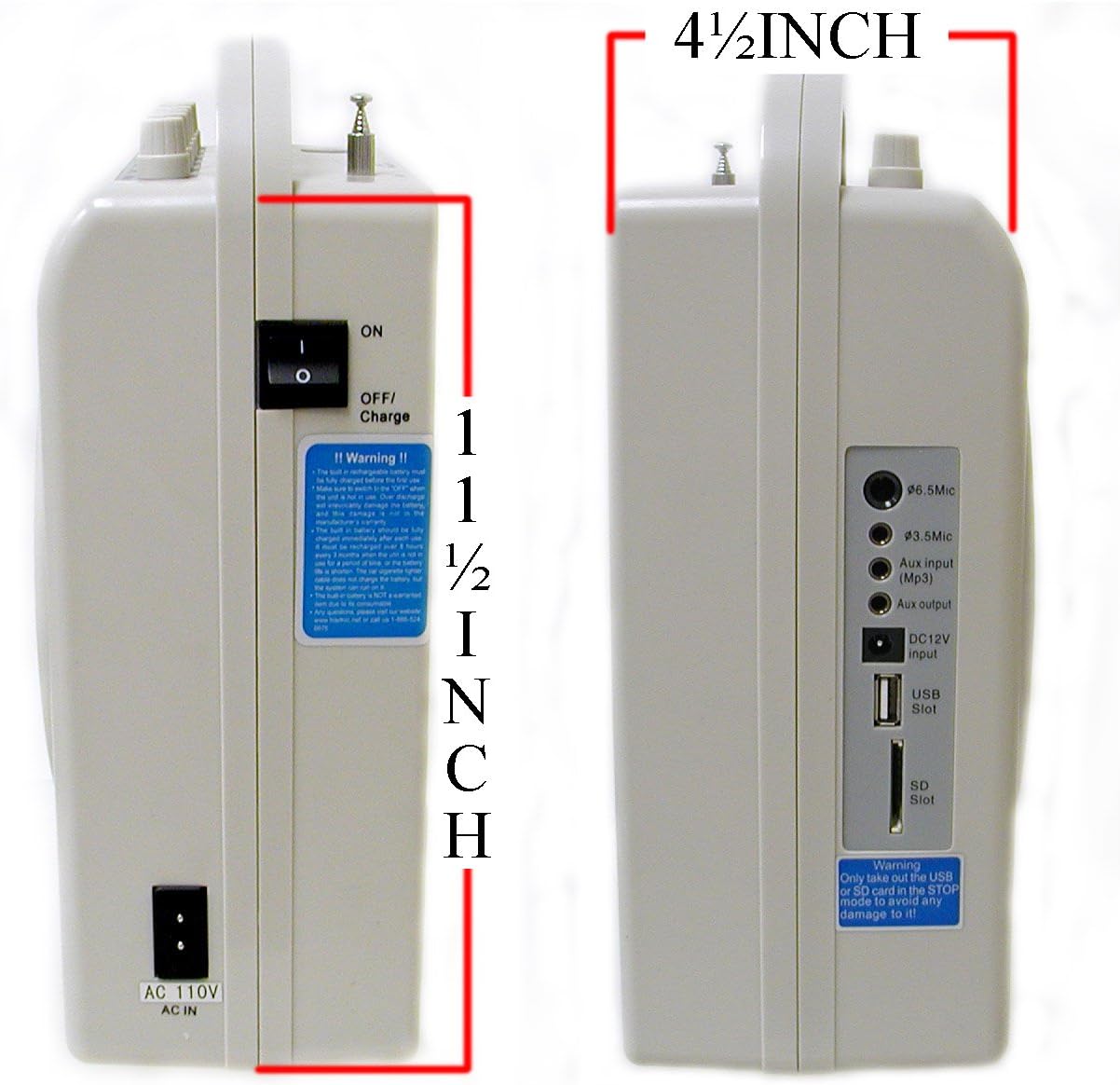
छवि: साइड view of the Hisonic HS128MP3, highlighting the 6.5mm Mic input, 3.5mm Mic input, Aux input (MP3), Aux output, DC12V input, USB Slot, and SD Slot.
- 6.5mm Mic Input: For wired microphones with a 1/4-inch jack.
- 3.5mm Mic Input: For wired microphones with a 1/8-inch jack.
- Aux Input (MP3): Connect external audio sources (e.g., smartphone, CD player).
- Aux आउटपुट: अर्कोसँग जडान गर्नुहोस् amplifier वा रेकर्डि device उपकरण।
- DC12V इनपुट: For connecting the car cigarette lighter cable.
- USB स्लट: For USB flash drives with MP3 files.
- एसडी स्लट: For SD cards with MP3 files.
4.3 पछाडिको प्यानल

छवि: पछाडि view of the Hisonic HS128MP3, showing the battery compartment cover opened to reveal the internal rechargeable battery, along with product information and FCC compliance details.
- ब्याट्री डिब्बा: Houses the rechargeable lead-acid battery.
- AC 110V AC IN: Power input for charging and AC operation.
- ON/OFF/CHARGE Switch: Controls power and charging mode.
5. सेटअप
३.२ प्रारम्भिक चार्जिङ
- Ensure the unit's ON/OFF/CHARGE switch is in the "OFF/CHARGE" position.
- Connect the AC power adapter to the "AC 110V AC IN" port on the rear panel and plug it into a standard wall outlet.
- The "Charge" indicator light on the top panel will illuminate.
- Allow the unit to charge for approximately 8-10 hours before first use to ensure the battery is fully conditioned.
- The charge indicator may remain lit even after full charge; this is normal.
३.२ माइक्रोफोन ब्याट्री स्थापना
For wireless microphones (handheld and bodypack):
- Open the battery compartment of the wireless handheld microphone or bodypack transmitter.
- Insert a fresh 9V battery, observing the correct polarity (+/-).
- ब्याट्री डिब्बा सुरक्षित रूपमा बन्द गर्नुहोस्।
6. सञ्चालन निर्देशनहरू
२ पावर अन/अफ गर्दै
- To power on the unit, slide the ON/OFF/CHARGE switch on the rear panel to the "ON" position. The "Power" indicator light on the top panel will illuminate.
- To power off the unit, slide the switch to the "OFF/CHARGE" position.
6.2 Using Microphones
ताररहित माइक्रोफोन:
- Ensure batteries are installed in the handheld microphone and/or bodypack transmitter.
- Turn on the wireless microphone(s).
- The "RF" indicator on the PA unit's top panel should light up, indicating a signal is being received.
- Adjust the "W/Mic VOL" knob on the top panel to control the volume of the wireless microphones.
- For the bodypack, connect either the headset or lavalier microphone to its input jack.
तारयुक्त माइक्रोफोनहरू:
- Connect your wired microphone to either the "6.5mm Mic Input" or "3.5mm Mic Input" on the side panel.
- Adjust the "Mic VOL" knob on the top panel to control the volume of the wired microphone.
नोट: You can use one wireless microphone and one wired microphone simultaneously.
6.3 MP3 Playback (USB/SD)
- MP3 अडियो भएको USB फ्ल्यास ड्राइभ वा SD कार्ड घुसाउनुहोस्। files into the respective slot on the side panel.
- The unit will automatically detect the media and begin playback. The corresponding "USB" or "SD" indicator will light up.
- Press the "Mode" button to switch between USB and SD card input if both are inserted.
- Use the "Play/Pause" button to start or pause playback.
- Use the skip buttons (left/right arrows) to navigate between tracks.
- Adjust the "USB/SD ON/OFF/VOL" knob to control the playback volume.
Warning: Only insert or remove the USB or SD card when the unit is in STOP or PAUSE mode to prevent potential damage to the media or unit.
6.4 Auxiliary Input/Output
सहायक इनपुट:
- Connect an external audio source (e.g., smartphone, tablet, laptop) to the "Aux input (MP3)" jack on the side panel using a 3.5mm audio cable.
- Adjust the "Aux VOL" knob on the top panel to control the volume of the auxiliary input.
सहायक आउटपुट:
- Connect the "Aux output" jack on the side panel to another amplifier, mixer, or recording device using a 3.5mm audio cable.
- The output level is controlled by the master volume of the HS128MP3 unit.
6.5 Tone and Echo Control
- टोन नब: Adjusts the overall tonal balance (bass/treble) of the audio output.
- इको नब: Adds an echo effect to the microphone inputs. Rotate clockwise to increase the effect.
7. मर्मतसम्भार
7.1 ब्याट्री केयर
- To prolong the life of the internal rechargeable battery, fully charge the unit after each use.
- If the unit will not be used for an extended period, charge it every 2-3 months to prevent deep discharge.
- Replace 9V batteries in microphones when performance degrades or the indicator light (if present) shows low power.
८.१ सरसफाई
- युनिटको बाहिरी भाग नरम, सुख्खा कपडाले पुछ्नुहोस्।
- घर्षण गर्ने क्लीनर, घोलक, वा कठोर रसायनहरू प्रयोग नगर्नुहोस्।
- Ensure no liquids enter the unit's openings.
T. समस्या निवारण
| समस्या | सम्भावित कारण | समाधान |
|---|---|---|
| स्पिकरबाट कुनै आवाज छैन | Unit not powered on; Volume too low; Microphone/Aux not connected or turned on. | Ensure unit is ON. Increase relevant volume knobs (Mic VOL, W/Mic VOL, Aux VOL, USB/SD VOL). Check microphone power and connections. |
| वायरलेस माइक्रोफोनले काम गरिरहेको छैन | Microphone battery low/dead; Microphone not turned on; Out of range. | Replace 9V battery. Turn on microphone. Ensure microphone is within operating range (approx. 30-35 meters). Check if RF indicator is lit. |
| एकाइ चार्ज छैन | AC adapter not connected properly; ON/OFF/CHARGE switch not in CHARGE position; Faulty battery. | Verify AC adapter connection. Ensure switch is in "OFF/CHARGE". If problem persists, contact support for battery replacement. |
| MP3 playback issues (no sound, not playing) | USB/SD card not inserted correctly; Files not in MP3 format; USB/SD volume too low; Unit not in correct mode. | Reinsert USB/SD card. Ensure files are MP3. Increase USB/SD VOL. Press "Mode" button to select correct input. |
9. निर्दिष्टीकरणहरू
| सुविधा | निर्दिष्टीकरण |
|---|---|
| ब्रान्ड | हिसोनिक |
| मोडेल नम्बर | HS128MP3 |
| आउटपुट वाटtage | ०.१ वाट |
| जडान प्रविधि | ताररहित |
| वस्तुको वजन | १.५ पाउन्ड (०.६८ किलो) |
| उत्पादन आयाम (L x W x H) | २.३ x २.१७ x २.३६ इन्च (५.८ x ५.५ x ६ सेमी) |
| माउन्टिङ प्रकार | ट्याब्लेटप |
| वक्ता गणना | 1 |
| मिल्दो यन्त्रहरू | Headset, MP3 Player |
| शक्ति स्रोत | AC 110V, DC 12V (rechargeable battery) |
10. वारेन्टी र समर्थन
For warranty information, technical support, or service inquiries, please contact Hisonic customer service. Keep your purchase receipt as proof of purchase for warranty claims.
For further assistance, please visit the official Hisonic webसाइटमा जानुहोस् वा तपाईंको उत्पादन प्याकेजिङसँग प्रदान गरिएको सम्पर्क जानकारी हेर्नुहोस्।