
Schneider Electric SR3B261FU
Schneider Electric Zelio SR3B261FU Logic Controller User Manual
Model: SR3B261FU
1. परिचय
This user manual provides essential information for the safe and efficient installation, operation, and maintenance of the Schneider Electric Zelio SR3B261FU Logic Controller. Please read this manual thoroughly before attempting to install or operate the device. Keep this manual for future reference.
2. सुरक्षा जानकारी
चेतावनी: Risk of electric shock. This device operates with high voltage. Installation, maintenance, and troubleshooting should only be performed by qualified personnel.
- यन्त्र स्थापना, तार जडान वा सेवा गर्नु अघि सधैं पावर विच्छेद गर्नुहोस्।
- बिजुली झटका रोक्नको लागि उचित ग्राउन्डिङ सुनिश्चित गर्नुहोस्।
- यदि उपकरण बिग्रिएको छ वा कुनै कम्पोनेन्टहरू हराइरहेको छ भने यसलाई सञ्चालन नगर्नुहोस्।
- सबै स्थानीय तथा राष्ट्रिय विद्युतीय संहिता र नियमहरूको पालना गर्नुहोस्।
- Use appropriate personal protective equipment (PPE) when working with electrical equipment.
3. उत्पादन समाप्तview
The Schneider Electric Zelio SR3B261FU is a compact, programmable logic controller (PLC) designed for simple automation systems. It features 26 input/output (I/O) points and operates on a 100-240 VAC power supply, making it suitable for a wide range of industrial and commercial applications. Its compact design allows for easy integration into control panels.
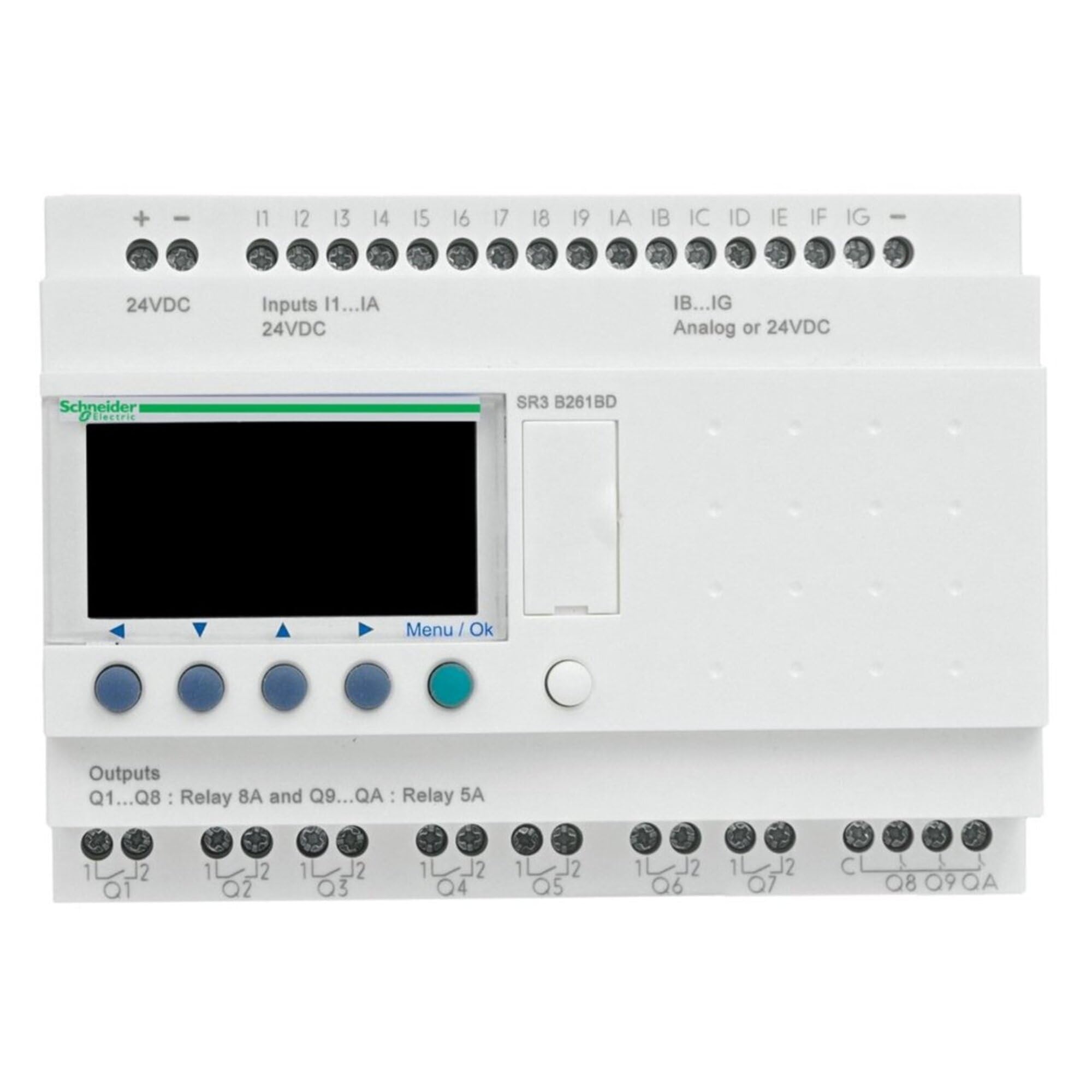
चित्र १: अगाडि view of the Schneider Electric Zelio SR3B261FU Logic Controller. This image shows the compact design, input/output terminals, and display interface of the device.
4. सेटअप र स्थापना
4.1. माउन्टिङ
The Zelio SR3B261FU is designed for DIN rail mounting. Ensure the mounting surface is stable and free from excessive vibration. Allow adequate space around the device for ventilation and wiring access.
- Attach the device to a standard 35mm DIN rail by hooking the top edge onto the rail and pressing down until it clicks into place.
- Verify that the device is securely fastened to the DIN rail.
W. तार
Refer to the wiring diagram provided with the product for specific connection details. Ensure all connections are secure and correctly polarized.
- विद्युत आपूर्ति: Connect the 100-240 VAC power supply to the designated terminals. Observe correct line and neutral connections.
- इनपुटहरू: Connect sensors, switches, and other input devices to the input terminals.
- आउटपुट: Connect actuators, relays, and other output devices to the output terminals. Ensure the load current does not exceed the specified limits for each output.
- ग्राउन्डिङ: Connect the protective earth (PE) terminal to a reliable ground point.
5. सञ्चालन निर्देशनहरू
5.1. पावर अन
After completing all wiring, apply power to the Zelio SR3B261FU. The device will perform a self-test, and the display (if present) will show the current status or program information.
5.2. प्रोग्रामिङ
The Zelio SR3B261FU is programmed using Schneider Electric's Zelio Soft software. Connect the logic controller to a computer via the appropriate programming cable (sold separately). Refer to the Zelio Soft software manual for detailed programming instructions.
- Create your control logic using ladder diagram (LD) or function block diagram (FBD).
- Transfer the program to the Zelio SR3B261FU.
- Monitor the program execution and I/O status through the software or the device's display.
5.3. Manual Control (if applicable)
Some Zelio models may feature buttons for manual control or parameter adjustment directly on the device. Consult the specific product documentation for your model to understand these functions.
6. मर्मतसम्भार
The Zelio SR3B261FU is designed for minimal maintenance. Regular inspection and cleaning are recommended to ensure optimal performance and longevity.
- सरसफाई: Disconnect power before cleaning. Use a soft, dry cloth to wipe the exterior of the device. Do not use abrasive cleaners or solvents.
- निरीक्षण: Periodically check all wiring connections for tightness and signs of corrosion. Inspect the device for any physical damage or discoloration.
- भेन्टिलेसन: Ensure that ventilation openings are not obstructed to prevent overheating.
T. समस्या निवारण
This section provides solutions to common issues. For more complex problems, contact Schneider Electric technical support.
| समस्या | सम्भावित कारण | समाधान |
|---|---|---|
| यन्त्र सक्रिय हुँदैन। | बिजुली आपूर्ति छैन; गलत वायरिङ; फ्यूज उडेको। | पावर जडानहरू जाँच गर्नुहोस्; भोल्युम प्रमाणित गर्नुहोस्tage; inspect fuses. |
| इनपुटहरूले प्रतिक्रिया दिइरहेका छैनन्। | गलत इनपुट वायरिङ; दोषपूर्ण सेन्सर; प्रोग्राम त्रुटि। | Verify input wiring; test sensor functionality; check program logic. |
| आउटपुटहरू सक्रिय भइरहेका छैनन्। | Incorrect output wiring; overloaded output; program error. | Verify output wiring; check load current; review program logic. |
| Communication error with software. | Incorrect cable; driver issue; software settings. | Ensure correct programming cable; install drivers; check software communication settings. |
8. प्राविधिक विशिष्टताहरू
| सुविधा | विवरण |
|---|---|
| निर्माता | श्नाइडर इलेक्ट्रिक |
| भाग नम्बर | SR3B261FU |
| वस्तुको वजन | 13.6 औंस |
| उत्पादन आयामहरू | १० x ३ x ३ इन्च |
| वस्तु मोडेल नम्बर | SR3B261FU |
| रङ | बहुरङ |
| शैली | कम्प्याक्ट |
| समाप्त गर्नुहोस् | पालिस |
| सामग्री | तामा |
| वस्तु प्याकेज मात्रा | 1 |
| समावेश अवयवहरू | SR3B261FU |
| ब्याट्री आवश्यक छ? | छैन |
| ASIN | B00CONKRTK |
| मिति पहिलो उपलब्ध | मे ४, २०२४ |
9. वारेन्टी र समर्थन
9.1. वारेन्टी जानकारी
According to the product specifications, this device is provided with कुनै वारेन्टी छैन. Please refer to your purchase agreement or contact your distributor for any specific warranty terms that may apply.
९.१। प्राविधिक समर्थन
For technical assistance, product inquiries, or to report issues, please contact Schneider Electric customer support. You can find contact information on the official Schneider Electric webसाइट:
Schneider Electric Customer Care
When contacting support, please have your product model number (SR3B261FU) and any relevant purchase details ready.
Ask a question about this manual
Ask about setup, troubleshooting, compatibility, parts, safety, or missing instructions. Manuals+ will review the question and use this page’s manual context to help answer it.