
1. परिचय
The Mitutoyo VDS-15DCX is a high-precision digital depth gauge designed for accurate measurement of depths, steps, and grooves. This manual provides essential information for the safe and effective use, maintenance, and troubleshooting of your instrument. Please read this manual thoroughly before operating the device.
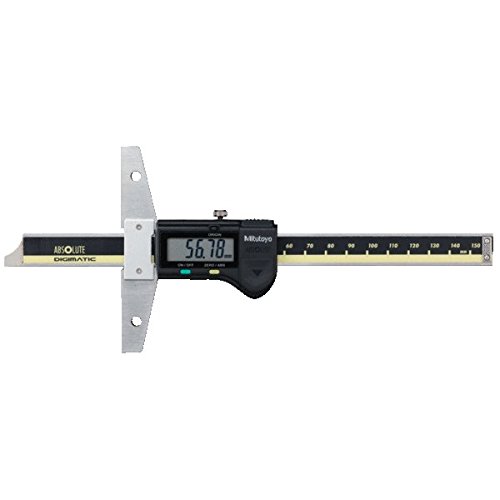
Image: Mitutoyo VDS-15DCX Digital Depth Gauge. This image displays the main unit of the digital depth gauge, showing its digital display, measuring base, and measuring rod.
2. सेटअप
2.1 अनप्याकिंग र निरीक्षण
- Carefully remove the depth gauge from its packaging.
- Inspect the instrument for any signs of damage that may have occurred during transit. If damage is found, do not use the device and contact your supplier.
- प्याकिङ सूचीमा सूचीबद्ध सबै कम्पोनेन्टहरू उपस्थित छन् भनी प्रमाणित गर्नुहोस्।
2.2 ब्याट्री स्थापना
The VDS-15DCX uses one SR44 silver oxide button cell battery.
- Locate the battery cover on the back of the digital display unit.
- Using a small screwdriver or coin, gently turn the battery cover counter-clockwise to open.
- Insert a new SR44 battery with the positive (+) side facing upwards.
- Replace the battery cover and turn clockwise to secure.
- Press the ON/OFF button to confirm the display powers on.
2.3 Cleaning Measuring Surfaces
Before use, gently wipe the measuring base and the tip of the measuring rod with a clean, lint-free cloth. Ensure no dust, oil, or debris is present on these surfaces, as this can affect measurement accuracy.
2.4 Zero-Setting Procedure
To ensure accurate measurements, the depth gauge must be zero-set before use.
- Place the depth gauge on a flat, stable, and clean reference surface.
- Ensure the measuring base is flush with the reference surface and the measuring rod is fully retracted.
- थिच्नुहोस् शून्य button. The display should show '0.00' or '0.000'.
- The instrument is now ready for measurement.
3. सञ्चालन निर्देशनहरू
४.१ आधारभूत मापन
- Ensure the depth gauge is properly zero-set (refer to Section 2.4).
- Place the measuring base firmly on the top surface of the workpiece or feature to be measured.
- Slowly extend the measuring rod until its tip makes contact with the bottom surface of the depth or step. Ensure the rod is perpendicular to the bottom surface.
- LCD स्क्रिनमा प्रदर्शित मापन मान पढ्नुहोस्।
५.३ एकाइ रूपान्तरण (मिमी/इन्च)
To switch between metric (mm) and imperial (inch) units, press the मिमी/इन्च button. The display will show the current unit of measurement.
3.3 Absolute (ABS) and Incremental (INC) Measurement
The VDS-15DCX allows for both absolute and incremental measurements.
- निरपेक्ष (ABS) मोड: This mode measures from the true zero point, which is set when the gauge is zeroed on a reference surface.
- वृद्धिशील (INC) मोड: To measure a difference from an arbitrary point, position the measuring rod at the desired reference point on the workpiece and press the शून्य button. The display will reset to zero, and subsequent movements will show the incremental distance from this new zero point. Press the ABS/INC मोडहरू बीच टगल गर्न बटन।
3.4 डाटा होल्ड प्रकार्य
यदि तपाईंको मोडेलमा समावेश छ भने होल्ड गर्नुहोस् button, pressing it will freeze the current reading on the display, allowing you to remove the gauge from the workpiece and record the measurement. Press the button again to release the hold function.
4. मर्मतसम्भार
८.१ सरसफाई
- After each use, wipe the entire instrument, especially the measuring surfaces, with a clean, dry, lint-free cloth.
- For stubborn dirt or oil, use a cloth lightly dampened with isopropyl alcohol. Avoid using strong solvents or abrasive cleaners.
- Do not immerse the depth gauge in any liquid.
4.2 भण्डारण
- Store the depth gauge in its original protective case when not in use.
- Store in a dry environment, away from direct sunlight, extreme temperatures, and high humidity.
- Avoid storing in areas with excessive dust or corrosive fumes.
4.3 ब्याट्री प्रतिस्थापन
Replace the battery when the display becomes dim or an indicator (e.g., 'B' or battery icon) appears on the screen. Refer to Section 2.2 for battery installation instructions. Dispose of used batteries according to local regulations.
4.4 Calibration Checks
Periodically check the accuracy of the depth gauge using a known reference standard (e.g., gauge blocks). If the readings are consistently outside the specified accuracy, the instrument may require professional calibration or repair.
T. समस्या निवारण
| समस्या | सम्भावित कारण | समाधान |
|---|---|---|
| डिस्प्ले अन हुँदैन | मृत वा गलत रूपमा स्थापित ब्याट्री | Replace battery (Section 2.2) or ensure correct polarity. |
| गलत पठन |
|
|
| डिस्प्लेले 'E' वा त्रुटि कोड देखाउँछ | Internal error or sensor issue | Remove and reinsert battery. If error persists, contact customer support. |
| बटनहरू अनुत्तरदायी | ब्याट्री कम भएको वा आन्तरिक खराबी | ब्याट्री बदल्नुहोस्। समस्या रहिरह्यो भने, ग्राहक समर्थनलाई सम्पर्क गर्नुहोस्। |
6. निर्दिष्टीकरणहरू
| सुविधा | निर्दिष्टीकरण |
|---|---|
| मोडेल नम्बर | VDS-15DCX (571-201-20) |
| मापन दायरा | 0-150 मिमी (0-6 इन्च) |
| संकल्प | Mm 0.01 मिमी (inches इन्च) |
| शुद्धता | ±0.02 मिमी (± 0.001 इन्च) |
| प्रदर्शन | LCD |
| विद्युत आपूर्ति | SR44 (1 pc) |
| वजन | ४१० ग्राम (०.९ पाउण्ड) |
| निर्माता | Mitutoyo |
7. वारेन्टी जानकारी
Mitutoyo products are manufactured to high standards and are typically covered by a limited warranty against defects in materials and workmanship. The specific terms and duration of the warranty may vary by region and product. Please refer to the warranty card included with your product or contact your local Mitutoyo distributor for detailed warranty information.
8. ग्राहक समर्थन
For technical assistance, service, or inquiries regarding your Mitutoyo VDS-15DCX digital depth gauge, please contact your authorized Mitutoyo distributor or visit the official Mitutoyo website for regional contact information. When contacting support, please have your model number (VDS-15DCX) and serial number (if applicable) ready.