
परिचय
This manual provides detailed instructions for the safe and efficient operation of your Fancierstudio Heat Press 16x20 FS16x20BP. Please read all instructions carefully before using the machine to ensure proper function and to prevent injury.
The Fancierstudio Heat Press 16x20 FS16x20BP is an industrial-quality digital heat press designed for applying transfers, letters, numbers, and images onto various items such as T-shirts, garments, bags, mouse mats, jigsaw puzzles, ID badges, and ceramic tiles. It features a 16x20 inch heat platen and a pull-out lower platen for ease of use and safety.
महत्त्वपूर्ण सुरक्षा निर्देशनहरू
- ताप प्रेसलाई सधैं स्थिर, ताप प्रतिरोधी सतहमा चलाउनुहोस्।
- Keep hands clear of the heat platen during operation to avoid burns.
- प्रयोगमा हुँदा मेसिनलाई बेवास्ता नगर्नुहोस्।
- कार्य क्षेत्रमा उचित वेंटिलेशन सुनिश्चित गर्नुहोस्।
- Unplug the machine when not in use or before cleaning/maintenance.
- Keep children and pets away from the heat press.
- Use appropriate electrical outlets (110V) and avoid overloading circuits.
उत्पादन अवयवहरू
Your Fancierstudio Heat Press 16x20 FS16x20BP includes the following main components:
- Upper Heat Platen: The heated plate that applies pressure and heat.
- Lower Platen: The base plate where items are placed, featuring a 5.5-inch pull-out function.
- नियन्त्रण प्यानल: Digital display for temperature and time settings.
- दबाव समायोजन नब: Located at the top for adjusting pressure.
- ह्यान्डल: For opening and closing the heat press.
- पावर स्विच: अन / अफ स्विच
- Teflon Sheet: Included for protecting items and platens.
- Silicone Gel Base Board: Provides a stable and heat-resistant surface for the lower platen.

Figure 1: Fancierstudio Heat Press 16x20 with the upper platen in the open position, showing the overall structure.

Figure 2: Fancierstudio Heat Press 16x20 in the closed position, ready for operation.
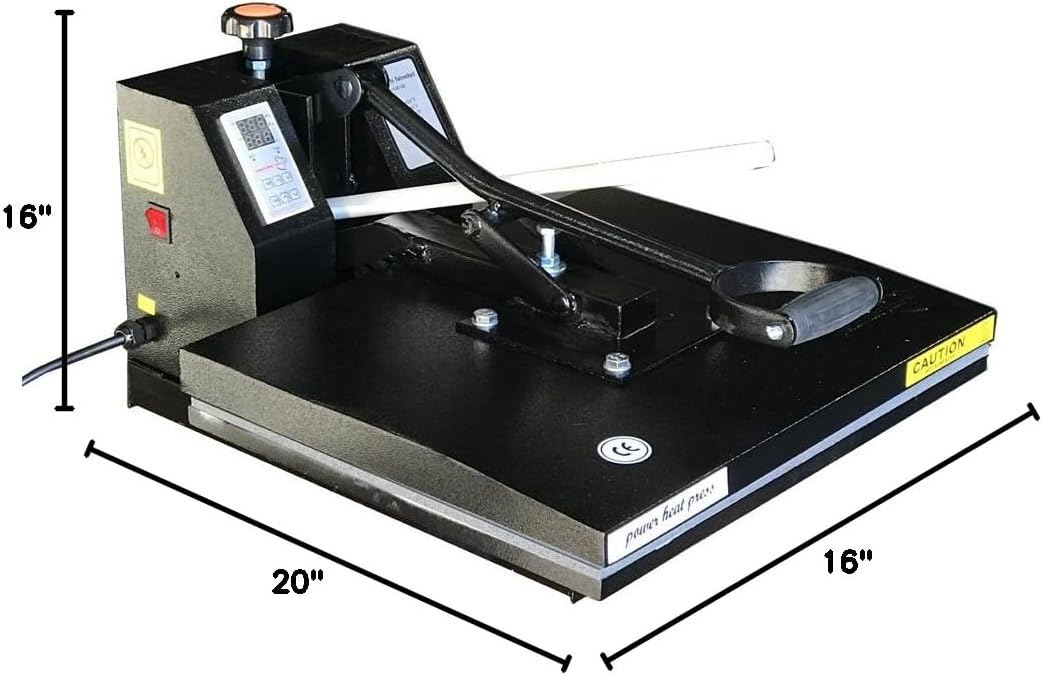
Figure 3: Visual representation of the Fancierstudio Heat Press 16x20 dimensions, indicating the 16-inch width and 20-inch depth of the platen area.
सेटअप
- अनप्याकिङ: Carefully remove the heat press from its packaging. Retain all packaging materials for future storage or shipping.
- नियुक्ति: Place the heat press on a sturdy, level, and heat-resistant surface. Ensure there is adequate space around the machine for safe operation and ventilation.
- पावर जडान: Connect the power cord to a grounded 110V electrical outlet. The machine requires 1800 watts of power.
- प्रारम्भिक बर्न-अफ: Before first use, it is recommended to perform an initial burn-off to eliminate any manufacturing odors. Set the temperature to 350°F (177°C) and let the machine heat up for 45 minutes to an hour without any materials on the platen. Ensure the area is well-ventilated during this process.
सञ्चालन निर्देशनहरू
नियन्त्रण प्यानल समाप्तview

Figure 4: The digital control panel for setting temperature and time. It features 'TEMP' and 'TIME' buttons with up/down arrows for adjustments.
तापमान र समय सेट गर्दै
- नियन्त्रण इकाईको छेउमा रहेको पावर स्विच खोल्नुहोस्।
- थिच्नुहोस् TEMP button once. Use the up/down arrow buttons to set your desired temperature (range: 0-500°F). Press TEMP सेटिङमा लक गर्न फेरि।
- थिच्नुहोस् TIME button once. Use the up/down arrow buttons to set your desired time in seconds (range: 0-999 seconds). Press TIME सेटिङ पुष्टि गर्न फेरि।
- Allow the heat press to reach the set temperature. The display will show the current temperature rising.
दबाव समायोजन
The pressure adjustment knob is located at the top of the heat press. Turn the knob clockwise to increase pressure and counter-clockwise to decrease pressure. Adjust the pressure based on the thickness of your material and transfer type. For best results, test pressure on a scrap piece of material.
Loading and Applying Transfers
- Once the desired temperature is reached, pull out the lower platen by 5.5 inches. This feature makes loading and unloading items easier and safer, reducing the risk of burns.
- Place your item (e.g., T-shirt) onto the lower platen. Smooth out any wrinkles.
- For best results, perform a pre-press for 5-10 seconds to remove moisture and wrinkles from the garment.
- Position your transfer paper or material onto the item. Cover with the included Teflon sheet.
- Slide the lower platen back into position. Pull the handle down firmly to lock the upper platen onto the item. The timer will automatically begin counting down.
- When the timer alarm sounds, lift the handle to release the pressure and raise the upper platen.
- Carefully pull out the lower platen and remove your item.
Video 1: This video demonstrates the operation of a Fancierstudio DG Heat Press (15x15 model), showcasing the pull-out lower platen, temperature/time settings, and the pressing process. While the video features a 15x15 model, the operational steps for setting temperature, time, and using the pull-out platen are similar to the 16x20 FS16x20BP model.
मर्मतसम्भार
- सरसफाई: Ensure the machine is unplugged and completely cool before cleaning. Wipe down the exterior with a damp कपडा। घर्षण क्लीनर प्रयोग नगर्नुहोस्।
- Platen Care: The heat platen has a coated surface. Use the included Teflon sheet to protect it from transfer residue. The silicone rubber base is lightly glued down for easy replacement if needed.
- भण्डारण: प्रयोगमा नभएको बेला ताप प्रेसलाई सुख्खा, धुलो-रहित वातावरणमा भण्डार गर्नुहोस्।
समस्या निवारण
| समस्या | सम्भावित कारण | समाधान |
|---|---|---|
| मेसिन सक्रिय हुँदैन | Power cord not connected; Power switch off; Circuit breaker tripped | Check power cord connection; Turn on power switch; Reset circuit breaker |
| तापक्रम सेट बिन्दुमा पुग्दैन | Incorrect temperature setting; Heating element issue | Verify temperature setting; Contact customer support if issue persists |
| असंगत दबाव | Pressure knob not adjusted correctly; Uneven surface | Adjust pressure knob; Ensure heat press is on a flat surface |
| Transfers not adhering properly | Incorrect temperature/time/pressure; Material incompatibility | Adjust settings according to transfer material instructions; Ensure material is suitable for heat pressing |
निर्दिष्टीकरणहरू
- मोडेल: FS16x20BP
- Platen Size: 16 इन्च x 20 इन्च
- Lower Platen Pull-Out: 5.5 इन्च
- भोल्युमtage: 110V (Standard US and Canada)
- शक्ति: ०.१ वाट
- Heat Press Style: Clamshell
- तापक्रम दायरा: ८६ - २२६.४°F (३० - १०८°C)
- समय दायरा: ० - ९९९ सेकेन्ड
- नियन्त्रण: Electronic time and heat control
- आधार: Silicone gel base board
- समावेश: टेफ्लोन पाना
- रंग: कालो
- वस्तु वजन: 72.3 पाउन्ड
- प्याकेज आयाम: १० x ३ x ३ इन्च
वारेन्टी र समर्थन
For warranty information, technical support, or replacement parts, please refer to the documentation included with your product or contact Fancierstudio customer service directly. Keep your purchase receipt as proof of purchase.
Fancierstudio offers customer support and a 30-day easy return policy for this product.