
1. परिचय
The Brightsign HD224 is a Full HD Standard I/O Digital Signage Player designed for reliable and easy-to-use content delivery. It supports flawless 4K and Full HD single video decoding, mainstream HTML5 performance, and simultaneous playback from local, networked, and streaming sources. This player includes standard I/O features such as gigabit Ethernet, GPIO (GPIO connectors sold separately), and analog and digital audio. The HD224 is suitable for mainstream 4Kp60, Full HD, and HTML5 applications, offering H.265 decoding, HTML5 rendering, and Gigabit Ethernet. Its robust interactive controls, live content features, BrightWall, and Mosaic Mode make it versatile for various digital signage applications.
१.३। मुख्य विशेषताहरु
- H.265 Decoding: Enables smaller file sizes and lower bitrates compared to H.264, optimizing storage and bandwidth.
- HTML5 Support: Features a hardware-accelerated engine for seamless playback of modular HTML assets alongside high-bandwidth video content.
- BrightBeacon: Facilitates two-way Bluetooth/Beacon communication between mobile devices and signage (requires a wireless/Bluetooth module, sold separately).
- BrightWall: Provides synchronized playback across multiple displays, ideal for video wall applications.
- AutoWall: Leverages HTML5 capabilities to create dynamic and unique multimedia video walls.
3. सेटअप गाइड
3.1 प्याकेज सामग्रीहरू
तपाईंको प्याकेजमा निम्न वस्तुहरू समावेश छन् भनी प्रमाणित गर्नुहोस्:
- Brightsign HD224 Digital Signage Player
- पावर एडाप्टर
- द्रुत सुरुवात गाइड (यदि लागू भएमा)
Note: Additional accessories such as HDMI cables, Ethernet cables, microSD cards, and GPIO connectors are sold separately.
४.१ प्लेयर जडान गर्दै
- माइक्रोएसडी कार्ड घुसाउनुहोस्: If using local storage for content, insert a formatted microSD card into the designated slot on the player. Ensure the card is inserted correctly until it clicks into place.
- प्रदर्शनमा जडान गर्नुहोस्: Connect an HDMI cable from the HDMI output port on the HD224 player to the HDMI input port on your display device (monitor, TV, projector).
- नेटवर्कमा जडान गर्नुहोस् (वैकल्पिक): For network-based content updates or live feeds, connect an Ethernet cable from the Ethernet port on the HD224 to your network router or switch.
- अडियो जडान गर्नुहोस् (वैकल्पिक): If external audio is required, connect an audio cable from the analog audio output port to your audio system. Digital audio is also supported via HDMI.
- Connect GPIO (Optional): If using interactive controls, connect your GPIO devices to the GPIO port. GPIO connectors are sold separately.
- पावर जोड्नुहोस्: Plug the power adapter into the 12V 1.5A power input port on the HD224, then plug the adapter into a power outlet. The player will power on automatically.
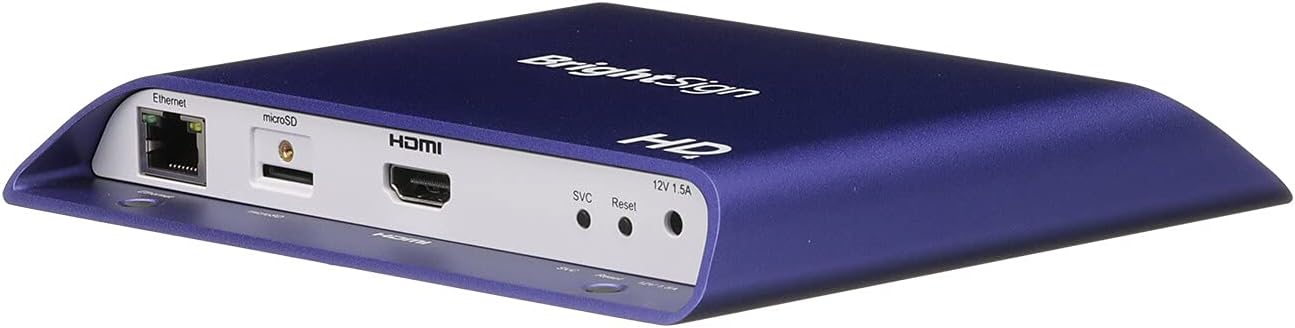
चित्र ४: पछाडि view of the Brightsign HD224 player showing connectivity ports including Ethernet, microSD, HDMI, SVC, Reset, and 12V 1.5A power input.
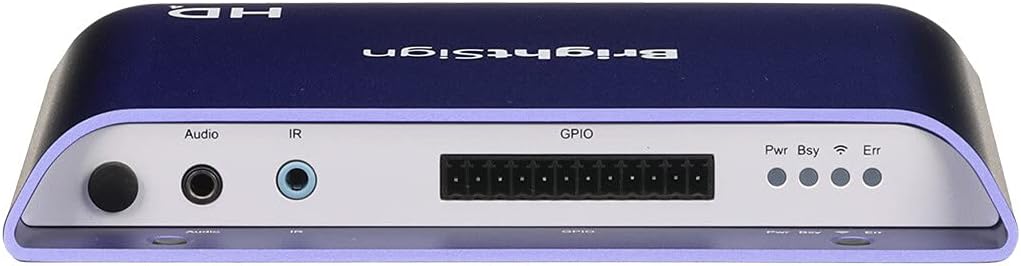
चित्र १: अगाडि view of the Brightsign HD224 player showing Audio, IR, GPIO ports, and status indicators for Power (Pwr), Busy (Bsy), and Error (Err).
4. सञ्चालन निर्देशनहरू
4.1 सामग्री व्यवस्थापन
The Brightsign HD224 player requires content to be prepared and published using BrightSign's proprietary software, BrightAuthor or BrightSign BSN.cloud. Refer to the BrightSign documentation for detailed instructions on creating presentations, scheduling content, and publishing to your player.
- स्थानीय प्लेब्याक: Content can be loaded onto a microSD card and inserted into the player for standalone operation.
- Networked Playback: For dynamic content updates and remote management, connect the player to a network and use BrightSign's network solutions.
- HTML5 Content: The player supports advanced HTML5 content, allowing for interactive and web-based presentations.
4.2 स्थिति सूचकहरू
The front panel of the HD224 features LED indicators to provide operational status:
- Pwr (Power): उपकरणको शक्ति स्थिति संकेत गर्दछ।
- Bsy (Busy): Indicates when the player is actively processing or playing content.
- Err (Error): Illuminates if an error occurs, such as a content loading issue or hardware malfunction. Refer to the troubleshooting section for more details.
5. मर्मतसम्भार
८.१ सरसफाई
To maintain optimal performance, keep the player clean. Use a soft, dry cloth to wipe the exterior. Do not use liquid cleaners or abrasive materials, as they may damage the device. Ensure ventilation openings are free from dust and obstructions.
5.2 फर्मवेयर अपडेटहरू
Periodically check the BrightSign website for firmware updates. Keeping your player's firmware up-to-date ensures access to the latest features, performance improvements, and security patches. Follow the instructions provided by BrightSign for safe firmware update procedures.
T. समस्या निवारण
| समस्या | सम्भावित कारण | समाधान |
|---|---|---|
| कुनै प्रदर्शन आउटपुट छैन |
|
|
| अडियो आउटपुट छैन |
|
|
| Player not connecting to network |
|
|
| Err LED is illuminated |
|
|
For further assistance, consult the official BrightSign support resources or contact their customer service.
7. निर्दिष्टीकरणहरू
| मोडेल नम्बर | HD224 |
| ब्रान्ड | Brightsign |
| आयाम (LxWxH) | १० x ३ x ३ इन्च |
| वस्तुको वजन | 1.54 पाउन्ड |
| संकल्प समर्थन | 1920x1080 (Full HD), 3840x2160 (4K) |
| जडान प्रविधि | इथरनेट |
| कनेक्टर प्रकार | HDMI |
| अडियो आउटपुट मोड | स्टेरियो, सराउन्ड |
| हार्ड ड्राइभ | 1 GB Hybrid Drive (Internal, for OS/firmware) |
| फ्ल्यास मेमोरी साइज | 1 (Internal, for OS/firmware) |
| ताररहित प्रकार | Bluetooth (requires wireless/Bluetooth module) |
| मिडिया प्रकार समर्थन | Digital video and image files (Blu-Ray Disc, DVD listed in source data likely refers to supported content formats, not physical disc playback) |
| विशेष सुविधा | पोर्टेबल |
Note: Specifications are subject to change without notice. For the most current information, please refer to the official BrightSign webसाइट।
8. वारेन्टी र समर्थन
BrightSign products are covered by a manufacturer's warranty. For specific warranty terms and conditions, please refer to the documentation included with your product or visit the official BrightSign website. Technical support and additional resources, including FAQs and software downloads, are available through BrightSign's customer support channels.
समर्थनको लागि, भ्रमण गर्नुहोस्: BrightSign Support