
1. परिचय
This manual provides essential information for the safe and efficient operation, maintenance, and troubleshooting of your VELECO FASTER Electric Mobility Scooter. Please read this manual thoroughly before operating the scooter to ensure proper usage and to maximize its lifespan. Keep this manual for future reference.
2. सुरक्षा जानकारी
तपाईंको सुरक्षा सर्वोपरि छ। सधैं निम्न सुरक्षा दिशानिर्देशहरू पालना गर्नुहोस्:
- स्कुटर चलाउँदा सधैं उपयुक्त सुरक्षा गियर लगाउनुहोस्, हेलमेट सहित।
- Familiarize yourself with all controls before your first ride.
- रक्सी वा लागू पदार्थको प्रभावमा स्कुटर नचलाउनुहोस्।
- सबै स्थानीय ट्राफिक नियम र नियमहरू पालना गर्नुहोस्।
- अन्य सवारी साधन र पैदल यात्रीहरूबाट सुरक्षित गति र दूरी कायम राख्नुहोस्।
- Avoid sudden stops or turns, especially at higher speeds.
- Ensure the battery is properly charged before each use.
- ४५ किलोग्राम (९९ पाउण्ड) को अधिकतम तौल क्षमता नाघ्नु हुँदैन।
- Regularly inspect tires, brakes, and lights for proper function.
- Use caution when riding on uneven terrain, inclines, or slippery surfaces.
3. उत्पादन समाप्तview
The VELECO FASTER is a 4-wheel electric mobility scooter designed for comfortable and reliable personal transportation. It features a robust design, LED lighting, and ampभण्डारण।

चित्र १: अगाडि view of the VELECO FASTER Electric Mobility Scooter, showcasing its LED headlight and overall design.

चित्र १: साइड view of the scooter, highlighting the comfortable seating, armrests, and wheel design.

चित्र ४: पछाडि view of the scooter, showing the taillights, reflectors, and rear storage box.

Figure 3.4: Labeled diagram illustrating key components such as mirrors, LED headlight, turn signals, hydraulic brake, charging socket, adjustable backrest, storage box, and pneumatic tires.
मुख्य विशेषताहरु:
- ३-पाङ्ग्रे डिजाइन: Provides stability and a smooth ride.
- एलईडी प्रकाश: Equipped with a powerful LED headlight for enhanced visibility and safety during night rides.
- Adjustable Seating: Seat moves forwards and backwards for user comfort.
- भण्डारण: Includes under-seat storage and a rear top box for personal items.
- ब्रेकिङ सिस्टम: Features reliable drum and disc brakes for effective stopping power.
- USB चार्जिंग पोर्ट: Conveniently located for charging mobile devices.

Figure 3.5: Detail of the handlebar controls, including light switches, horn, and speed adjustment.

Figure 3.6: The digital dashboard displaying speed, battery level, and other operational indicators.
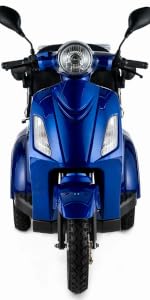
Figure 3.7: Integrated USB charging port and side reflector for added convenience and visibility.
4. सेटअप
4.1 अनप्याकिंग र विधानसभा
- सबै प्याकेजिङ सामग्रीहरू सावधानीपूर्वक हटाउनुहोस्।
- Inspect the scooter for any signs of damage during transit. Contact your dealer immediately if damage is found.
- Attach any components that may have been removed for shipping, such as mirrors or the rear storage box, following the included assembly guide.
- सबै बोल्ट र फास्टनरहरू सुरक्षित रूपमा कसिएको सुनिश्चित गर्नुहोस्।
२.२ प्रारम्भिक ब्याट्री चार्ज
Before first use, fully charge the scooter's battery. This typically takes several hours. Refer to the charger's indicator lights for charging status.
- Locate the charging port, usually found near the footrest area.
- चार्जरलाई स्कूटरको चार्जिङ पोर्टमा जडान गर्नुहोस्, त्यसपछि चार्जरलाई मानक भित्ता आउटलेटमा प्लग गर्नुहोस्।
- Do not interrupt the charging cycle until the battery is fully charged.
- Always use the charger provided by VELECO.
5. सञ्चालन निर्देशनहरू
5.1 Starting the Scooter
- इग्निसनमा साँचो घुसाउनुहोस् र यसलाई 'अन' स्थितिमा घुमाउनुहोस्।
- Check the battery indicator on the dashboard to ensure sufficient charge.
- Ensure the kickstand (if present) is up and the parking brake is disengaged.
३.३.२ ड्राइभिङ
- प्रवेग: Gently twist the throttle handle to accelerate. The scooter has a maximum speed of 8 miles per hour (12.9 km/h).
- ब्रेकिङ: Apply the brake levers smoothly to slow down or stop. The scooter is equipped with drum and disc brakes.
- स्टीयरिङ: Use the handlebars to steer. The turning radius is 70 cm.
- बत्तीहरू: Use the switch on the handlebar to turn on the LED headlight and taillights.
- मोड्ने संकेतहरू: Activate the turn signal switch when changing direction.
- हर्न: Use the horn to alert others when necessary.
5.3 पार्किंग
- स्कुटरलाई पूर्ण रूपमा रोक्नुहोस्।
- पार्किङ ब्रेक लगाउनुहोस्।
- साँचोलाई 'बन्द' स्थितिमा घुमाउनुहोस् र यसलाई हटाउनुहोस्।
- For extended parking, consider using a scooter cover to protect it from elements.
6. मर्मतसम्भार
6.1 ब्याट्री केयर
- ब्याट्री स्वास्थ्य कायम राख्न स्कुटर बारम्बार प्रयोगमा नभए पनि नियमित रूपमा ब्याट्री चार्ज गर्नुहोस्।
- रिचार्ज गर्नु अघि ब्याट्री पूर्ण रूपमा खेर नजानुहोस्।
- Store the scooter and battery in a cool, dry place.
८.१ सरसफाई
- विज्ञापन संग स्कूटर सफा गर्नुहोस्amp कपडा र हल्का डिटर्जेंट।
- Avoid using high-pressure washers or directing water directly at electrical components.
- Dry the scooter thoroughly after cleaning.
6.3 टायरको चाप
- Regularly check the tire pressure and inflate to the recommended PSI (pounds per square inch) as indicated on the tire sidewall or in the scooter's specifications.
- Proper tire pressure ensures optimal performance, range, and safety.
6.4 सामान्य निरीक्षण
- Periodically check all visible cables and connections for wear or damage.
- Ensure all lights (headlight, taillights, turn signals) are functioning correctly.
- Test the brakes to confirm they are responsive and effective.
- कुनै पनि ढीलो नट वा बोल्टहरू कस्नुहोस्।
T. समस्या निवारण
This section addresses common issues you might encounter with your VELECO FASTER scooter.
| समस्या | सम्भावित कारण | समाधान |
|---|---|---|
| स्कुटर चल्दैन। | Battery is discharged or not connected. Key is not in 'ON' position. Main fuse tripped. | Charge the battery. Ensure key is 'ON'. Check battery connections. Inspect and reset main fuse (often under the seat). |
| Motor runs but scooter does not move. | Parking brake engaged. Freewheel lever engaged. | Disengage parking brake. Ensure freewheel lever is in drive position. |
| घटाइएको दायरा वा शक्ति। | Battery not fully charged. Old or damaged battery. Low tire pressure. | Fully charge the battery. Consider battery replacement if old. Check and inflate tires to correct pressure. |
| ब्रेकहरू कमजोर महसुस हुन्छन्। | Brake pads worn. Brake cable loose. | Have brakes inspected and adjusted or replaced by a qualified technician. |
If you encounter a problem not listed here or cannot resolve an issue, please contact VELECO customer support or an authorized service center.
8. निर्दिष्टीकरणहरू
The following table outlines the key technical specifications for the VELECO FASTER Electric Mobility Scooter:
| सुविधा | विवरण |
|---|---|
| ब्रान्ड | भेलेको |
| मोडेल नाम | छिटो |
| रङ | कालो |
| उत्पादन वजन | ०.६ किलोग्राम |
| उत्पादन आयाम (L x W x H) | 69 सेमी x 68.6 सेमी x 104.9 सेमी |
| सामग्री | Aluminum or Steel Alloy |
| अधिकतम वजन सिफारिस | ०.६ किलोग्राम |
| ब्रेक शैली | Drum, Disc |
| अधिकतम गति | ४ माइल प्रति घण्टा (लगभग ६.४ किमी/घण्टा) |
| टर्निङ रेडियस | २.१ सेन्टिमिटर |
| ह्यान्डल प्रकार | पुश ह्यान्डल |
| शक्ति स्रोत | ब्याट्री संचालित |
| व्हील प्रकार | वायवीय |
| निर्माता | भेलेको |
| ASIN | B07QLR7RMB |
9. वारेन्टी र समर्थन
For information regarding your product's warranty, please refer to the documentation provided at the time of purchase or visit the official VELECO website. If you require technical assistance, spare parts, or have any questions not covered in this manual, please contact VELECO customer support through their official channels.