
Lenyes S805BK
Lenyes S805BK Portable Bluetooth Speaker User Manual
Model: S805BK
परिचय
खरिद गर्नुभएकोमा धन्यवादasing the Lenyes S805BK Portable Bluetooth Speaker. This manual provides essential information for setting up, operating, and maintaining your speaker. Please read it carefully before use to ensure optimal performance and longevity of your device.
उत्पादन समाप्त भयोview
The Lenyes S805BK is a compact, portable Bluetooth speaker designed for high-quality audio playback. It features IPX6 waterproofing, 360° sound, and a robust design suitable for various environments.
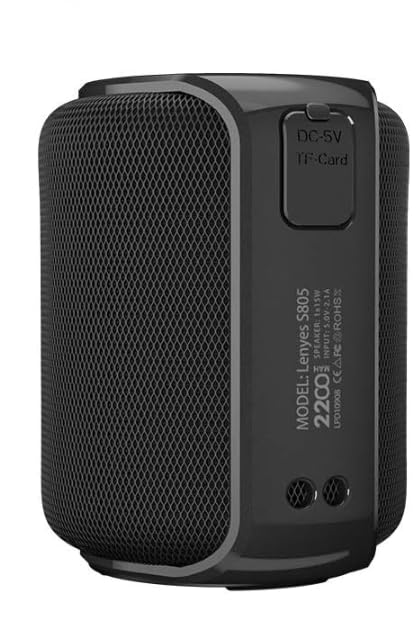
चित्र १: अगाडि view of the Lenyes S805BK Portable Bluetooth Speaker, showcasinयसको कम्प्याक्ट डिजाइन र स्पिकर ग्रिलको विशेषता।
कम्पोनेन्ट पहिचान
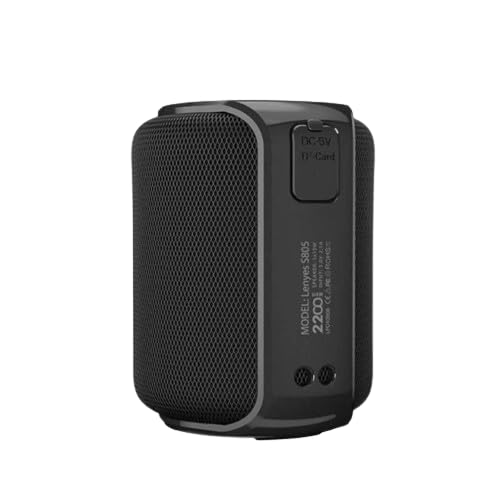
Figure 2: Side panel of the speaker, indicating the DC-5V charging port and the TF-Card slot for local music playback.

Figure 3: Top panel of the speaker, showing the integrated control buttons for power, volume, and playback functions.
निम्न घटकहरूसँग आफैलाई परिचित गर्नुहोस्:
- पावर बटन: स्पिकर खोल्न वा बन्द गर्न प्रयोग गरियो।
- भोल्युम बढाउने/अर्को ट्र्याक बटन: भोल्युम बढाउँछ वा अर्को ट्र्याकमा जान्छ।
- भोल्युम कम/अघिल्लो ट्र्याक बटन: भोल्युम घटाउँछ वा अघिल्लो ट्र्याकमा जान्छ।
- प्ले/पज बटन: संगीत प्लेब्याक नियन्त्रण गर्छ र कलहरूको जवाफ दिन्छ/समाप्त गर्छ।
- मोड बटन: Switches between Bluetooth and TF Card modes.
- DC-5V चार्जिङ पोर्ट: स्पिकरको आन्तरिक ब्याट्री चार्ज गर्नको लागि।
- TF-Card Slot: For inserting a MicroSD card with audio files.
सेटअप
१. वक्तालाई चार्ज गर्दै
- Locate the DC-5V charging port on the side of the speaker (refer to Figure 2).
- Connect the provided USB charging cable to the speaker's DC-5V port and the other end to a compatible USB power adapter (5V) or a computer's USB port.
- The charging indicator light will illuminate during charging. It typically takes approximately 3 hours for a full charge.
- Once fully charged, the indicator light may change color or turn off, depending on the speaker's design.
नोट: इष्टतम ब्याट्री जीवनको लागि, पहिलो प्रयोग गर्नु अघि स्पिकरलाई पूर्ण रूपमा चार्ज गर्नुहोस्।
२ ब्लुटुथ पेयरि।
- स्पिकर पूर्ण चार्ज भएको सुनिश्चित गर्नुहोस्।
- Press and hold the Power Button to turn on the speaker. A voice prompt or indicator light will confirm it is in Bluetooth pairing mode.
- On your mobile device (smartphone, tablet, etc.), navigate to the Bluetooth settings.
- ब्लुटुथ सक्षम गर्नुहोस् र उपलब्ध यन्त्रहरू खोज्नुहोस्।
- Select "Lenyes S805BK" from the list of found devices.
- Once paired, the speaker will provide an audible confirmation, and the Bluetooth indicator light will typically become solid.
नोट: The speaker has a Bluetooth range of approximately 11 meters (36 feet) in an open environment.
७. ट्रु वायरलेस स्टेरियो (TWS) प्रकार्य
The TWS function allows two Lenyes S805BK speakers to be paired together for a stereo sound experience.

Figure 4: Illustration of two Lenyes S805BK speakers utilizing the True Wireless Stereo (TWS) function for enhanced audio.
- Turn on both Lenyes S805BK speakers. Ensure they are not connected to any other Bluetooth device.
- On one of the speakers (this will be the primary speaker), press and hold the Play/Pause button for a few seconds until you hear a confirmation tone, indicating TWS pairing mode.
- The two speakers will automatically search for and connect to each other. Once connected, you will hear another confirmation tone.
- Now, connect your mobile device to the primary speaker via Bluetooth as described in the "Bluetooth Pairing" section.
- अब दुवै स्पिकरहरू मार्फत अडियो स्टेरियोमा बज्नेछ।
नोट: TWS function requires two identical Lenyes S805BK speakers.
सञ्चालन निर्देशनहरू
पावर अन/अफ
- पावर अन: Press and hold the Power Button for approximately 2-3 seconds until the indicator light illuminates and you hear a power-on sound.
- पावर अफ: Press and hold the Power Button for approximately 2-3 seconds until the indicator light turns off and you hear a power-off sound.
संगीत प्लेब्याक (ब्लुटुथ मोड)
- प्ले/पज: प्ले/पज बटन एक पटक थिच्नुहोस्।
- अर्को ट्र्याक: भोल्युम अप/नेक्स्ट ट्र्याक बटन थिच्नुहोस् र होल्ड गर्नुहोस्।
- अघिल्लो ट्र्याक: भोल्युम डाउन/अघिल्लो ट्र्याक बटन थिच्नुहोस् र होल्ड गर्नुहोस्।
- आवाज बढाउ: भोल्युम अप/नेक्स्ट ट्र्याक बटन छोटो थिच्नुहोस्।
- भोल्यूम डाउन: भोल्युम डाउन/अघिल्लो ट्र्याक बटन छोटो थिच्नुहोस्।
TF कार्ड प्लेब्याक
- MP3 अडियो भएको माइक्रोएसडी (TF) कार्ड घुसाउनुहोस् files into the TF-Card slot (refer to Figure 2).
- The speaker will automatically switch to TF Card mode or you may need to press the Mode Button to select it.
- Use the Play/Pause, Volume Up/Next Track, and Volume Down/Previous Track buttons to control playback as described above.
कल ह्याण्डलिंग
- कलको जवाफ दिनुहोस्: When a call comes in, press the Play/Pause Button once to answer.
- कल समाप्त गर्नुहोस्: During a call, press the Play/Pause Button once to end the call.
- कल अस्वीकार: When a call comes in, press and hold the Play/Pause Button for approximately 2 seconds to reject the call.
मर्मतसम्भार
- सरसफाई: स्पिकरको सतह सफा गर्न नरम, सुख्खा कपडा प्रयोग गर्नुहोस्। घर्षण गर्ने क्लिनर वा घोलकहरू प्रयोग नगर्नुहोस्।
- पानी प्रतिरोध (IPX6): The speaker is IPX6 waterproof, meaning it can withstand powerful water jets. However, it is not designed for submersion. Ensure the charging port and TF card slot covers are securely closed before exposure to water.
- भण्डारण: स्पिकरलाई प्रत्यक्ष घाम र अत्यधिक तापक्रमबाट टाढा चिसो, सुख्खा ठाउँमा राख्नुहोस्। यदि लामो समयसम्म भण्डारण गर्दै हुनुहुन्छ भने, ब्याट्रीलाई स्वस्थ राख्न समय-समयमा चार्ज गर्नुहोस्।
- ब्याट्री केयर: Avoid fully discharging the battery frequently. Recharge the speaker when the low battery indicator or voice prompt is activated.
समस्या निवारण
| समस्या | सम्भावित समाधान |
|---|---|
| स्पिकर अन गर्दैन। | ब्याट्री चार्ज भएको सुनिश्चित गर्नुहोस्। चार्जिङ केबल प्रयोग गरेर स्पिकरलाई पावर स्रोतमा जडान गर्नुहोस्। |
| ब्लुटुथ मार्फत जोडा बनाउन सकिँदैन। |
|
| आवाज छैन वा कम आवाज छैन। |
|
| TWS जोडी असफल भयो। |
|
निर्दिष्टीकरणहरू
| सुविधा | विवरण |
|---|---|
| मोडेल नाम | S805BK |
| ब्रान्ड | लेनियस |
| जडान प्रविधि | ब्लुटुथ |
| स्पिकर प्रकार | बाहिरी, पोर्टेबल |
| विशेष सुविधा | वाटरप्रूफ (IPX6) |
| शक्ति स्रोत | ब्याट्री संचालित |
| ब्याट्री क्षमता | 2200mAh |
| चार्ज गर्ने समय | करिब ३ घण्टा |
| खेल्ने समय | २+ घण्टा |
| ब्लुटुथ दायरा | २ मिटर |
| आउटपुट पावर | 15 वाट |
| ध्वनि सुविधाहरू | 360° Sound, BassUp Technology |
| नियन्त्रण विधि | छुनुहोस् (बटनहरू) |
| मिल्दो यन्त्रहरू | स्मार्टफोन, ट्याब्लेट |
| वस्तुको वजन | 450 ग्राम |
| प्याकेज आयामहरू | ३७ x १७ x १७ सेमी |
वारेन्टी र समर्थन
The Lenyes S805BK Portable Bluetooth Speaker comes with a ३ वर्षको वारेन्टी खरिद गरेको मितिदेखि। यो वारेन्टीले सामान्य प्रयोग अन्तर्गत निर्माण दोषहरू समेट्छ।
For warranty claims, technical support, or any inquiries, please contact your retailer or visit the official Lenyes webग्राहक सेवा जानकारीको लागि साइट।
वारेन्टी प्रमाणीकरणको लागि कृपया आफ्नो खरिदको प्रमाण राख्नुहोस्।
Ask a question about this manual
Ask about setup, troubleshooting, compatibility, parts, safety, or missing instructions. Manuals+ will review the question and use this page’s manual context to help answer it.