
क्लेन उपकरणहरू VDV501-853
Klein Tools Scout Pro 3 Cable Tester Instruction Manual
मोडेल: VDV501-853
ब्रान्ड: क्लेन उपकरणहरू
1. परिचय
The Klein Tools Scout Pro 3 Cable Tester with Test + Map Remote Kit is a versatile instrument designed for locating and testing various types of cables. This device is engineered to provide accurate identification and verification of voice (RJ11/12), data (RJ45), and video (F-connector) coaxial cables. It also features Power over Ethernet (PoE) detection and comprehensive wiremap testing capabilities, ensuring reliable cable installations.
The backlit display enhances readability in various lighting conditions, making it suitable for professional use in diverse environments. This manual provides detailed instructions for the proper setup, operation, and maintenance of your Scout Pro 3 Cable Tester.
2. सुरक्षा जानकारी
WARNING: Read, understand, and follow all instructions, warnings, and cautions before using this product. Failure to do so may result in electric shock, fire, or serious injury.
- Always inspect the tester and cables for damage before use. Do not use if damaged.
- Do not use the tester on live circuits or energized cables unless specifically designed for such use (e.g., PoE detection).
- Ensure proper battery installation and replacement. Use only specified battery types.
- Keep the device dry. Do not expose to rain or moisture.
- Do not attempt to modify or repair the tester. Refer all servicing to qualified personnel.
- विद्युतीय प्रणालीहरूसँग काम गर्दा उपयुक्त व्यक्तिगत सुरक्षात्मक उपकरण (PPE) लगाउनुहोस्।
3. प्याकेज सामग्री
The Klein Tools Scout Pro 3 Cable Tester with Test + Map Remote Kit includes the following components:
- 1 x Scout Pro 3 Tester
- 1 x Self-storing Test+Map remote (#1)
- 5 x Test+Map remotes (#2-6)
- 7 x Female-to-female coax barrel adapters
- 7 x Male-to-female coax barrel adapters
- 7 x RJ45 jumper cables (6-Inch)
- 2 x RJ11 jumper cables (6-Inch)
- 2 x RJ12 jumper cables (6-Inch)
- 1 x 9V ब्याट्री
- 1 x Convenient carrying case

Figure 3.1: Complete contents of the Scout Pro 3 Cable Tester kit.
4. सेटअप
4.1 ब्याट्री स्थापना
The Scout Pro 3 Tester requires 4 AA batteries for operation. To install or replace batteries:
- परीक्षकको पछाडि ब्याट्री डिब्बाको कभर पत्ता लगाउनुहोस्।
- कभर सुरक्षित गर्ने स्क्रू खोल्न स्क्रूड्राइभर प्रयोग गर्नुहोस्।
- Remove the cover and insert the 4 AA batteries, ensuring correct polarity (+/-) as indicated inside the compartment.
- कभर बदल्नुहोस् र पेच कसो।

चित्र ५: ८ AA ब्याट्रीहरूको लागि ब्याट्री डिब्बा।
4.2 Connecting Remotes
The kit includes a self-storing Test+Map remote (#1) and five additional Test+Map remotes (#2-6). These remotes are used for identifying cable runs and verifying wiremaps.
- For basic testing, the self-storing remote can be detached from the main unit and connected to the far end of the cable.
- For identifying multiple cable runs, connect the numbered Test+Map remotes (#2-6) to the far ends of the cables you wish to test. The tester will display the ID number of the connected remote.
5. सञ्चालन निर्देशनहरू
5.1 General Operation and Display
The Scout Pro 3 features a large, backlit LCD for clear display of test results. Press the power button to turn the unit on. The display will show various indicators including voltage warning, shield detection, and low battery status.
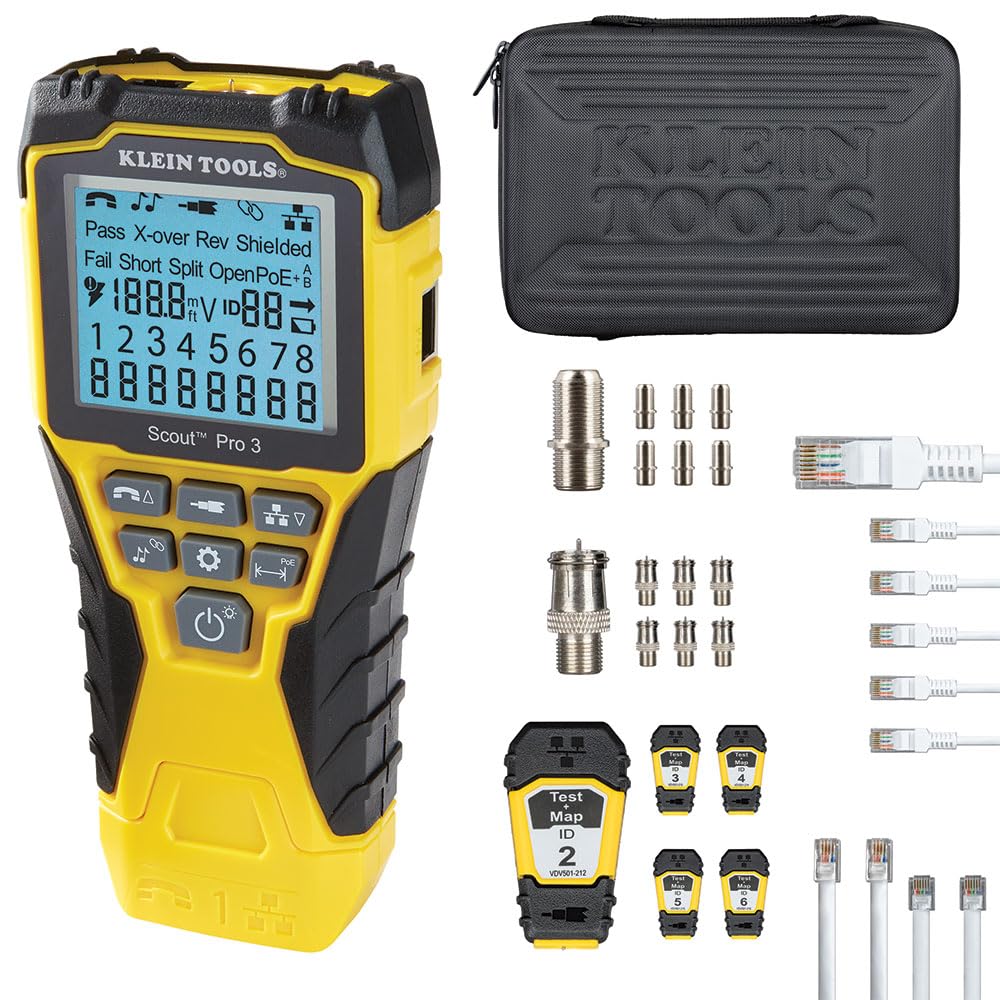
Figure 5.1: Scout Pro 3 Tester with its backlit LCD display.
5.2 Versatile Connection Testing
The Scout Pro 3 tests voice (RJ11/12), data (RJ45), and video (F-connector) coax connections. Connect the cable to the appropriate port on the tester and the remote unit.

Figure 5.2: Input ports for various cable types.
5.3 Comprehensive Wire Testing (Wiremap)
The tester performs wiremap testing to check for common cable faults such as Miswires, Split Pairs, Short Faults, Open Faults, and Shield issues. The results are displayed clearly on the LCD.

Figure 5.3: Display showing a 'Fail Short' condition.

Figure 5.4: Display showing a 'Pass X-over' condition with remote ID.
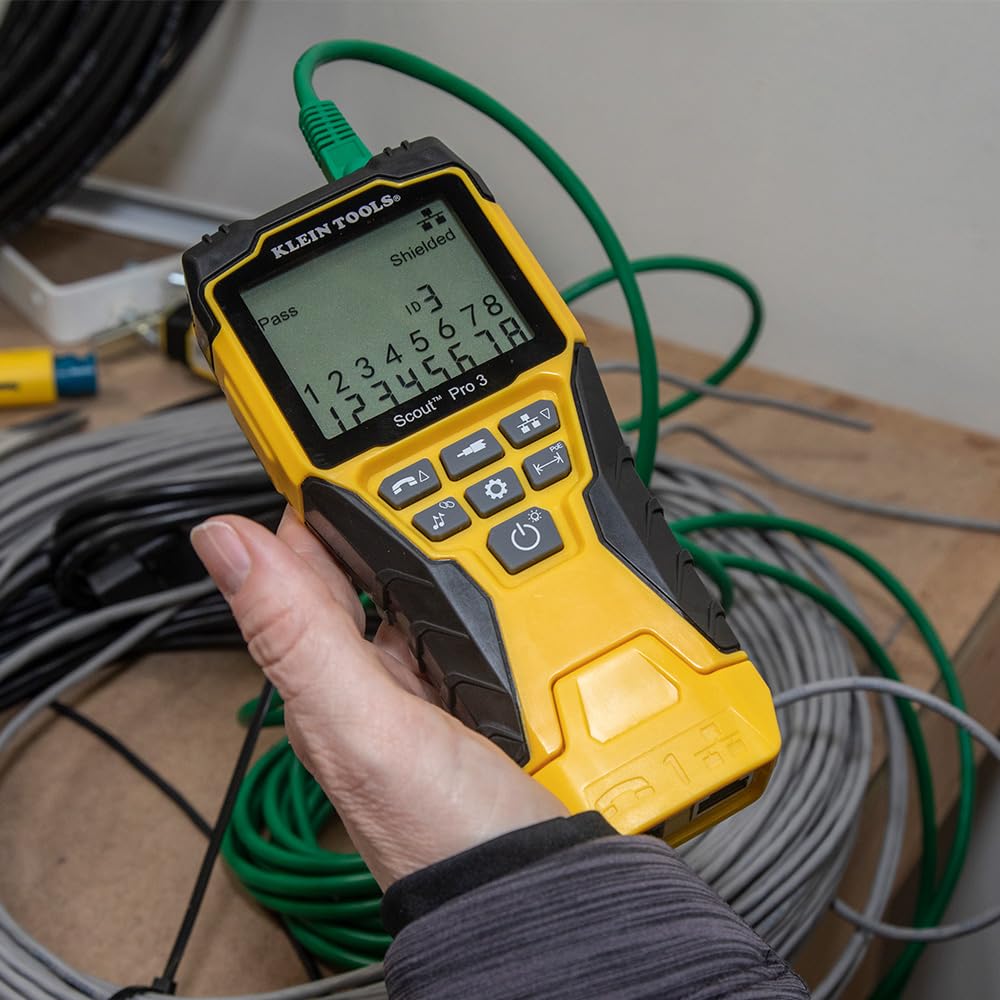
Figure 5.5: Display showing a 'Pass Shielded' condition.
5.4 Power over Ethernet (PoE) Detection
The Scout Pro 3 can detect, identify, and test Power over Ethernet (PoE) presence, including PoE+ and various wiring types (A wiring, B wiring), and voltage levels. This feature is crucial for verifying power delivery in network installations.

Figure 5.6: Display showing PoE voltagई पत्ता लगाउने।

Figure 5.7: Display showing a 'Fail PoE' condition.
६.६ केबल लम्बाइ मापन
The tester measures cable length up to 2000 feet (610 meters), providing accurate distance information for cable runs.

Figure 5.8: Cable length measurement display.
5.6 Cable Tracing (Toning)
The multi-style tone generator allows for tracing cables, wire pairs, and individual conductor wires. This feature requires an analog probe (Klein Tools Cat. No. VDV500-123, sold separately).
The tester can tone wires from 800 Hz to 1500 Hz and can tone individual wires, pairs, or all 8 wires. It also supports toning RJ11/RJ12 terminated cables.
5.7 Hub Blink Mode
The Hub Blink mode identifies the port location on a hub or a switch by causing the corresponding port LED to blink, simplifying cable identification in crowded network environments.

Figure 5.9: Tester in Hub Blink mode.
6. मर्मतसम्भार
८.१ सरसफाई
Ensure the tester is turned off and disconnected from all cables before cleaning. Use a clean, dry, lint-free cloth to wipe the unit. Do not use abrasive cleaners or solvents.
6.2 ब्याट्री प्रतिस्थापन
Replace batteries when the low battery indicator appears on the display. Refer to Section 4.1 for battery installation instructions. Always dispose of old batteries responsibly according to local regulations.
6.3 भण्डारण
When not in use, store the tester and its accessories in the provided carrying case in a cool, dry place, away from direct sunlight and extreme temperatures. If storing for extended periods, remove the batteries to prevent leakage.
T. समस्या निवारण
This section addresses common issues you might encounter with your Scout Pro 3 Cable Tester.
| समस्या | सम्भावित कारण | समाधान |
|---|---|---|
| परीक्षक सक्रिय हुँदैन। | मृत वा गलत तरिकाले जडान गरिएका ब्याट्रीहरू। | Check battery polarity or replace batteries (refer to Section 4.1). |
| Inaccurate cable test results (e.g., "Fail Short", "Open"). | Damaged cable, incorrect termination, or faulty remote. | Inspect the cable for visible damage. Re-terminate the cable ends. Try a different remote if available. |
| PoE detection fails or shows incorrect voltage. | No PoE power on the line, incorrect PoE standard, or tester not fully connected. | Verify the PoE source is active. Ensure the cable is fully seated in the tester's RJ45 port. |
| Cable length measurement is inconsistent. | Cable impedance variations, external interference, or damaged cable. | Ensure the cable is not coiled tightly. Test a known good cable for comparison. Minimize external electrical interference. |
| Toning function not working. | Analog probe not connected or faulty, or cable not properly connected. | Ensure the analog probe (VDV500-123) is correctly connected and functioning. Verify cable connection to the tester. |
8. निर्दिष्टीकरणहरू
| सुविधा | विवरण |
|---|---|
| मोडेल नम्बर | VDV501-853 |
| उत्पादन आयामहरू | १० x ३ x ३ इन्च |
| वस्तुको वजन | 1.2 पाउन्ड |
| शक्ति स्रोत | ब्याट्री संचालित |
| ब्याट्री आवश्यक छ | 4 AA ब्याट्रीहरू |
| Cable Types Tested | Voice (RJ11/12), Data (RJ45), Video (F-connector) Coax |
| केबल लम्बाइ मापन | ७० फिट (२१ मिटर) सम्म |
| PoE पत्ता लगाउने | Yes (Detects, identifies, and tests PoE, PoE+, A wiring, B wiring, and voltage) |
| Wiremap Testing | Miswires, Split Pairs, Short Faults, Open Faults, Shield issues |
| टोन जेनरेटर | Multi-style (requires analog probe VDV500-123, sold separately) |
9. वारेन्टी र समर्थन
Klein Tools stands behind the quality of its products. For detailed warranty information, product registration, and customer support, please visit the official Klein Tools webसाइट वा तिनीहरूको ग्राहक सेवा विभागमा सम्पर्क गर्नुहोस्।
You can also refer to the official Instructions for Use (IFU) document for more comprehensive details:
सम्बन्धित कागजातहरू - VDV501-853
 |
VDV Scout Pro 2 Series: Voice, Data, Video Cable Testers Klein Tools VDV Scout Pro 2 Series testers for voice, data, and video connections. Features include cable testing, mapping, length measurement, and remote identification for up to 19 locations. |
 |
क्लेन उपकरणहरू VDV स्काउट™ प्रो ३ निर्देशन पुस्तिका Klein Tools VDV Scout™ Pro 3 को लागि विस्तृत गाइड, एक पोर्टेबल आवाज, डेटा, र भिडियो केबल परीक्षक। RJ11, RJ12, RJ45, र F-कनेक्टर केबलहरूको लागि केबल परीक्षण, पहिचान, लम्बाइ मापन, टोन उत्पादन, र समस्या निवारण सुविधाहरू बारे जान्नुहोस्। |
 |
क्लेन टूल्स स्काउट प्रो ३: व्यावसायिक केबल परीक्षक र तार म्यापर आवाज, डेटा र भिडियोको लागि बहुमुखी केबल परीक्षक, क्लेन टूल्स स्काउट प्रो ३ पत्ता लगाउनुहोस्। कुशल नेटवर्क समस्या निवारणको लागि तार म्यापिङ, लम्बाइ मापन, टोन जेनेरेसन, र हब ब्लिङ्क परीक्षण जस्ता सुविधाहरू समावेश छन्। |
 |
Klein Tools VDV Scout Pro 3 Cable Tester - User Manual and Specifications Comprehensive user manual for the Klein Tools VDV Scout Pro 3 cable tester, covering voice, data, and video cable testing, length measurement, tone generation, and identification features. Includes specifications, operating instructions, and troubleshooting. |
 |
Klein Tools VDV Scout™ Pro 3: केबल परीक्षणको लागि निर्देशन पुस्तिका आवाज, डेटा र भिडियो नेटवर्कहरूको लागि एक पेशेवर केबल परीक्षक, Klein Tools VDV Scout™ Pro 3 को क्षमताहरू अन्वेषण गर्नुहोस्। यो म्यानुअलले गल्ती पत्ता लगाउने, PoE परीक्षण, केबल ID, लम्बाइ मापन, र टोन उत्पादनको लागि यसको सुविधाहरूको विवरण दिन्छ। |
 |
Klein Tools VDV Scout™ Pro 3 Instruction Manual: Cable Testing, Fault Detection, Length Measurement The Klein Tools VDV Scout™ Pro 3 is a portable cable tester for voice, data, and video networks. It troubleshoots faults, measures length, identifies cables, and generates tones for tracing. Supports RJ11, RJ12, RJ45, and F-connectors. Essential for network installation and maintenance. |
Ask a question about this manual
Ask about setup, troubleshooting, compatibility, parts, safety, or missing instructions. Manuals+ will review the question and use this page’s manual context to help answer it.