
परिचय
Thank you for choosing the JBL Tune 225 TWS Wireless In-Ear Headphones. This manual provides essential information for setting up, operating, and maintaining your device. Please read it carefully to ensure optimal performance and longevity of your headphones.
बक्समा के छ
Your JBL Tune 225 TWS package includes the following items:
- JBL Tune 225 TWS Wireless In-Ear Headphones (Left and Right earbuds)
- कम्प्याक्ट चार्जिङ केस
- USB-C चार्जिङ केबल

Image: JBL Tune 225 TWS earbuds and their charging case, showing the components included in the package.
सेटअप
१. हेडफोन र केस चार्ज गर्दै
Before first use, fully charge both the earbuds and the charging case. Connect the provided USB-C cable to the charging case and a power source. The LED indicators on the case will show the charging status. A full charge typically takes approximately 2 hours.
- चार्ज केस ब्याट्री लाइफ: Up to 20 hours capacity, providing an average of 25 hours of combined playtime with the earbuds.
- इयरबड ब्याट्री लाइफ: एकल चार्जमा 5 घण्टा सम्म।

Image: JBL Tune 225 TWS earbuds placed inside their open charging case, showing the LED battery indicators.
२ ब्लुटुथ पेयरि।
- चार्जिङ केस खोल्नुहोस्। इयरबडहरू स्वतः पेयरिङ मोडमा प्रवेश गर्नेछन्।
- आफ्नो उपकरणमा (स्मार्टफोन, ट्याब्लेट, आदि), ब्लुटुथ सेटिङहरूमा जानुहोस्।
- Select "JBL Tune 225 TWS" from the list of available devices.
- एकपटक जडान भएपछि, तपाईंले श्रव्य पुष्टिकरण सुन्नुहुनेछ, र इयरबडहरूमा रहेको LED ले सफल जडान भएको संकेत गर्नेछ।
The JBL Tune 225 TWS uses Bluetooth version 5.0 for a stable connection up to 10 meters (33 feet).
हेडफोनहरू सञ्चालन गर्दै
टच नियन्त्रणहरू
The JBL Tune 225 TWS features touch controls on each earbud for managing audio playback and calls.
| कार्य | बायाँ इयरबड | दाँया Earbud |
|---|---|---|
| प्ले/पज गर्नुहोस् | N/A | एकल ट्याप |
| अर्को ट्र्याक | डबल ट्याप गर्नुहोस् | N/A |
| अघिल्लो ट्र्याक | ट्रिपल ट्याप | N/A |
| जवाफ/अन्त कल | एकल ट्याप | एकल ट्याप |
| कल अस्वीकार गर्नुहोस् | थिच्नुहोस् र होल्ड गर्नुहोस् (2s) | थिच्नुहोस् र होल्ड गर्नुहोस् (2s) |
| आवाज सहायक सक्रिय गर्नुहोस् | N/A | डबल ट्याप गर्नुहोस् |
Note: Volume control is not directly available on the earbuds and must be adjusted via your connected device.
एकल वा दोहोरो इयरबड प्रयोग
The JBL Tune 225 TWS allows for flexible use of either a single earbud or both earbuds simultaneously. Simply remove one or both from the charging case, and they will automatically connect to your paired device. If you place one earbud back into the case, the other will continue to play.

छवि: क्लोज-अप view of the left and right JBL Tune 225 TWS earbuds, highlighting their individual design.
मर्मतसम्भार
सरसफाई
Regular cleaning helps maintain sound quality and hygiene. Use a soft, dry, lint-free cloth to wipe the earbuds and charging case. Do not use harsh chemicals or abrasive materials. For earbud grilles, gently use a dry cotton swab to remove any debris.
भण्डारण
When not in use, always store the earbuds in their charging case to protect them and keep them charged. Store the case in a cool, dry place, away from extreme temperatures and direct sunlight.
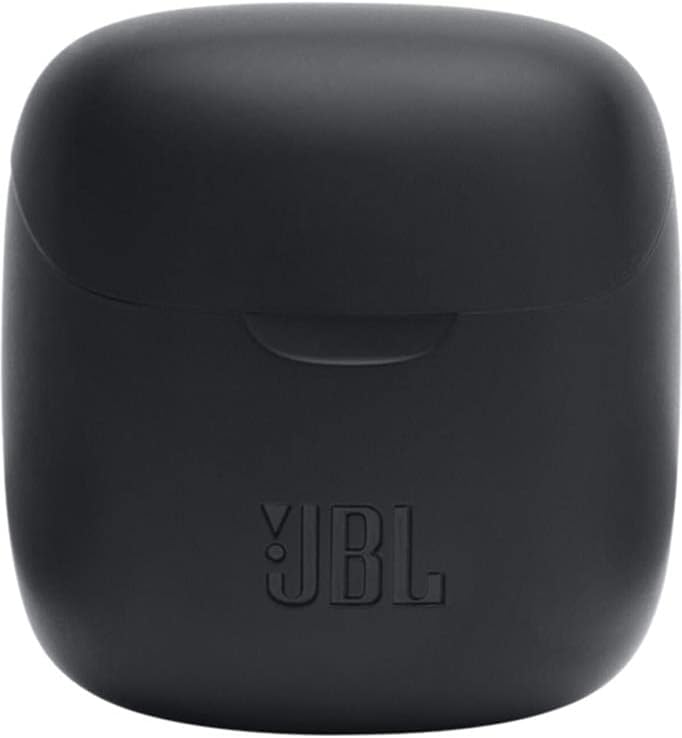
Image: The closed charging case for the JBL Tune 225 TWS, ready for storage or transport.
समस्या निवारण
- कुनै ध्वनि/जडान समस्या छैन: Ensure both earbuds are charged. Place them back in the case, close it, then reopen to re-initiate pairing. Check your device's Bluetooth settings to ensure "JBL Tune 225 TWS" is connected. Try forgetting the device and re-pairing.
- एउटा इयरबडले काम गरिरहेको छैन: Ensure both earbuds are charged. Try placing both back in the case, closing it, and then taking them out again. Sometimes a simple reset by placing them in the case can resolve this.
- चार्जिङ समस्याहरू: Ensure the USB-C cable is securely connected to both the case and the power source. Check if the charging port is clean and free of debris. Try a different USB-C cable or power adapter.
- कम भोल्युम: Adjust the volume on your connected device. Ensure the earbuds are properly seated in your ears.
निर्दिष्टीकरणहरू
| सुविधा | विवरण |
|---|---|
| ब्रान्ड | JBL |
| मोडेल नाम | ट्यून 225TWS |
| मोडेल नम्बर | ट्यून 225TWS |
| रङ | कालो |
| कान नियुक्ति | कान भित्र |
| फारम कारक | कान भित्र |
| प्रतिबाधा | ४ ओम |
| चालक प्रकार | गतिशील चालक |
| चालक आकार | 12.5 मिमी |
| आवृत्ति दायरा | ७ हर्ट्ज - ४०,००० हर्ट्ज |
| संवेदनशीलता | २० dB |
| जडान प्रविधि | ताररहित (ब्लुटुथ) |
| ब्लुटुथ संस्करण | 5.0 |
| ब्लुटुथ दायरा | २ मिटर |
| नियन्त्रण विधि | छुनुहोस् |
| इयरबड ब्याट्री लाइफ | ४ घण्टा |
| केस ब्याट्री लाइफ चार्ज गर्दै | Up to 20 Hours (additional) |
| Total Combined Playtime | 25 घण्टा सम्म |
| चार्ज गर्ने समय | ४ घण्टा |
| पानी प्रतिरोध स्तर | पानी प्रतिरोधी |
| उत्पादन वजन | 57 ग्राम |
| चार्जिङ केस वजन | 100 ग्राम |
| UPC | 050036374019 |
वारेन्टी र समर्थन
वारेन्टी जानकारी र ग्राहक समर्थनको लागि, कृपया आधिकारिक JBL हेर्नुहोस्। website or contact your local JBL authorized dealer. Keep your proof of purchase for warranty claims.
प्रयोगकर्ता पुस्तिकाको डिजिटल प्रतिलिपि डाउनलोडको लागि उपलब्ध छ: JBL Tune 225 TWS User Manual (PDF)


