
1. परिचय
This instruction manual provides comprehensive guidance for the Hanwha Techwin XNP-6400RW 2MP Network 40x IR PTZ Camera. This advanced surveillance camera is designed for outdoor use, offering high-resolution imaging, extensive zoom capabilities, and intelligent features for robust security monitoring. Please read this manual thoroughly before installation and operation to ensure proper use and optimal performance.
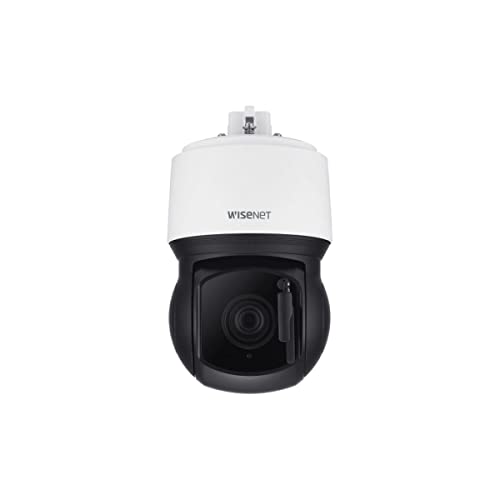
चित्र १: अगाडि view of the Hanwha Techwin XNP-6400RW PTZ Camera, showcasing its dome design and integrated lens.
Product. उत्पाद सुविधाहरू
The Hanwha Techwin XNP-6400RW camera incorporates several key features for advanced surveillance:
- उच्च संकल्प: 2MP resolution at 60 frames per second (fps) for clear and detailed video.
- शक्तिशाली जुम: 40X optical zoom lens (4.25mm ~ 170mm) with a wide field of view (65.66° ~ 1.88°).
- Extended IR Range: इन्फ्रारेड (IR) viewable length up to 200 meters (656 feet) for monitoring in complete darkness.
- Wide Tilt Range: Features a -20° tilt look-up capability, allowing the camera to see above the horizon.
- उन्नत भिडियो कम्प्रेसन: Supports H.265, H.264, and MJPEG triple codecs, along with WiseStream II for efficient data management.
- परिष्कृत इमेजिङ: Day & Night (ICR) functionality, extreme Wide Dynamic Range (WDR), and Digital Image Stabilization (DIS) with a built-in Gyro sensor.
- AI-based Analytics: Includes AI-based Object Auto tracking (Person, Vehicle), target lock tracking, and intelligent video analytics.
- Integrated Wiper: Built-in wiper system to clear water or dust from the lens, complemented by a heater for perfect drying.
- बलियो जडान: RJ45 connector for simplified installation with a single cable.
- साइबर सुरक्षा: Enhanced cybersecurity features for data protection.
२. बक्समा के छ?
अनप्याक गर्दा, कृपया सबै कम्पोनेन्टहरू उपस्थित छन् भनी प्रमाणित गर्नुहोस्:
- Hanwha Techwin XNP-6400RW PTZ Camera Unit
- प्रयोगकर्ता गाइड (यो कागजात)
Note: Additional mounting hardware or power supplies may be sold separately depending on the specific package.
4. सेटअप
4.1 क्यामेरा माउन्ट गर्दै
The XNP-6400RW camera is designed for outdoor installation and supports both wall mount and ceiling mount configurations. Ensure the mounting surface is sturdy enough to support the camera's weight and withstand environmental conditions.
- स्थान चयन गर्नुहोस्: Choose a strategic location that provides the desired field of view र पावर र नेटवर्क जडानको पहुँच भित्र छ।
- सतह तयार गर्नुहोस्: Drill necessary holes for the mounting bracket (not included, sold separately) according to the bracket's instructions.
- सुरक्षित कोष्ठक: Attach the mounting bracket securely to the wall or ceiling using appropriate fasteners.
- क्यामेरा जडान गर्नुहोस्: Mount the camera unit onto the secured bracket. Ensure all connections are made before final tightening.
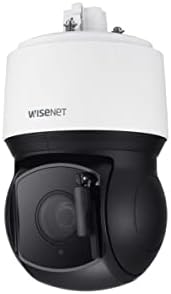
चित्र १: पक्ष view of the Hanwha Techwin XNP-6400RW PTZ Camera, illustrating its design for mounting.
4.2 पावर जडान
The camera operates on a Corded Electric power source, requiring 24 Volts (DC). Connect the power cable to the camera's power input and then to a suitable power supply. Ensure the power supply meets the camera's voltage र वर्तमान आवश्यकताहरू।
१० नेटवर्क जडान
The XNP-6400RW utilizes a single RJ45 connector for network connectivity, simplifying installation. It supports Wi-Fi connectivity protocol. Connect a standard Ethernet cable from the camera's RJ45 port to your network switch or router. Ensure your network is configured to provide an IP address to the camera.
4.4 प्रारम्भिक कन्फिगरेसन
After physical installation and connection, access the camera's web एक मार्फत इन्टरफेस web browser using its assigned IP address. Refer to the separate network configuration guide for detailed steps on setting up network parameters, user accounts, and initial camera settings.
5. सञ्चालन
३.१ प्यान, टिल्ट, र जुम (PTZ) नियन्त्रण
The camera features Pan, Tilt, and Zoom capabilities, controlled via the network interface or a compatible DVR/NVR system. The 40X optical zoom allows for detailed observation of distant objects, while the -20° tilt look-up capability expands the vertical viewदायरा।
5.2 छवि सेटिङहरू
Adjust image settings such as brightness, contrast, and exposure through the camera's web interface. The camera automatically switches between Day and Night modes using its Infrared Cut-filter Removable (ICR) mechanism. Extreme WDR (Wide Dynamic Range) helps to capture clear images in scenes with both very bright and very dark areas.
5.3 Intelligent Video Analytics
The XNP-6400RW includes AI-based object auto-tracking for persons and vehicles. To utilize this feature:
- ट्र्याकिङ सक्षम गर्नुहोस्: Access the analytics settings in the camera's web इन्टरफेस।
- Define Zones: Set up detection zones or lines as required for your monitoring area.
- Select Object Type: Choose to track specific object types, such as 'Person' or 'Vehicle'.
- Activate Target Lock: Use the target lock tracking feature to continuously follow a selected object.
The camera also supports motion-only alerts. Configure alert notifications and actions (e.g., recording, email alerts) within the system settings.
5.4 भिडियो रेकर्डिङ
The camera supports H.265, H.264, and MJPEG video compression formats, optimized with WiseStream II for efficient storage. Configure recording schedules and storage destinations (e.g., NVR, NAS, local SD card if supported) through the camera's interface or connected recording device.
6. मर्मतसम्भार
७.१ लेन्स सफाई
The XNP-6400RW features a built-in wiper to remove water and dust from the lens. This system automatically activates a heater to dry any remaining moisture, ensuring clear visibility. For manual cleaning, use a soft, lint-free cloth and a mild lens cleaning solution. Avoid abrasive materials that could scratch the lens.
6.2 फर्मवेयर अपडेटहरू
Regularly check the Hanwha Techwin website for firmware updates. Keeping the camera's firmware up-to-date ensures optimal performance, security enhancements, and access to new features. Follow the provided instructions carefully when performing firmware updates.
6.3 वातावरणीय विचारहरू
As an outdoor camera with an IP66 waterproof rating, the XNP-6400RW is designed to withstand harsh weather conditions. However, periodically inspect the camera housing and mounting for any signs of wear, damage, or loose connections. Ensure no obstructions are blocking the camera's view or the wiper mechanism.
T. समस्या निवारण
If you encounter issues with your Hanwha Techwin XNP-6400RW camera, refer to the following common problems and solutions:
- कुनै शक्ति छैन:
- Check the power cable connection to the camera and the power source.
- Verify the power supply is providing 24V DC and is functioning correctly.
- नेटवर्क जडान छैन:
- Ensure the RJ45 Ethernet cable is securely connected at both ends.
- Check network switch/router status and cable integrity.
- Verify the camera's IP address and network settings are correct.
- खराब छवि गुणस्तर:
- Clean the camera lens using the built-in wiper or manually.
- Adjust image settings (focus, exposure, WDR) in the web इन्टरफेस।
- Ensure sufficient lighting in the scene, or that IR is functioning correctly in low light.
- PTZ Not Responding:
- Check network connection and camera status.
- Ensure the control software or DVR/NVR is properly configured for PTZ control.
- AI Analytics Not Working:
- Verify that AI analytics features are enabled in the camera's settings.
- Ensure detection zones are correctly defined and not obstructed.
For further assistance, consult the detailed troubleshooting section on the Hanwha Techwin support webसाइट वा प्राविधिक समर्थन सम्पर्क गर्नुहोस्।
8. निर्दिष्टीकरणहरू
| सुविधा | निर्दिष्टीकरण |
|---|---|
| मोडेल नाम | XNP-6400RW |
| ब्रान्ड | HANWHA |
| निर्माता | हान्वा टेकविन |
| भिडियो क्याप्चर रिजोल्युसन | १२९६ पिक्सेल (३ मेगापिक्सेल) |
| फ्रेम दर | 60fps |
| अप्टिकल जूम | 40X (4.25mm ~ 170mm) |
| IR Viewसक्षम लम्बाइ | १० मिटर (३३ फिट) |
| Tilt Capability | -20° look-up |
| भिडियो कोडेक्स | H.265, H.264, MJPEG, WiseStream II |
| विशेष सुविधाहरू | Night Vision, PTZ Technology, Built-in Wiper, AI-based Object Auto Tracking, WDR, DIS |
| इनडोर/आउटडोर उपयोग | बाहिरी |
| वाटरप्रूफ रेटिंग | IP66 |
| जडान प्रविधि | Wired (RJ45), Wi-Fi |
| शक्ति स्रोत | कर्ड इलेक्ट्रिक |
| भोल्युमtage | 24 भोल्ट (DC) |
| माउन्ट प्रकार | पर्खाल माउन्ट, छत माउन्ट |
| वस्तु आयामहरू | १० x ३ x ३ इन्च |
| रङ | सेतो, कालो |
9. वारेन्टी र समर्थन
१.२ उत्पादन ग्यारेन्टी
For detailed information regarding the warranty coverage for your Hanwha Techwin XNP-6400RW camera, please refer to the official Hanwha Techwin webसाइट वा तपाईंको खरिदसँगै समावेश गरिएको वारेन्टी कार्ड। वारेन्टीका सर्तहरू र नियमहरू क्षेत्र र खुद्रा विक्रेता अनुसार फरक हुन सक्छन्।
२.१ प्राविधिक सहयोग
Should you require technical assistance, please contact Hanwha Techwin customer support. Support resources, including FAQs, software downloads, and contact information, are available on the official Hanwha Techwin webसाइट।
निर्माता: हान्वा टेकविन