
1. परिचय
This manual provides essential information for the installation, operation, and maintenance of your Pureit Hul Copper+ Eco Mineral RO+UV+MF Water Purifier. This advanced system is designed to provide purified water through a 7-stage purification process, enriching it with the goodness of copper and offering high water saving capabilities.

छवि: अगाडि view of the Pureit Hul Copper+ Eco Mineral RO+UV+MF Water Purifier, showcasinयसको कालो र तामाको डिजाइन।
2. महत्त्वपूर्ण सुरक्षा निर्देशनहरू
चोटपटक वा क्षति हुनबाट जोगिन उपकरण सञ्चालन गर्नु अघि कृपया सबै सुरक्षा निर्देशनहरू ध्यानपूर्वक पढ्नुहोस्।
- Ensure the purifier is installed by a qualified technician.
- उपकरण, कर्ड, वा प्लगलाई पानी वा अन्य तरल पदार्थमा नडुबाउनुहोस्।
- उपकरणलाई प्रत्यक्ष सूर्यको किरण, ताप स्रोत र संक्षारक रसायनहरूबाट टाढा राख्नुहोस्।
- Do not allow children to operate the purifier without supervision.
- Use only potable water as input. The maximum supported TDS level is 500 PPM.
- सफा गर्नु वा कुनै मर्मत गर्नु अघि उपकरण अनप्लग गर्नुहोस्।
२. बक्समा के छ?
अनप्याक गर्दा, सबै कम्पोनेन्टहरू उपस्थित छन् र क्षति नभएको प्रमाणित गर्नुहोस्:
- 1 x Pureit Hul Copper+ Eco Mineral RO+UV+MF Water Purification Unit
Installation. स्थापना निर्देशिका
The Pureit WUCU200 is a freestanding unit. Professional installation is recommended.
- स्थान छान्नुहोस्: Select a clean, dry, and well-ventilated area near a water source and an electrical outlet. Ensure sufficient space around the unit for maintenance.
- पानी जडान: Connect the purifier to the raw water supply as per the installation diagram provided by the technician. Ensure all connections are secure to prevent leaks.
- नाली जडान: Connect the waste water pipe to a suitable drain.
- पावर जडान: Plug the power cord into a grounded electrical outlet. The purifier operates on a MANUAL power source.
- प्रारम्भिक फ्लस: Before first use, allow the purifier to run for a few cycles to flush out any manufacturing residues. Refer to the technician's instructions for the specific flushing procedure.
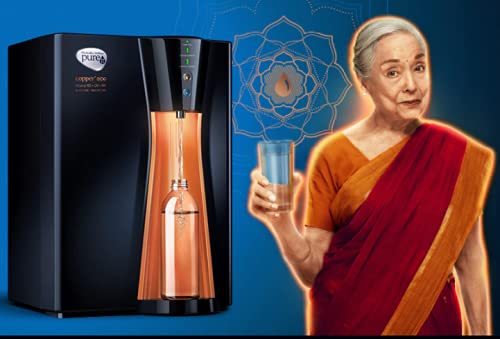
Image: The Pureit water purifier positioned in a kitchen environment, illustrating typical placement.
5. सञ्चालन निर्देशनहरू
Follow these steps for daily operation of your water purifier:
- पावर अन: Ensure the purifier is plugged in and the power switch (if present) is turned on. Indicator lights will illuminate, showing the unit is active.
- पानी शुद्धीकरण: The purifier will automatically begin purifying water and filling its 8-liter storage tank.
- पानी वितरण: Place a clean container under the water outlet. Press the dispense button or lever to release purified water.
- Copper Infusion: The purifier is designed to enrich water with copper. This process occurs automatically during purification.
- सूचक बत्तीहरू: Pay attention to the indicator lights on the unit. These provide information on power status, purification progress, and filter life. Refer to the specific indicator guide provided by the manufacturer for detailed explanations.
6. मर्मत र हेरचाह
Regular maintenance ensures optimal performance and longevity of your purifier.
- बाह्य सरसफाई: प्युरिफायरको बाहिरी भाग नरम, घ ले पुछ्नुहोस्।amp कपडा। कठोर रसायन वा घर्षण क्लीनर प्रयोग नगर्नुहोस्।
- ट्याङ्की सफाई: Periodically drain and clean the storage tank as per manufacturer guidelines to prevent biofilm buildup.
- फिल्टर प्रतिस्थापन: The purifier contains multiple filters and a GermKill Kit (GKK) that require periodic replacement. The frequency depends on water quality and usage. Refer to the service schedule or indicator lights for timely replacement. Contact authorized service personnel for filter changes.
- सेवा तालिका: Adhere to the recommended service schedule to ensure the purifier functions effectively and maintains water quality.
7. समस्या निवारण गाइड
यो खण्डले तपाईंले सामना गर्न सक्ने सामान्य समस्याहरूलाई सम्बोधन गर्दछ। यहाँ सूचीबद्ध नगरिएका समस्याहरूको लागि, ग्राहक समर्थनलाई सम्पर्क गर्नुहोस्।
| समस्या | सम्भावित कारण | समाधान |
|---|---|---|
| पानी वितरण छैन | बिजुली छैन; पानी आपूर्ति बन्द छ; ट्याङ्की खाली छ; फिल्टर बन्द छ। | Check power connection; ensure water supply is on; wait for tank to fill; contact service for filter inspection. |
| ढिलो पानीको बहाव | Low water pressure; partially clogged filter. | Check input water pressure; contact service for filter inspection/replacement. |
| पानीमा असामान्य स्वाद/गन्ध | Expired filters; dirty tank. | Replace filters/GKK; clean the storage tank. |
| Leakage from unit | खुकुलो जडानहरू; क्षतिग्रस्त घटक। | Immediately turn off water supply and power. Contact service technician. |
8. उत्पादन निर्दिष्टीकरण
| ब्रान्ड | Pureit |
| मोडेल नाम | WUCU200 |
| विशेष सुविधाहरू | RO, UV, MF, Copper+ Enrichment |
| शुद्धिकरण एसtages | ३-सेकेन्डtagई शुद्धिकरण प्रक्रिया |
| क्षमता | 8 लिटर |
| स्थापना प्रकार | स्वतन्त्र रुपमा ठडिएको |
| शक्ति स्रोत | म्यानुअल |
| समर्थित पानी TDS स्तर (अधिकतम) | 500 PPM |
| वस्तुको वजन | ०.६ किलोग्राम |
| उत्पादन आयाम (LxWxH) | ३७ x १७ x १७ सेमी |
| निर्माता | Hindustan Unilever |
९. वारेन्टी र ग्राहक समर्थन
For warranty details, please refer to the warranty card provided with your product at the time of purchase. The warranty typically covers manufacturing defects under normal use conditions.
For technical assistance, service requests, or to purchase genuine replacement parts, please contact Pureit customer support. Contact information can usually be found on the product packaging or the official Pureit webसाइट।