
परिचय
This manual provides essential information for the safe and efficient operation of your LVYUAN 3000W/6000W 12V to 220V Power Inverter. Please read these instructions carefully before installation and use. Keep this manual for future reference.
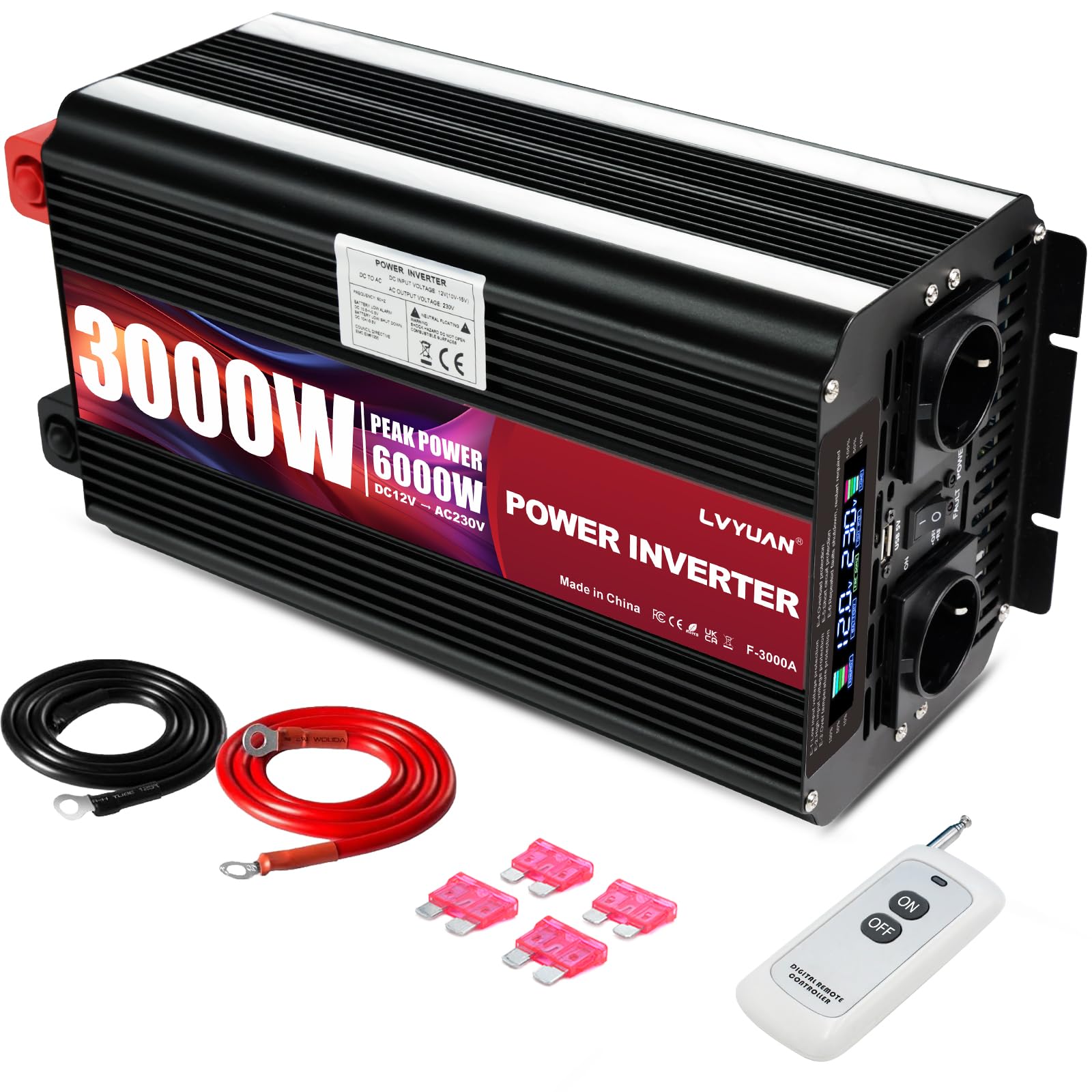
Image: LVYUAN 3000W/6000W Power Inverter. This image shows the main unit with its cooling fans, DC input terminals (red and black), and the front panel with AC outlets and USB port.
महत्त्वपूर्ण सुरक्षा निर्देशनहरू
यी सुरक्षा निर्देशनहरू पालना गर्न असफल भएमा विद्युतीय झट्का, आगो वा गम्भीर चोटपटक लाग्न सक्छ।
- Do not connect the inverter to AC mains power. This can cause severe damage to the inverter and connected devices.
- Ensure correct polarity when connecting to a battery. Reverse connection of positive (+) and negative (-) terminals is strictly prohibited and will damage the unit.
- Avoid overloading the inverter. Do not exceed the continuous output power of 3000W.
- Use only the provided standard battery cables. Using inadequate cables may prevent the inverter from delivering full power.
- The inverter is designed for DC 12V input (10V-15.5V). Do not use with other DC voltagई स्रोतहरु।
- Ensure adequate ventilation around the inverter to prevent overheating. The aluminum casing ले ताप घटाउन मद्दत गर्छ, तर उचित हावा प्रवाह महत्त्वपूर्ण छ।
- इन्भर्टरलाई पानी, ओसिलोपन र ज्वलनशील पदार्थहरूबाट टाढा राख्नुहोस्।
- इन्भर्टर नखोल्नुहोस् casing भित्र प्रयोगकर्ता-सेवायोग्य भागहरू छैनन्।
- In case of accidental fuse blow, use only the provided spare fuses for replacement.
प्याकेज सामग्री
प्याकेजमा सबै वस्तुहरू छन् भनी प्रमाणित गर्नुहोस्:
- 1x LVYUAN Power Inverter (3000W/6000W)
- 2x Battery Connection Cables (50cm solid copper, 25mm²)
- 1x Wireless Remote Control (Note: 12V 23A battery not included)
- 1x प्रयोगकर्ता पुस्तिका
- अतिरिक्त फ्यूज
प्राविधिक विनिर्देशहरू
| सुविधा | निर्दिष्टीकरण |
|---|---|
| मोडेल नम्बर | BT-3000W12V-M-EU-DYK |
| इनपुट भोल्यूमtage | DC 12V (10V-15.5V) |
| आउटपुट भोल्युमtage | AC 220V ± 5% |
| निरन्तर उत्पादन शक्ति | 3000W |
| पीक आउटपुट पावर | 6000W |
| आउटपुट आवृत्ति | ५० हर्ट्ज |
| रूपान्तरण दक्षता | > ७५% |
| AC आउटलेटहरू | 2x EU Sockets (220V~240V) |
| USB पोर्ट | १x १२V १०A |
| सञ्चालन तापमान | 0°C देखि 40°C |
| आयाम (L x W x H) | ८६५ x ५९८ x ५५० मिमी |
| शुद्ध वजन | 4.62 किलो |
| सुरक्षा मानकहरू | CE |
सेटअप र स्थापना
- उपयुक्त स्थान छनौट गर्नुहोस्: Place the inverter in a dry, well-ventilated area, away from direct sunlight, heat sources, and flammable materials. Ensure sufficient space for airflow around the unit.
- Prepare the battery: Ensure your DC 12V battery is fully charged and in good condition.
- Connect the battery cables:
- जडान गर्नुहोस् रातो ब्याट्री केबललाई सकारात्मक (+) इन्भर्टरको टर्मिनल।
- को अर्को छेउ जडान गर्नुहोस् रातो लाई केबल सकारात्मक (+) तपाईंको १२V ब्याट्रीको टर्मिनल।
- जडान गर्नुहोस् कालो ब्याट्री केबललाई नकारात्मक (-) इन्भर्टरको टर्मिनल।
- को अर्को छेउ जडान गर्नुहोस् कालो लाई केबल नकारात्मक (-) तपाईंको १२V ब्याट्रीको टर्मिनल।
चेतावनी: Double-check all connections for correct polarity before proceeding. Incorrect polarity will damage the inverter.
- सुरक्षित जडानहरू: Ensure all cable connections are tight and secure to prevent loose contacts and potential hazards.
- Initial power-up: Once connected, switch the inverter's main power switch to the "ON" position. The LED display should illuminate, showing input and output voltage.
सञ्चालन निर्देशनहरू
इन्भर्टर प्रयोग गर्दै
- पावर अन: Ensure the inverter is connected to a 12V DC battery. Turn the main power switch on the inverter to the "ON" position.
- एलईडी डिस्प्ले मनिटर: The integrated LED display will show the real-time input voltage (from the battery) and output voltage (एसी २३०V)।
- एसी उपकरणहरू जडान गर्नुहोस्: Plug your 220V~240V AC devices (e.g., laptops, hair dryers, sandwich makers, fans) into the two EU sockets on the inverter.
- USB यन्त्रहरू जडान गर्नुहोस्: Plug your USB-powered devices (e.g., smartphones, tablets) into the 5V 2.4A USB port.
- पावर अफ: When finished, first disconnect all AC and USB devices. Then, switch the inverter's main power switch to the "OFF" position.
वायरलेस रिमोट कन्ट्रोल प्रयोग गर्दै
The wireless remote control allows for convenient power management from a distance.
- ब्याट्री स्थापना गर्नुहोस्: Insert a 12V 23A battery (not included) into the wireless remote control.
- रिमोट कन्ट्रोल सक्षम गर्नुहोस्: Ensure the main power switch on the inverter is set to the "OFF" position. This enables the remote control functionality.
- रिमोट अपरेशन: Use the A/B buttons on the remote control to turn the inverter ON or OFF.
- नोट: If the main power switch on the inverter is in the "ON" position, the remote control will not function.
ओभरलोड संरक्षण
The inverter features overload protection. If the connected load exceeds 3000W, the inverter may shut down automatically to prevent damage. Reduce the load and restart the inverter if this occurs.
मर्मतसम्भार
- सरसफाई: इन्भर्टरको बाहिरी भागलाई समय-समयमा नरम, सुख्खा कपडाले सफा गर्नुहोस्। तरल क्लिनर वा घोलकहरू प्रयोग नगर्नुहोस्।
- भेन्टिलेसन: Ensure the cooling fans and ventilation openings are free from dust and debris. Blocked vents can lead to overheating.
- केबल जडानहरू: Regularly check battery cable connections for tightness and corrosion. Clean any corrosion with a wire brush and baking soda solution.
- फ्यूज प्रतिस्थापन: If a fuse blows, replace it only with a fuse of the same type and rating as the original, using the provided spare fuses. Refer to the safety instructions for guidance.
- भण्डारण: लामो समयसम्म प्रयोगमा नभएको बेला, इन्भर्टरलाई ब्याट्रीबाट विच्छेद गर्नुहोस् र यसलाई चिसो, सुख्खा ठाउँमा भण्डार गर्नुहोस्।
समस्या निवारण
| समस्या | सम्भावित कारण | समाधान |
|---|---|---|
| Inverter does not turn on / No output voltage |
|
|
| कम उत्पादन भोल्युमtage (जस्तै, १२V को सट्टा ५V) |
|
|
| Inverter shuts down automatically |
|
|
| Wireless remote control not working |
|
|
वारेन्टी र समर्थन
LVYUAN provides a warranty for this product, including free replacement under warranty. For any issues or support inquiries, please contact LVYUAN customer service. They offer 24-hour service.
विशेष वारेन्टी सर्तहरू र सम्पर्क जानकारीको लागि कृपया आफ्नो खरिद कागजात हेर्नुहोस्।