
1. परिचय
Thank you for choosing the SNDWAY SW-TG100 Laser Distance Meter. This device is designed for precise and rapid measurement of distances, areas, and volumes. It utilizes laser technology to provide accurate readings up to 100 meters, making it an essential tool for professionals and DIY enthusiasts in construction, interior design, and various other fields. Please read this manual carefully before using the device to ensure safe and optimal operation.
2. सुरक्षा जानकारी
This device emits a Class 2 laser. Observe the following safety precautions:
- Do not stare into the laser beam directly. Direct exposure to the laser can cause eye damage.
- लेजर किरण मानिस वा जनावरहरूमा लक्षित नगर्नुहोस्।
- यन्त्रलाई विच्छेद वा परिमार्जन नगर्नुहोस्। Unauthorized modifications can lead to hazardous laser radiation exposure.
- उपकरणलाई बालबालिकाको पहुँचबाट टाढा राख्नुहोस्।
- यस म्यानुअलमा वर्णन गरिए अनुसार यन्त्रलाई यसको उद्देश्यको लागि मात्र प्रयोग गर्नुहोस्।
- विस्फोटक वातावरणमा वा ज्वलनशील पदार्थहरूको नजिक उपकरण प्रयोग नगर्नुहोस्।
3. उत्पादन समाप्तview
The SNDWAY SW-TG100 is a compact and ergonomic laser distance meter. Below is an image illustrating the device's general appearance.
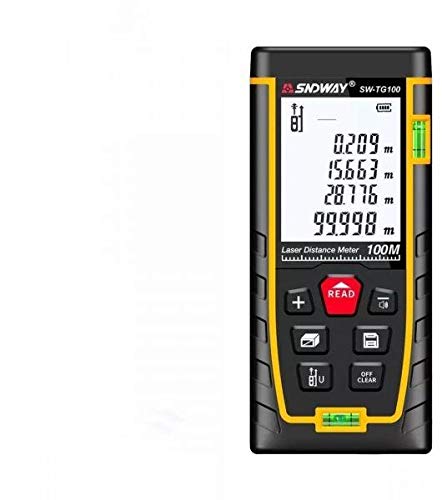
चित्र १: अगाडि view of the SNDWAY SW-TG100 Laser Distance Meter. The image shows the device's display screen, measurement buttons, and the laser emission/reception lens.
मुख्य घटकहरूमा सामान्यतया समावेश छन्:
- LCD डिस्प्ले: Shows measurement results, unit, battery status, and function indicators.
- मापन बटन: एकल वा निरन्तर मापन सुरु गर्छ।
- प्रकार्य बटन: For selecting measurement modes (distance, area, volume, Pythagorean, etc.), unit conversion, and saving data.
- Clear/Off Button: Clears the last measurement or turns the device off.
- लेजर एपर्चर: Where the laser beam is emitted and received.
- ब्याट्री डिब्बा: (If applicable) For inserting or accessing batteries.
4. सेटअप
२ पावर अन/अफ गर्दै
- पावर अन गर्न: थिच्नुहोस् [MEAS] बटन छोटकरीमा थिच्नुहोस्। डिस्प्ले उज्यालो हुनेछ।
- पावर अफ गर्न: थिच्नुहोस् र होल्ड गर्नुहोस् [CLEAR/OFF] डिस्प्ले बन्द नभएसम्म केही सेकेन्डको लागि बटन थिच्नुहोस्। ब्याट्री बचत गर्न निष्क्रियताको अवधि पछि उपकरण स्वचालित रूपमा बन्द हुनेछ।
५.१ ब्याट्री स्थापना (यदि लागू भएमा)
While the product specifications indicate no batteries are required, this typically implies an internal rechargeable battery. If your model requires external batteries, open the battery compartment cover located on the back or bottom of the device. Insert the specified battery type (e.g., AAA batteries) according to the polarity indicators (+/-). Close the compartment cover securely.
4.3 एकाइ सेटिङ
To change the measurement unit (e.g., meters, feet, inches), press the [एकाइ] इच्छित एकाइ प्रदर्शित नभएसम्म बटन बारम्बार थिच्नुहोस्।
5. सञ्चालन निर्देशनहरू
६.२.१ एकल दूरी मापन
- यन्त्र खोल्नुहोस्।
- लेजरलाई लक्षित सतहमा देखाउनुहोस्।
- थिच्नुहोस् [MEAS] एक पटक बटन थिच्नुहोस्। लेजर सक्रिय हुनेछ।
- थिच्नुहोस् [MEAS] button again. The measurement will be taken, and the result will appear on the display.
5.2 क्षेत्र मापन
- थिच्नुहोस् [समारोह] button until the area measurement icon (usually a square or rectangle) appears on the display.
- Measure the first side (e.g., length) by pointing the laser and pressing [MEAS].
- Measure the second side (e.g., width) by pointing the laser and pressing [MEAS] फेरि।
- उपकरणले स्वचालित रूपमा क्षेत्र गणना गर्नेछ र प्रदर्शन गर्नेछ।
5.3 भोल्युम मापन
- थिच्नुहोस् [समारोह] button until the volume measurement icon (usually a cube) appears on the display.
- Measure the length by pointing the laser and pressing [MEAS].
- Measure the width by pointing the laser and pressing [MEAS].
- Measure the height by pointing the laser and pressing [MEAS].
- उपकरणले स्वचालित रूपमा भोल्युम गणना गर्नेछ र प्रदर्शन गर्नेछ।
६.३ निरन्तर मापन (ट्र्याकिङ)
This mode allows for dynamic measurement, displaying the distance in real-time as you move the device.
- थिच्नुहोस् र होल्ड गर्नुहोस् [MEAS] button (or press it twice quickly, depending on the model) to enter continuous measurement mode.
- Move the device slowly towards or away from the target. The display will update with the current distance.
- थिच्नुहोस् [MEAS] or [CLEAR/OFF] निरन्तर मापन मोड बाहिर निस्कन।
6. मर्मतसम्भार
- सरसफाई: नरम प्रयोग गर्नुहोस्, डीamp उपकरण सफा गर्न कपडा casing. Do not use abrasive cleaners or solvents. Clean the laser lens carefully with a soft, lint-free cloth, similar to cleaning camera lenses.
- भण्डारण: Store the device in a cool, dry place, away from direct sunlight and extreme temperatures. If storing for an extended period, remove any external batteries (if applicable).
- प्रभावबाट बच्न: उपकरणलाई थोपा र बलियो प्रभावबाट जोगाउनुहोस्, जसले यसको शुद्धता र कार्यक्षमतालाई असर गर्न सक्छ।
T. समस्या निवारण
| समस्या | सम्भावित कारण | समाधान |
|---|---|---|
| उपकरण चालु छैन। | कम वा सकिएको ब्याट्री। | Charge the device or replace batteries (if applicable). |
| गलत मापन। | Dirty laser lens; unstable measurement surface; strong light interference. | Clean the laser lens; ensure a stable measurement point; measure in less bright conditions if possible. |
| "त्रुटि" सन्देश प्रदर्शनमा। | Measurement out of range; poor reflection from target. | Ensure target is within measurement range (0.05m-100m); use a reflective target plate if measuring against highly reflective or transparent surfaces. |
8. निर्दिष्टीकरणहरू
| सुविधा | विवरण |
|---|---|
| निर्माता | SNDWAY |
| मोडेल | SW-TG100 |
| मापन दायरा | 100 मिटर सम्म |
| मापन शुद्धता | Typically ±2mm (specific accuracy may vary based on conditions) |
| मापन एकाइहरू | m / ft / in |
| लेजर क्लास | कक्षा ३ |
| वस्तुको वजन | 260 ग्राम |
| प्याकेज आयामहरू | ३७ x १७ x १७ सेमी |
| ब्याट्री आवश्यक छ | No (implies internal rechargeable battery) |
| मिति पहिलो उपलब्ध | जुलाई १, २०२१ |
9. वारेन्टी र समर्थन
SNDWAY products are manufactured to high-quality standards. For specific warranty information, please refer to the warranty card included with your product or contact the retailer from whom you purchased the device. For technical support, troubleshooting assistance beyond this manual, or service inquiries, please contact SNDWAY customer service through their official webतपाइँको खरिद संग प्रदान गरिएको साइट वा सम्पर्क जानकारी।
कृपया वारेन्टी दावीहरूको लागि खरिदको प्रमाण राख्नुहोस्।