
1. उत्पादन समाप्तview
The Glückluz 10W Cozylife Smart Bulb is an advanced LED light bulb offering versatile lighting options and smart control. It features RGBCW (Red, Green, Blue, Cool White, Warm White) color capabilities, allowing for millions of color choices and tunable white light. With 1000 lumens of brightness, it provides ample illumination for various settings. This smart bulb connects via both 2.4GHz WiFi and Bluetooth, enabling seamless control through the Cozylife App, as well as voice commands via Amazon Alexa and Google Home.

Image: Four Glückluz 10W Cozylife Smart Bulbs, showcasing their vibrant color capabilities.
2. सेटअप र स्थापना
- भौतिक स्थापना: Screw the Glückluz Smart Bulb into a standard E27 light socket. Ensure the power is off before installation.
- पावर अन: Turn on the light switch. The bulb should blink, indicating it is in pairing mode. If it does not blink, turn the bulb off and on five times to reset it.
- Download Cozylife App: Download the 'Cozylife' app from the App Store (iOS) or Google Play Store (Android).
- दर्ता/लगइन: Open the Cozylife app and register a new account or log in with an existing one.
- यन्त्र थप्नुहोस्: In the app, tap '+' to add a new device. Select 'Lighting' and then 'Light Source (Wi-Fi)'.
- २.४GHz वाइफाइमा जडान गर्नुहोस्: Ensure your smartphone is connected to a 2.4GHz WiFi network. The bulb requires a 2.4GHz network for initial setup and operation. Enter your WiFi password in the app.
- जोडी बनाउने प्रक्रिया: Follow the in-app instructions to complete the pairing. The bulb will stop blinking once successfully connected.
- Integrate with Voice Assistants (Optional): To use with Amazon Alexa or Google Home, link your Cozylife account within the Alexa or Google Home app. Refer to the respective app's instructions for detailed steps.

Image: The Cozylife App interface demonstrating smart bulb control and integration with voice assistants.
Understanding Bulb Modes
The Glückluz Smart Bulb supports various modes for different control methods and functionalities:
| सुविधा | ब्लुटुथ मात्र | Bluetooth & WiFi (10W 1000lm) |
|---|---|---|
| Alexa/Google Home Compatibility | छैन | हो |
| Cozylife APP Control | हो | हो |
| APP नियन्त्रण विधि | ब्लुटुथ | ब्लुटुथ र वाइफाइ |
| Dimmable रंग | हो | हो |
| Dimmable चमक | हो | हो |
| टाइमर प्रकार्य | हो | हो |
| समूह नियन्त्रण | हो | हो |
Table: Comparison of smart bulb modes and their features.
3. सञ्चालन निर्देशनहरू
3.1 Cozylife App Control
The Cozylife app provides comprehensive control over your smart bulb from anywhere with an internet connection.
- अन/अफ: Tap the bulb icon to turn it on or off.
- चमक समायोजन: Use the slider to adjust the light intensity from 1% to 100%.
- रङ चयन: Choose from 16 million colors using the color wheel or predefined color palettes.
- सेतो प्रकाश समायोजन: Adjust the color temperature of white light from warm white to cool white.
- दृश्य मोडहरू: Select from 8 preset scene modes (e.g., Reading, Party, Relax) or create custom scenes to suit your mood.
- समय कार्य: Set schedules for the bulb to turn on/off automatically at specific times, ideal for energy saving or simulating presence.
- समूह नियन्त्रण: Group multiple Glückluz smart bulbs together in the app to control them simultaneously.
- संगीत सिंक्रोनाइजेसन: The bulb can change colors in sync with the rhythm of your favorite music, creating dynamic lighting effects.

Image: A room lit with vibrant colors, illustrating the 16 million color options available.

Image: A romantic dinner setting with purple lighting, highlighting the DIY preset scene modes.

Image: A house exterior demonstrating scheduled lighting changes via mobile app remote control.

Image: A party scene with dynamic lighting, illustrating the music synchronization feature.
५.२ आवाज नियन्त्रण (एलेक्सा / गुगल होम)
Once integrated with Amazon Alexa or Google Home, you can control your smart bulb using simple voice commands:
- "Alexa/Hey Google, turn on [Bulb Name]."
- "Alexa/Hey Google, turn off [Bulb Name]."
- "Alexa/Hey Google, set [Bulb Name] to 50% brightness."
- "Alexa/Hey Google, change [Bulb Name] to blue."
- "Alexa/Hey Google, set [Bulb Name] to warm white."
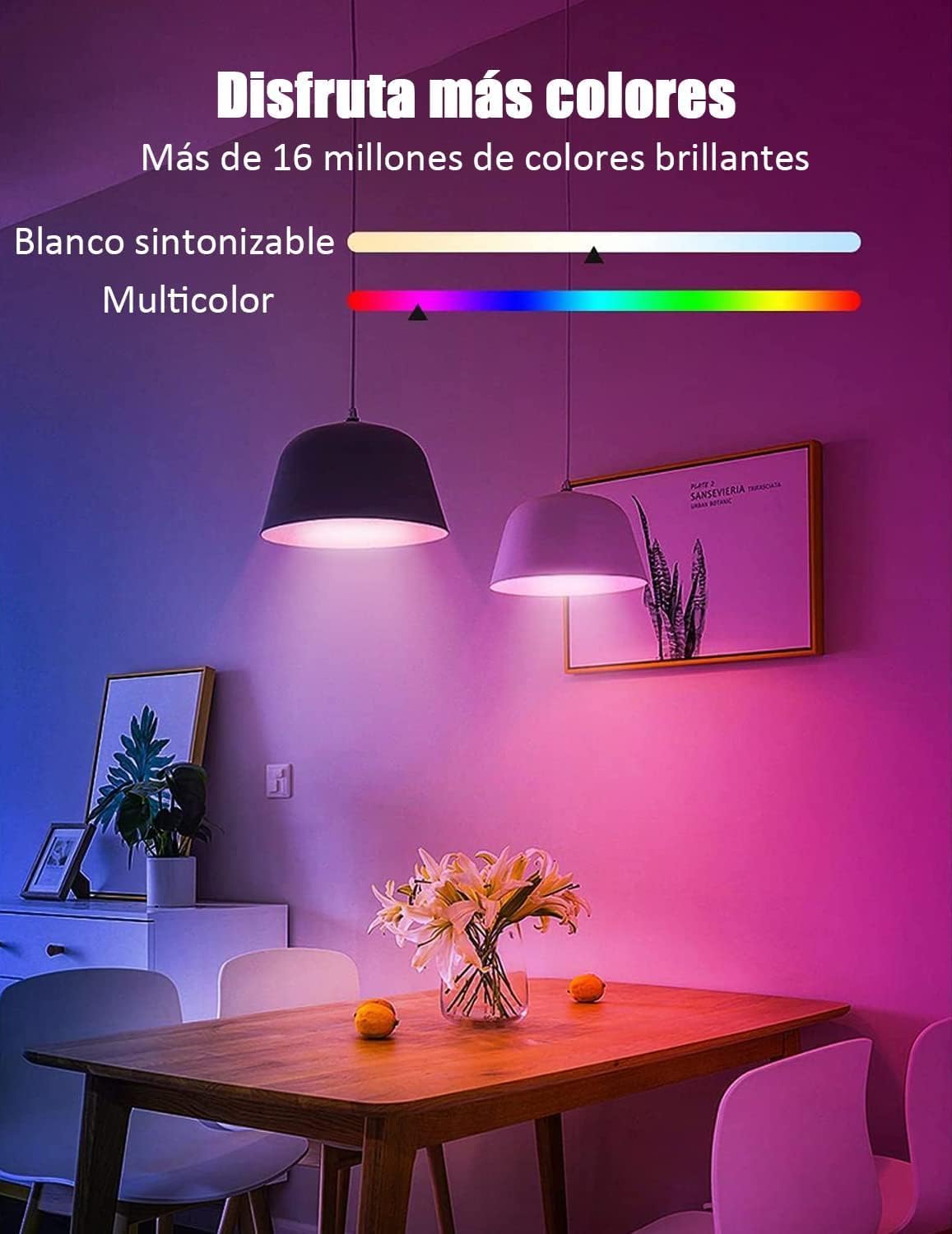
Image: A family scene demonstrating hands-free voice control with Alexa and Google Assistant.
4. मर्मतसम्भार
The Glückluz Smart Bulb is designed for long-lasting performance with minimal maintenance. Follow these guidelines to ensure optimal operation:
- सरसफाई: सफा गर्नुअघि बल्ब निभाइएको र चिसो भएको सुनिश्चित गर्नुहोस्। बल्बलाई नरम, सुख्खा कपडाले पुछ्नुहोस्। तरल पदार्थ सफा गर्ने वा घर्षण गर्ने सामग्रीहरू प्रयोग नगर्नुहोस्।
- वातावरणीय अवस्था: Avoid installing the bulb in enclosed fixtures that restrict airflow, as this can reduce its lifespan. Do not expose the bulb to excessive moisture or extreme temperatures.
- ऊर्जा दक्षता: This 10W LED bulb is designed to be highly energy-efficient, saving up to 85% energy compared to traditional 60W incandescent bulbs.
- पर्यावरण मैत्री डिजाइन: The bulbs are free from mercury and lead, making them an environmentally conscious lighting choice.

Image: An illustration demonstrating the energy savings of the 10W Glückluz smart bulb compared to traditional bulbs.
T. समस्या निवारण
If you encounter issues with your Glückluz Smart Bulb, refer to the following common problems and solutions:
- Bulb Not Connecting/Responding:
- Ensure your WiFi network is 2.4GHz. The bulb does not support 5GHz networks.
- Check the distance between the bulb and your WiFi router. Connectivity can be affected by thick walls or multiple obstacles. Try moving the bulb closer to the router during setup.
- Perform a factory reset: Turn the bulb off and on five times consecutively. The bulb should start blinking rapidly, indicating it's ready for re-pairing.
- Verify your WiFi password is entered correctly in the Cozylife app.
- आवाज नियन्त्रणले काम गरिरहेको छैन:
- Ensure your Cozylife account is correctly linked to your Amazon Alexa or Google Home app.
- Check that your voice assistant device (e.g., Echo Dot, Google Nest) is online and functioning correctly.
- Use the exact bulb name you assigned in the Cozylife app when giving voice commands.
- एप मुद्दाहरू:
- Ensure the Cozylife app is updated to the latest version.
- Restart the Cozylife app or your smartphone.
- यदि समस्याहरू रहिरह्यो भने, सहायताको लागि ग्राहक समर्थनलाई सम्पर्क गर्नुहोस्।
- Bulb Malfunction/Short Lifespan:
- While designed for durability, if a bulb fails prematurely, it may indicate a manufacturing defect. Contact customer support for potential replacement options.
6. निर्दिष्टीकरणहरू
| विशेषता | निर्दिष्टीकरण |
|---|---|
| ब्रान्ड | Glückluz |
| मोडेल नम्बर | Bulb-Cozylife |
| भाग नम्बर | E27 |
| वाटtage | ०.१ वाट |
| चमकदार प्रवाह | 1000 लुमेन |
| रंग तापमान | RGBCW (Tunable White, 6500 Kelvin Cool White) |
| भोल्युमtage | 240 Volts (AC80-250V 50/60Hz) |
| बल्ब प्रकार | एलईडी |
| बल्ब आकार आकार | A19 |
| सामग्री | Acrylonitrile Butadiene Styrene (ABS) |
| जडान | WiFi (2.4GHz) & Bluetooth |
| औसत आयु | ४ घण्टा |
| आयामहरू | ३७ x १७ x १७ सेमी |
| वजन | 210 ग्राम |
| कम्पोनेन्टहरू समावेश | प्रयोगकर्ता पुस्तिका |
| उत्पत्ति | चीन |
९. समर्थन जानकारी
For any questions, technical assistance, or troubleshooting not covered in this manual, please contact Glückluz customer service. Our team is available to assist you with app usage, connectivity issues, and general product inquiries.
- ग्राहक सेवा: Refer to the contact information provided with your product packaging or on the official Glückluz webसाइट।
- फर्काउँछ: Please refer to the retailer's return policy for information regarding product returns.