
1. परिचय
This manual provides essential information for the safe installation, operation, and maintenance of your CREATE WIND CLEAR Ceiling Fan. Please read these instructions thoroughly before installation and retain them for future reference.
The CREATE WIND CLEAR Ceiling Fan is a quiet ceiling fan featuring a 40W DC brushless motor and a winter-summer reversal function. Its compact and versatile design includes retractable blades. It is suitable for small to medium-sized rooms and bedrooms, offering a built-in LED light with three adjustable color temperatures. The fan body is constructed from steel, and the blades are made of ABS. It provides 6 speed settings and a programmable timer up to 8 hours, all controllable via the included remote control and WiFi connectivity.
2. सुरक्षा निर्देशनहरू
- स्थापना, मर्मतसम्भार, वा सफाई गर्नु अघि सधैं मुख्य सर्किट ब्रेकरमा पावर विच्छेद गर्नुहोस्।
- सबै स्थानीय र राष्ट्रिय विद्युतीय संहिताहरू अनुसार एक योग्य इलेक्ट्रीशियनद्वारा स्थापना गरिनुपर्छ।
- Ensure the mounting structure can support the weight of the fan (refer to specifications for weight).
- फ्यान ब्लेडको बाटोमा वस्तुहरू नघसाउनुहोस्।
- सुनिश्चित गर्नुहोस् कि सबै जडानहरू सुरक्षित छन् र राम्ररी इन्सुलेटेड छन्।
- यो उपकरण कम शारीरिक, संवेदी वा मानसिक क्षमताहरू, वा अनुभव र ज्ञानको कमी भएका व्यक्तिहरू (बालबालिकाहरू सहित) द्वारा प्रयोगको लागि होईन, जबसम्म उनीहरूलाई उनीहरूको सुरक्षाको लागि जिम्मेवार व्यक्तिद्वारा उपकरणको प्रयोगको बारेमा पर्यवेक्षण वा निर्देशन दिइएको छैन।
३.२। समावेश अवयवहरू
स्थापना सुरु गर्नु अघि सबै कम्पोनेन्टहरू उपस्थित छन् भनी प्रमाणित गर्नुहोस्:
- CREATE WIND CLEAR Ceiling Fan Unit
- रिमोट कन्ट्रोल
- रिमोट कन्ट्रोलको लागि ब्याट्री
- माउन्टिङ हार्डवेयर (स्क्रू, कोष्ठक, आदि - विशिष्ट वस्तुहरू फरक हुन सक्छन्)
- निर्देशन पुस्तिका
For a visual reference of the product and its components, please see the image below:

4. सेटअप र स्थापना
Professional installation is highly recommended for this ceiling fan. Ensure the power supply is disconnected before starting any installation work.
२.२ भौतिक स्थापना
- माउन्टिंग कोष्ठक: Securely attach the mounting bracket to a ceiling joist or a suitable electrical junction box rated for fan support.
- तार: Connect the fan's electrical wires to the household wiring according to the wiring diagram provided in the full installation guide (not included in this summary). Ensure proper grounding.
- फ्यान सभा: Carefully lift and attach the fan motor assembly to the mounting bracket.
- ब्लेड स्थापना: The fan features retractable blades that deploy automatically when the fan operates. No manual blade installation is typically required after the main unit is mounted.
- लाइट किट स्थापना: Attach the LED light kit to the fan housing as per the detailed instructions.
Refer to the following images for visual guidance on the fan's appearance and dimensions:


4.2 WiFi सेटअप
The fan supports WiFi connectivity for control via a smartphone application. Refer to the specific instructions provided with the fan for pairing the device with your home WiFi network and the CREATE smart home app.
5. सञ्चालन निर्देशनहरू
Your CREATE WIND CLEAR Ceiling Fan can be operated using the included remote control or via the dedicated smartphone application.
5.1 रिमोट कन्ट्रोल प्रकार्यहरू
- पावर अन/अफ: पंखा र बत्ती खोल्न वा बन्द गर्न पावर बटन थिच्नुहोस्।
- फ्यान गति: Adjust between 6 fan speeds using the designated speed buttons.
- प्रकाश नियन्त्रण: Turn the LED light on/off and cycle through three adjustable color temperatures (warm, neutral, cold).
- टाइमर: १, २, ४, वा ८ घण्टा पछि पंखा स्वतः बन्द हुने गरी सेट गर्नुहोस्।
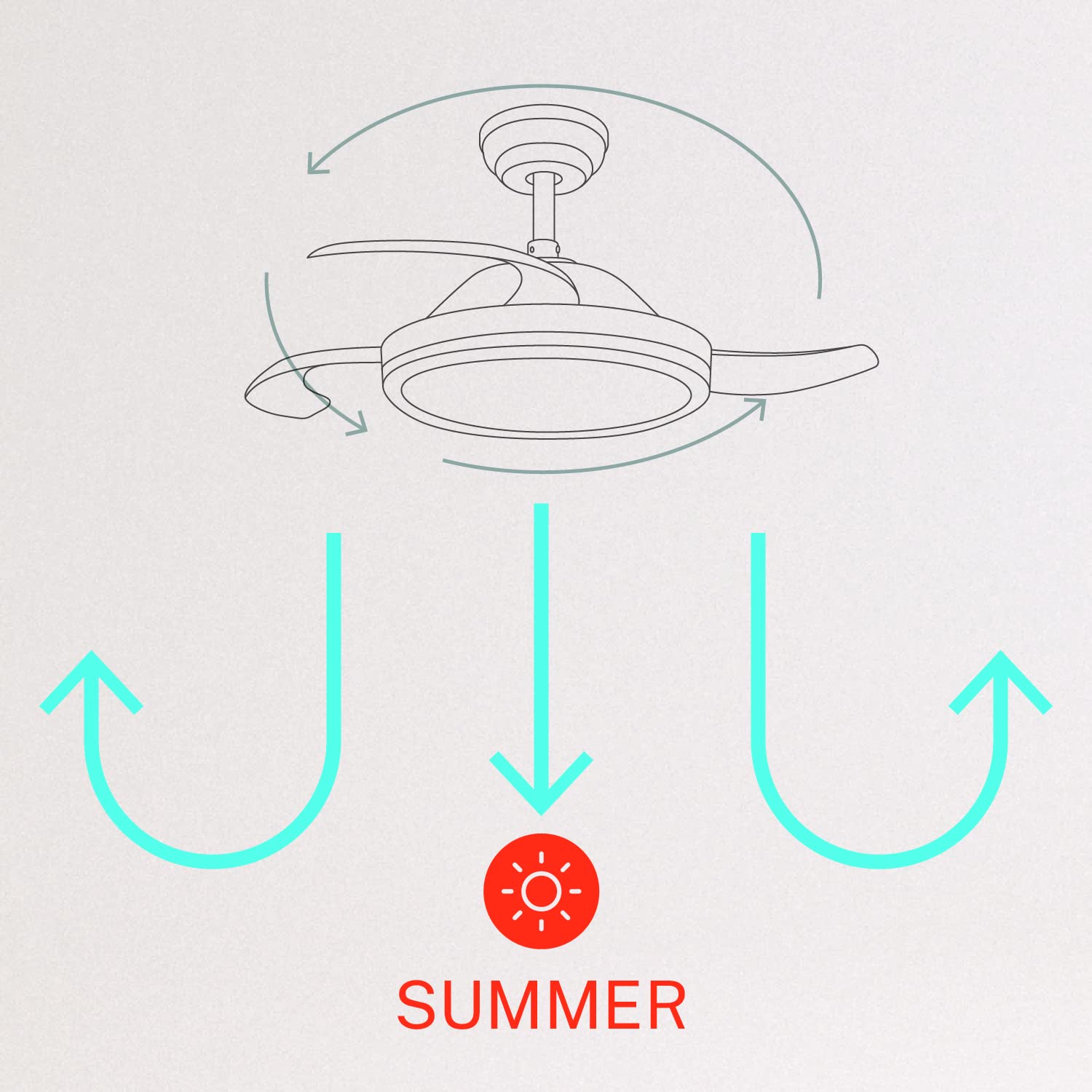
- जाडो/गर्मी मोड: Switch between forward (summer) and reverse (winter) rotation modes.

५.२ जाडो र गर्मी मोडहरू
The fan features a reversible motor to optimize air circulation for different seasons:
- समर मोड (घडीको विपरीत दिशामा घुमाउने): The fan blades rotate counter-clockwise, pushing air downwards to create a cooling breeze.
- जाडो मोड (घडीको दिशामा घुमाउने): The fan blades rotate clockwise, drawing air upwards to circulate warm air trapped near the ceiling, helping to distribute heat more evenly.

6. मर्मतसम्भार
नियमित मर्मतसम्भारले तपाईंको सिलिङ फ्यानको इष्टतम प्रदर्शन र दीर्घायु सुनिश्चित गर्दछ।
- सरसफाई: समय-समयमा पंखाको ब्लेड र मोटर हाउजिङलाई नरम, घamp कपडा। घर्षण गर्ने क्लिनर वा घोलकहरू प्रयोग नगर्नुहोस्। सफा गर्नु अघि पंखा बन्द गरिएको र बिजुली काटिएको सुनिश्चित गर्नुहोस्।
- कडा पेच: Check all mounting screws and blade attachment screws annually to ensure they are properly tightened.
- प्रकाश स्रोत: The LED light source is integrated. If it requires service, contact qualified personnel.
T. समस्या निवारण
यदि तपाईंले आफ्नो फ्यानमा समस्याहरू सामना गर्नुभयो भने, निम्न सामान्य समस्याहरू र समाधानहरू हेर्नुहोस्:
| समस्या | सम्भावित कारण | समाधान |
|---|---|---|
| फ्यान सुरु हुँदैन | No power supply; Loose wiring; Remote control battery depleted | Check circuit breaker; Verify all wiring connections; Replace remote control battery. |
| फ्यान डगमगाउँछ | Loose mounting screws; Unbalanced blades | Ensure mounting bracket and fan assembly screws are tight; Check for any obstructions to blade movement. |
| उज्यालोले काम गर्दैन | Loose wiring; LED module fault | लाइट किटको तार जडानहरू जाँच गर्नुहोस्; यदि LED मोड्युल खराब छ भने ग्राहक समर्थनलाई सम्पर्क गर्नुहोस्। |
| रिमोट कन्ट्रोल काम गर्दैन | Depleted battery; Remote not paired | Replace remote control battery; Refer to pairing instructions in the full manual. |
| WiFi control issues | Poor WiFi signal; Incorrect app setup | Ensure strong WiFi signal; Reconfigure WiFi connection in the app. |
8. निर्दिष्टीकरणहरू
| सुविधा | विवरण |
|---|---|
| ब्रान्ड | सिर्जना गर्नुहोस् |
| मोडेल नम्बर | ००२०२९७९३३_०५ |
| रङ | सेतो |
| इलेक्ट्रिक फ्यान डिजाइन | छत प्रशंसक |
| शक्ति स्रोत | कर्ड इलेक्ट्रिक |
| शैली | With WiFi |
| उत्पादन आयामहरू | ३७D x ३७W x ७८.४H सेन्टिमिटर |
| कोठाको प्रकार | सुत्ने कोठा |
| विशेष सुविधा | टाइमर |
| सिफारिस गरिएका प्रयोगहरू | भेन्टिलेटिंग |
| वाटtage | ०.१ वाट |
| समावेश अवयवहरू | रिमोट, ब्याट्री |
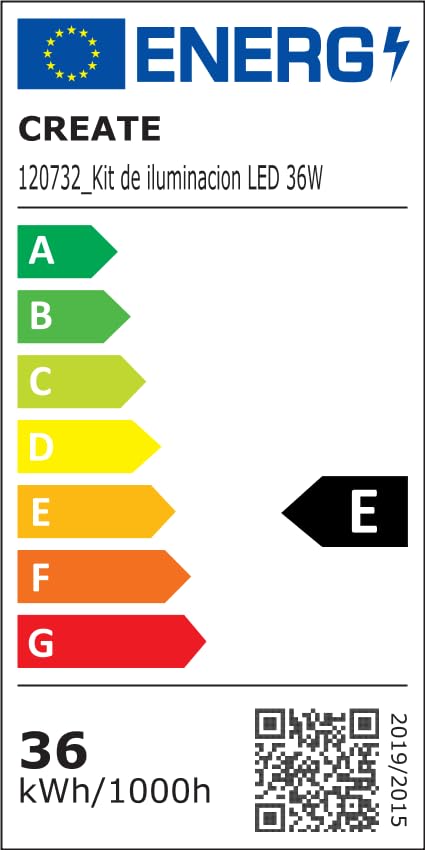
For detailed product data and energy efficiency information, please refer to the following documents:

9. वारेन्टी र समर्थन
For warranty information, technical support, or service inquiries, please contact CREATE customer service or refer to the official CREATE webसाइट। खरिदको प्रमाणको रूपमा आफ्नो खरिद रसिद राख्नुहोस्।