1. परिचय
Thank you for choosing the Giveet G9 Open Ear Bluetooth 5.3 Headset. This manual provides detailed instructions for setting up, operating, and maintaining your headset to ensure optimal performance and longevity. The G9 headset features an open-ear design for comfort and situational awareness, a detachable DSP noise-cancelling microphone for clear communication, and Bluetooth 5.3 for stable, multi-device connectivity.

Image 1.1: Giveet G9 Open Ear Bluetooth Headset with detachable microphone. The image displays the headset with its main body, ear hooks, and the separate boom microphone.
2. प्याकेज सामग्री
कृपया निम्न वस्तुहरूको लागि प्याकेज जाँच गर्नुहोस्:
- 1 x Giveet G9 Open Ear Headset
- 1 x Removable Mic Boom
- 4 x Removable Soft Rubber Covers (for mic port)
- १ x USB-C चार्जिंग केबल
- 1 x प्रयोगकर्ता पुस्तिका

Image 2.1: Contents of the Giveet G9 headset package. This image shows the headset, detachable microphone, USB-C cable, spare rubber covers, and the user manual laid out next to the product box.
3. उत्पादन समाप्तview
Familiarize yourself with the various components and controls of your Giveet G9 headset.

Image 3.1: Diagram of Giveet G9 headset controls and components. This image highlights the volume up/next song button, volume down/previous song button, removable mic boom, LED indicator, Type-C charging port, built-in mic, and the multi-function button for power, play/pause, answer/hang up, voice assistant, and music/game mode switch.
4. सेटअप
६.२ हेडसेट चार्ज गर्दै
Before first use, fully charge the headset. Connect the provided USB-C charging cable to the charging port on the headset and a power source (e.g., computer USB port, USB wall adapter). The LED indicator will show charging status.
- चार्ज गर्ने समय: पूर्ण चार्जको लागि लगभग २.५ घण्टा।
- Battery life: Up to 12 hours of continuous music playback or talk time.
- Standby time: Up to 200 hours.

Image 4.1: Giveet G9 headset battery life and charging details. This image illustrates the charging time (1.5 hours), working time (12 hours), and standby time (200 hours), with a close-up of the USB-C charging port.
६.४ हेडसेट लगाउने
The G9 headset features an open-ear design with soft silicone ear hooks and a flexible aluminum alloy wire for a secure and comfortable fit. Place the ear hooks over your ears, ensuring the speakers rest comfortably near your ear canals without entering them. The lightweight design (30g) allows for extended wear.

Image 4.2: Man wearing Giveet G9 headset while driving. This image demonstrates the open-ear design and comfortable fit, highlighting its suitability for various activities including driving.
२.३ छुट्याउन मिल्ने माइक्रोफोन जोड्ने
The boom microphone attaches magnetically to the headset. Align the microphone's connector with the port on the headset until it snaps into place. The microphone can be rotated 360 degrees to position it optimally for voice capture.
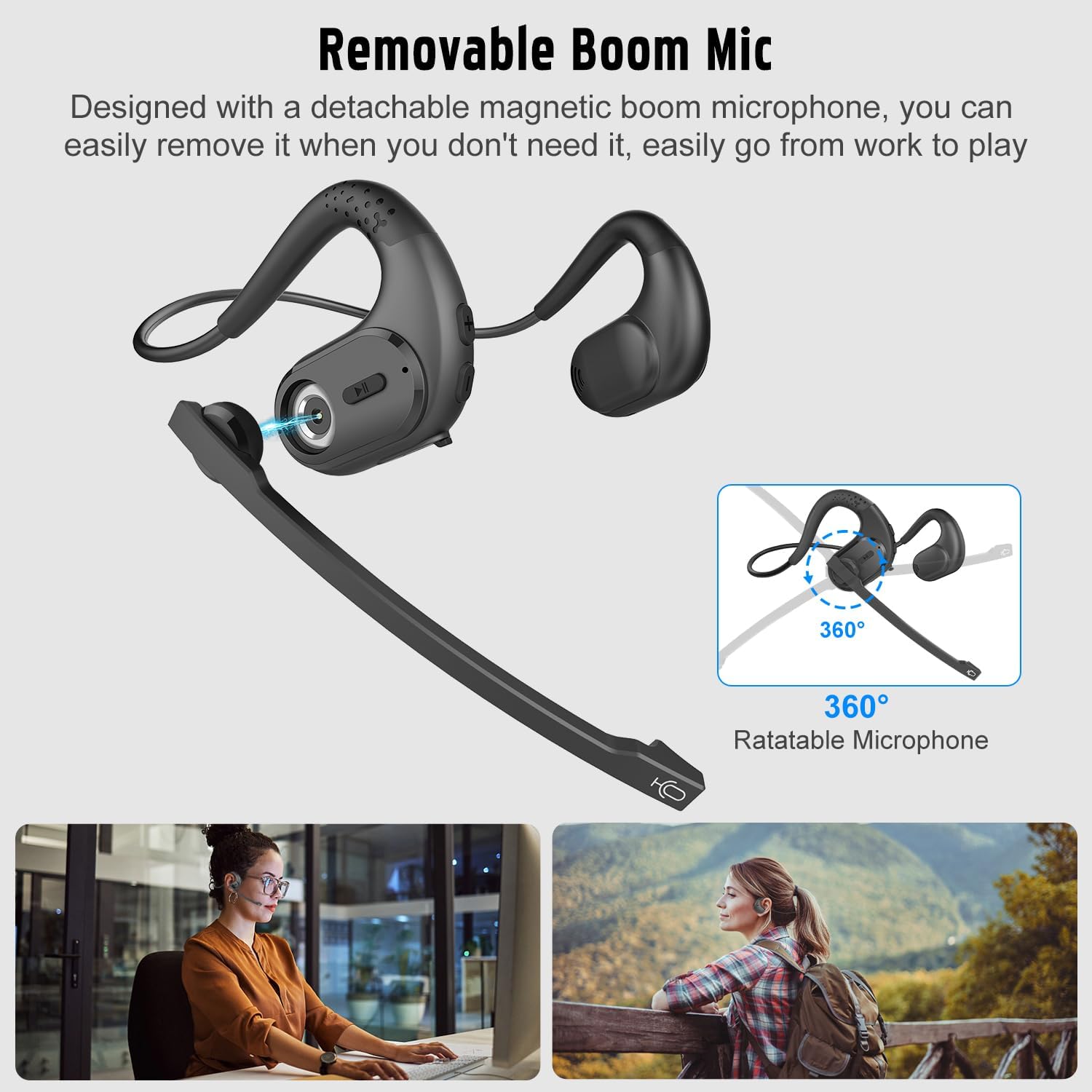
Image 4.3: Diagram showing the detachable and rotatable boom microphone. This image illustrates how the magnetic boom microphone attaches and can be rotated 360 degrees for optimal positioning.
२ ब्लुटुथ पेयरि।
४.२ प्रारम्भिक जोडी
- पावर अन: Press and hold the Multi-Function Button (MFB) for 3 seconds until the LED indicator flashes blue and red, indicating pairing mode.
- ब्लुटुथ सक्रिय गर्नुहोस्: On your device (phone, PC, laptop), enable Bluetooth.
- यन्त्र चयन गर्नुहोस्: In your device's Bluetooth settings, search for and select "Giveet G9".
- जडान गर्नुहोस्: एक पटक जडान भएपछि, एलईडी सूचक बिस्तारै नीलो फ्ल्यास हुनेछ।
5.2 बहुबिन्दु जडान
The G9 headset supports multipoint technology, allowing connection to two devices simultaneously.
- Pair the headset with the first device (e.g., laptop) as described in Section 5.1.
- पहिलो उपकरणमा ब्लुटुथ असक्षम पार्नुहोस्। हेडसेट पुन: जोडा बनाउने मोडमा प्रवेश गर्नेछ।
- Pair the headset with the second device (e.g., phone) as described in Section 5.1.
- पहिलो यन्त्रमा ब्लुटुथ पुन: सक्षम पार्नुहोस्। हेडसेट स्वचालित रूपमा दुवै यन्त्रहरूमा जडान हुनुपर्छ।
You can now seamlessly switch between audio sources from your two connected devices without re-pairing.

Image 5.1: Giveet G9 headset connected to a laptop and a smartphone via Bluetooth. This image visually represents the multipoint connection feature, showing the headset wirelessly linked to two devices.
6. सञ्चालन निर्देशनहरू
6.1 आधारभूत नियन्त्रणहरू
| कार्य | कार्य |
|---|---|
| पावर अन/अफ | 3 सेकेन्डको लागि MFB थिच्नुहोस् र होल्ड गर्नुहोस् |
| संगीत प्ले/पज गर्नुहोस् | छोटो प्रेस MFB |
| भोल्युम माथि | Short press '+' button |
| भोल्युम डाउन | Short press '-' button |
| अर्को गीत | Long press '+' button |
| अघिल्लो गीत | Long press '-' button |
| जवाफ/अन्त कल | छोटो प्रेस MFB |
| कल अस्वीकार गर्नुहोस् | लामो समय MFB थिच्नुहोस् |
| आवाज सहायक सक्रिय गर्नुहोस् | MFB डबल प्रेस गर्नुहोस् |
| म्यूट / अनम्यूट माइक्रोफोन | Press and hold '+' and '-' buttons simultaneously |
| संगीत/खेल मोड स्विच | ट्रिपल प्रेस MFB |
४.३ माइक्रोफोनको प्रयोग
The detachable boom microphone features DSP noise cancellation, effectively filtering out background noise for clear voice transmission during calls. When the boom mic is attached, it will be prioritized over the built-in microphone. You can remove the boom mic when not needed, and the headset will automatically switch to its built-in microphone.

Image 6.1: Woman in office using Giveet G9 headset with DSP noise cancelling microphone. This image illustrates the headset's use in a professional setting, emphasizing the clarity provided by the DSP noise-cancelling microphone.
7. मर्मतसम्भार
- सरसफाई: Wipe the headset with a soft, dry cloth. Do not use abrasive cleaners or immerse in water.
- भण्डारण: हेडसेटलाई प्रत्यक्ष घाम र अत्यधिक तापक्रमबाट टाढा चिसो, सुख्खा ठाउँमा राख्नुहोस्।
- ब्याट्री केयर: ब्याट्रीको आयु जोगाउन, बारम्बार प्रयोग नगरे पनि, हेडसेट नियमित रूपमा चार्ज गर्नुहोस्। लामो समयसम्म ब्याट्री पूर्ण रूपमा डिस्चार्ज नगर्नुहोस्।
- माइक्रोफोन पोर्ट: Use the provided rubber covers for the microphone port when the boom mic is detached to protect it from dust and debris.
T. समस्या निवारण
| समस्या | सम्भावित समाधान |
|---|---|
| हेडसेट सक्रिय हुँदैन | Ensure the headset is fully charged. Press and hold the MFB for 3 seconds. |
| उपकरणसँग जोडा बनाउन सकिँदैन | Ensure headset is in pairing mode (LED flashes blue/red). Disable and re-enable Bluetooth on your device. Move headset closer to device. |
| कुनै आवाज वा कम भोल्युम छैन | Check volume levels on both headset and connected device. Ensure headset is selected as the audio output device. |
| माइक्रोफोन काम गर्दैन | Ensure the boom mic is securely attached. Check microphone settings on your device. Ensure mic is not muted (refer to Section 6.1). |
| रुकावट जडान | Move closer to the connected device. Avoid obstacles between headset and device. Disconnect and re-pair the headset. |
9. निर्दिष्टीकरणहरू
| सुविधा | विवरण |
|---|---|
| मोडेल नाम | G9 Open Ear Headphones with Microphone |
| ब्रान्ड | गिवेट |
| जडान | ब्लुटुथ 5.3 |
| माइक्रोफोन प्रविधि | Stereo, DSP Noise Cancelling (detachable boom mic) |
| ब्याट्री प्रकार | लिथियम-आयन (1 समावेश) |
| चार्ज पोर्ट | USB-C |
| चार्ज गर्ने समय | लगभग ६ घण्टा |
| Playtime/Talk Time | ४ घण्टा सम्म |
| स्ट्यान्डबाइ समय | ४ घण्टा सम्म |
| वजन | लगभग 30 ग्राम |
| फारम कारक | कान खोल्नुहोस् |
| मिल्दो यन्त्रहरू | Cellphone, PC, Computer, Laptop, Tablet, etc. |
| विशेष सुविधाहरू | Multipoint Connection, 360° Rotatable Microphone, Lightweight Design |
10. सुरक्षा जानकारी
- हेडसेटलाई छुट्याउन वा परिमार्जन नगर्नुहोस्।
- Keep the headset away from water, moisture, and extreme temperatures.
- श्रवण क्षतिबाट बच्न उच्च आवाजमा लामो समयसम्म सुन्नबाट बच्नुहोस्।
- Use caution when operating vehicles or machinery while wearing the headset, as the open-ear design allows ambient sound, but full attention to surroundings is always required.
- Dispose of batteries according to local regulations. Do not expose to fire or high heat.
11. वारेन्टी र समर्थन
Giveet products are designed for reliability and performance. For warranty information, technical support, or customer service inquiries, please refer to the contact details provided on the product packaging or the official Giveet webसाइट। वारेन्टी दावीहरूको लागि कृपया आफ्नो खरिदको प्रमाण राख्नुहोस्।