
1. परिचय
Thank you for choosing the OFFTV Fingerprint Door Lock. This smart lock provides advanced security and convenient access through multiple methods, including fingerprint recognition, passcodes, and smartphone application control. This manual will guide you through the installation, operation, and maintenance of your new door lock to ensure optimal performance and security.
2. उत्पादन समाप्तview प्याकेज सामग्री
The OFFTV Fingerprint Door Lock is designed for modern homes and offices, offering a keyless entry solution with robust features. It includes an auto-lock function for enhanced security and a sleek, modern design.

This image displays the complete OFFTV Fingerprint Door Lock assembly, including the exterior handle with keypad and fingerprint sensor, the interior handle, and two mechanical backup keys. A smartphone screen showing the control app is also visible.
प्याकेज सामग्री:
- OFFTV Fingerprint Door Lock (Front and Rear Panels)
- मोर्टाइज लक बडी
- स्ट्राइक प्लेट र स्ट्राइक बक्स
- माउन्टिंग स्क्रू र सहायक उपकरणहरू
- मेकानिकल कुञ्जीहरू (२)
- स्थापना टेम्पलेट
- प्रयोगकर्ता पुस्तिका
3. स्थापना र सेटअप
Proper installation is crucial for the lock's functionality and security. Please follow the steps carefully. For detailed visual instructions, refer to the included installation template and diagrams.
3.1 ढोका तयारी
- तपाईंको ढोकाले आवश्यक मोटाई र ब्याकसेट विशिष्टताहरू पूरा गर्छ भनी सुनिश्चित गर्नुहोस्।
- Use the provided template to mark and drill holes on the door if necessary.
3.2 Installing the Lock
- ढोकाको किनारमा मोर्टाइज लक बडी जडान गर्नुहोस्।
- Attach the exterior panel, ensuring the spindle is correctly aligned.
- Connect the cable from the exterior panel to the interior panel.
- Secure the interior panel to the door using the provided screws.
- Install batteries (4x AAA, not included) into the battery compartment on the interior panel.
- Test the lock's mechanical function with a mechanical key.

This diagram illustrates the flexibility of the OFFTV Fingerprint Door Lock, showing how it can be installed on both left-opening and right-opening doors. It also highlights the automatic locking feature.
३.३ प्रारम्भिक सेटअप र एप पेयरिङ
- Download the designated smart lock application (e.g., Tuya Smart or Smart Life) from your smartphone's app store.
- एउटा खाता बनाउनुहोस् र लग इन गर्नुहोस्।
- आफ्नो स्मार्टफोनमा ब्लुटुथ सक्षम गर्नुहोस्।
- In the app, select 'Add Device' and follow the on-screen instructions to pair your lock. You may need to wake up the lock by touching the keypad.
- Once paired, set up an administrator fingerprint and passcode through the app. This is essential for managing other users.
4. सञ्चालन निर्देशनहरू
Your OFFTV Fingerprint Door Lock offers multiple convenient ways to unlock and secure your door.
4.1 फिंगरप्रिन्टको साथ अनलक गर्दै
- Place your registered finger flat on the fingerprint sensor.
- The lock will emit a confirmation sound or light indicator if the fingerprint is recognized.
- ढोका खोल्नको लागि ह्यान्डल घुमाउनुहोस्।
यो छविले विस्तृत जानकारी प्रदान गर्दछ view of the fingerprint sensor on the OFFTV Smart Door Lock, emphasizing its 160x160 DPI sensor which is 35% larger than older models, providing higher identification efficiency for quick unlocking.
4.2 Unlocking with Passcode
- यसलाई सक्रिय गर्न किप्याड छुनुहोस्।
- Enter your registered passcode followed by the '#' key.
- The lock will confirm successful entry.
- ढोका खोल्नको लागि ह्यान्डल घुमाउनुहोस्।
एन्टी-पिपिङ पासकोड: सुरक्षा बढाउनको लागि, तपाईंले आफ्नो वास्तविक पासकोडको अगाडि वा पछि अनियमित अंकहरू प्रविष्ट गर्न सक्नुहुन्छ। उदाहरणका लागिample, if your passcode is 123456, you can enter 987123456१७#।

This image demonstrates the virtual password anti-snooping feature, where users can enter random digits before or after the actual password to prevent others from guessing the code.
4.3 Unlocking with Smartphone App
- Open the smart lock application on your smartphone.
- Ensure Bluetooth is enabled and you are within range of the lock.
- एप भित्र रहेको अनलक आइकनमा ट्याप गर्नुहोस्।
- The lock will disengage, allowing you to turn the handle.
The app also allows you to manage users, generate one-time passwords, and view unlocking history.

This image displays the smartphone application interface for the OFFTV Smart Door Lock, illustrating features like adding fingerprints, creating one-time passwords, and viewing unlocking history in real-time via Bluetooth connectivity.
4.4 Unlocking with Mechanical Key (Emergency)
In case of battery depletion or electronic malfunction, use the provided mechanical keys to unlock the door. Insert the key into the keyhole and turn to unlock.
Or ढोका लक गर्दै
The OFFTV Fingerprint Door Lock features an automatic locking mechanism. After the door closes, the lock will automatically engage after a preset time (typically 5 seconds). You can adjust this setting via the smartphone app.
5. मर्मतसम्भार
Regular maintenance ensures the longevity and reliable operation of your smart door lock.
5.1 ब्याट्री प्रतिस्थापन
The lock will provide a low battery warning through the app and/or an indicator light/sound. Replace all four AAA batteries promptly to avoid being locked out. Use high-quality alkaline batteries for best performance.
६.२ आपतकालीन शक्ति
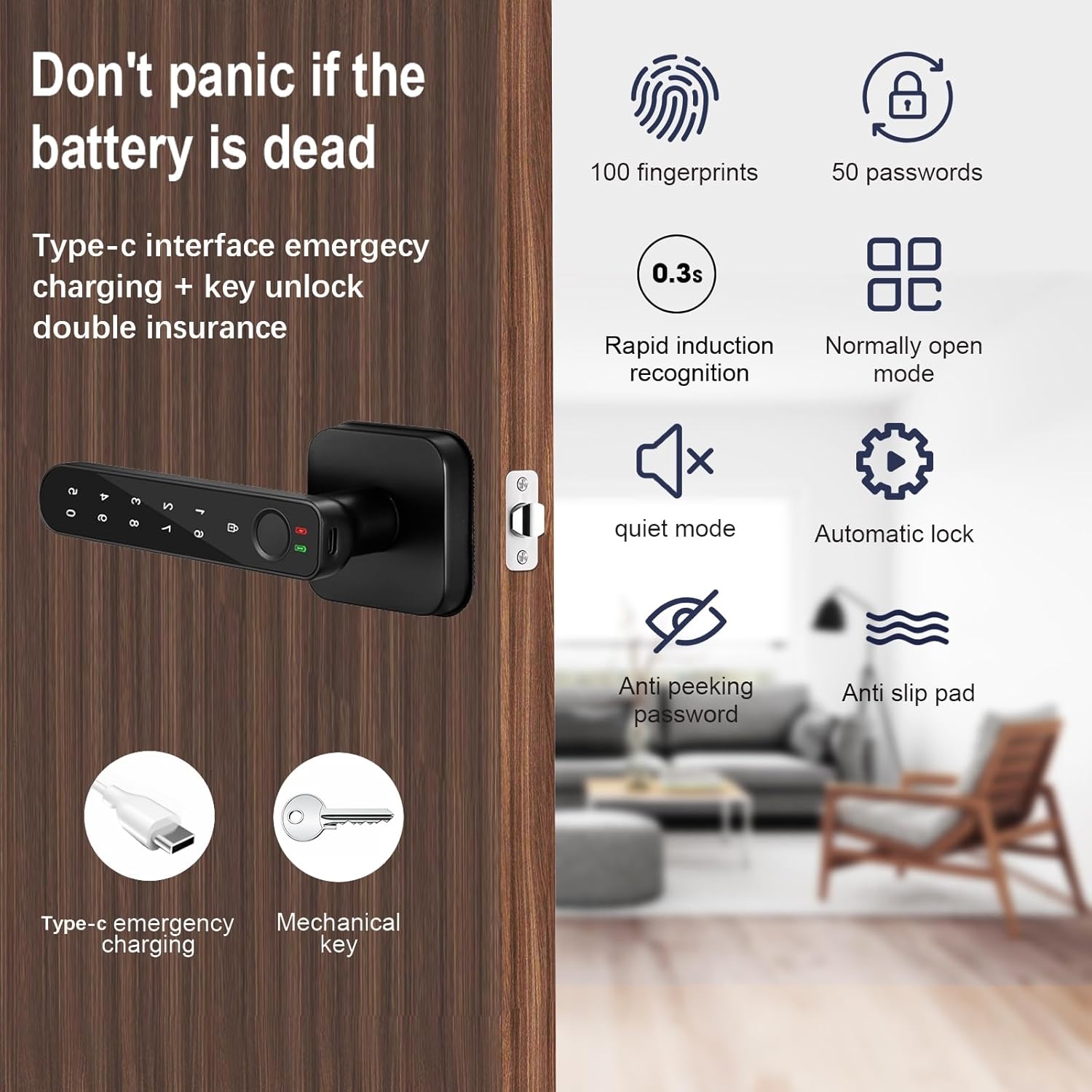
If the batteries die completely before replacement, you can temporarily power the lock using a Type-C USB cable connected to a power bank. Plug the Type-C cable into the emergency power port on the exterior panel to provide enough power for a single unlock.

This image highlights the emergency features of the OFFTV Fingerprint Door Lock, showing the Type-C interface for emergency charging and the mechanical key for backup access, ensuring entry even if the battery is depleted.
८.१ सरसफाई
Wipe the lock's surface, keypad, and fingerprint sensor with a soft, dry cloth. Avoid using abrasive cleaners or solvents that could damage the finish or electronic components.
T. समस्या निवारण
If you encounter issues with your OFFTV Fingerprint Door Lock, refer to the following common problems and solutions:
| समस्या | सम्भावित कारण | समाधान |
|---|---|---|
| फिंगरप्रिन्ट पहिचान भएन | Finger is dirty/wet, sensor is dirty, fingerprint not registered correctly. | Clean finger and sensor. Re-register fingerprint if necessary. Try a different registered finger. |
| कीप्याड अनुत्तरदायी | ब्याट्री कम छ, किप्याडमा खराबी छ। | Replace batteries. Use emergency Type-C power. Try mechanical key. |
| एप लकमा जडान हुन सकेन | Bluetooth off, out of range, app not updated, lock not paired. | Ensure Bluetooth is on and you are close to the lock. Restart app and phone. Re-pair the lock if needed. |
| लक स्वतः लक हुँदैन। | Auto-lock feature disabled or setting changed. | Check auto-lock settings in the smartphone app. Ensure the door closes completely. |
| तालाले असामान्य आवाज निकाल्छ | Mechanical obstruction, internal issue. | Check for any obstructions around the latch bolt. If persists, contact support. |
7. निर्दिष्टीकरणहरू
| सुविधा | विवरण |
|---|---|
| ब्रान्ड | OFFTV |
| विशेष सुविधाहरू | Auto-Lock, Fingerprint, Keyless, Anti-Peeking Password, Quiet Mode |
| लक प्रकार | बायोमेट्रिक, किप्याड |
| आयाम (L x W x H) | १० x ३ x ३ इन्च |
| वस्तुको वजन | 2.42 पाउन्ड |
| सामग्री | जस्ता |
| समाप्त प्रकार | पाउडर लेपित |
| जडान प्रोटोकल | ब्लुटुथ |
| नियन्त्रण विधि | एप, हात नियन्त्रण, मेकानिकल नब |
| शक्ति स्रोत | 4x AAA ब्याट्रीहरू (समावेश छैन) |
| आपतकालीन शक्ति | प्रकार- C USB |
| UPC | 757876938806 |
War. वारंटी र समर्थन
The OFFTV Fingerprint Door Lock comes with a standard manufacturer's warranty against defects in materials and workmanship. Please refer to the warranty card included in your package for specific terms and conditions.
For technical support, troubleshooting assistance, or warranty claims, please contact OFFTV customer service through the contact information provided on the product packaging or the official OFFTV website. When contacting support, please have your product model (B0CJMS2JLB) and purchase date ready.