
1. परिचय
Thank you for choosing the Ingco CSDLI08025 8V Cordless Screwdriver. This manual provides essential information for the safe and efficient operation, maintenance, and troubleshooting of your new tool. Please read these instructions carefully before use and keep them for future reference.
The Ingco CSDLI08025 is a versatile 8V cordless screwdriver designed for various tasks, including furniture assembly, drawer installation, and general DIY projects. It features a powerful 220 RPM motor, 6 Nm of torque, an integrated LED work light, and comes with 17 essential accessories for immediate use.
2. सुरक्षा निर्देशनहरू
आगो, बिजुली झटका, र व्यक्तिगत चोटपटकको जोखिम कम गर्न सधैं आधारभूत सुरक्षा सावधानीहरू पालना गर्नुहोस्।
- कार्य क्षेत्र सुरक्षा: आफ्नो कार्य क्षेत्र सफा र राम्रोसँग उज्यालो राख्नुहोस्। अव्यवस्थित वा अँध्यारो क्षेत्रहरूले दुर्घटनाहरूलाई निम्त्याउँछन्। ज्वलनशील तरल पदार्थ, ग्याँस वा धुलो जस्ता विस्फोटक वायुमण्डलमा विद्युतीय उपकरणहरू नचलाउनुहोस्।
- विद्युतीय सुरक्षा: माटोले ढाकिएका वा जमिन भएका सतहहरू (जस्तै, पाइप, रेडिएटर, रेन्ज, रेफ्रिजरेटर) सँग शरीरको सम्पर्कबाट बच्नुहोस्। पावर उपकरणहरूलाई वर्षा वा भिजेको अवस्थामा नदेखाउनुहोस्।
- व्यक्तिगत सुरक्षा: सधैं आँखा सुरक्षा उपकरण लगाउनुहोस्। लामो समयसम्म काम गर्दा श्रवण सुरक्षा उपकरण प्रयोग गर्नुहोस्। राम्रोसँग लुगा लगाउनुहोस्; खुकुलो लुगा वा गहनाबाट टाढा रहनुहोस्। कपाल, लुगा र पन्जाहरू चल्ने भागहरूबाट टाढा राख्नुहोस्।
- उपकरण प्रयोग र हेरचाह: पावर उपकरणलाई जबरजस्ती नगर्नुहोस्। आफ्नो अनुप्रयोगको लागि सही पावर उपकरण प्रयोग गर्नुहोस्। कुनै पनि समायोजन गर्नु अघि, सामानहरू परिवर्तन गर्नु अघि, वा पावर उपकरणहरू भण्डारण गर्नु अघि पावर स्रोत र/वा ब्याट्री प्याकबाट प्लग विच्छेद गर्नुहोस्।
- ब्याट्री सुरक्षा: Recharge only with the charger specified by the manufacturer. Do not use battery packs other than those specifically designated for the tool. Do not open, crush, or expose the battery to fire or high temperatures.
3. प्याकेज सामग्री
अनप्याक गर्दा सबै वस्तुहरू उपस्थित छन् भनी प्रमाणित गर्नुहोस्:
- 1 x Ingco CSDLI08025 8V Cordless Screwdriver
- 1 x USB चार्जिङ केबल
- १ एक्स भण्डारण केस
- 10 x 25mm Cr-V Screwdriver Bits (SL4, SL6, PH1, PH2, PH3, PZ1, PZ2, PZ3, T20, T25)
- 1 x 60mm Bit Connector/Extension
- 4 x HSS Drill Bits with Hex Shank (2.0mm, 2.5mm, 3.0mm, 4.0mm)
- 1 x CRV PH2 Screwdriver Bit
- 1 x CRV 6 Screwdriver Bit
4. उत्पादन समाप्तview
Familiarize yourself with the main components of your Ingco CSDLI08025 cordless screwdriver:

चित्र १: Diagram showing the Ingco CSDLI08025 cordless screwdriver with labeled components: self-locking chuck, LED light, on/off switch, rotation button (forward/reverse), and USB port.
- सेल्फ-लकिङ चक: छिटो र सुरक्षित बिट परिवर्तनहरूको लागि।
- एलईडी प्रकाश: अँध्यारो ठाउँहरूमा दृश्यता सुधार गर्न कार्य क्षेत्रलाई उज्यालो बनाउँछ।
- अन/अफ स्विच: स्क्रूड्राइभरलाई सक्रिय र निष्क्रिय पार्छ।
- Rotation Button (Forward/Reverse): Controls the direction of rotation for driving or removing screws.
- USB पोर्ट: आन्तरिक ब्याट्री चार्ज गर्नको लागि।
- समायोज्य ह्यान्डल: Allows the tool to be used in a pistol grip or straight configuration for versatility.
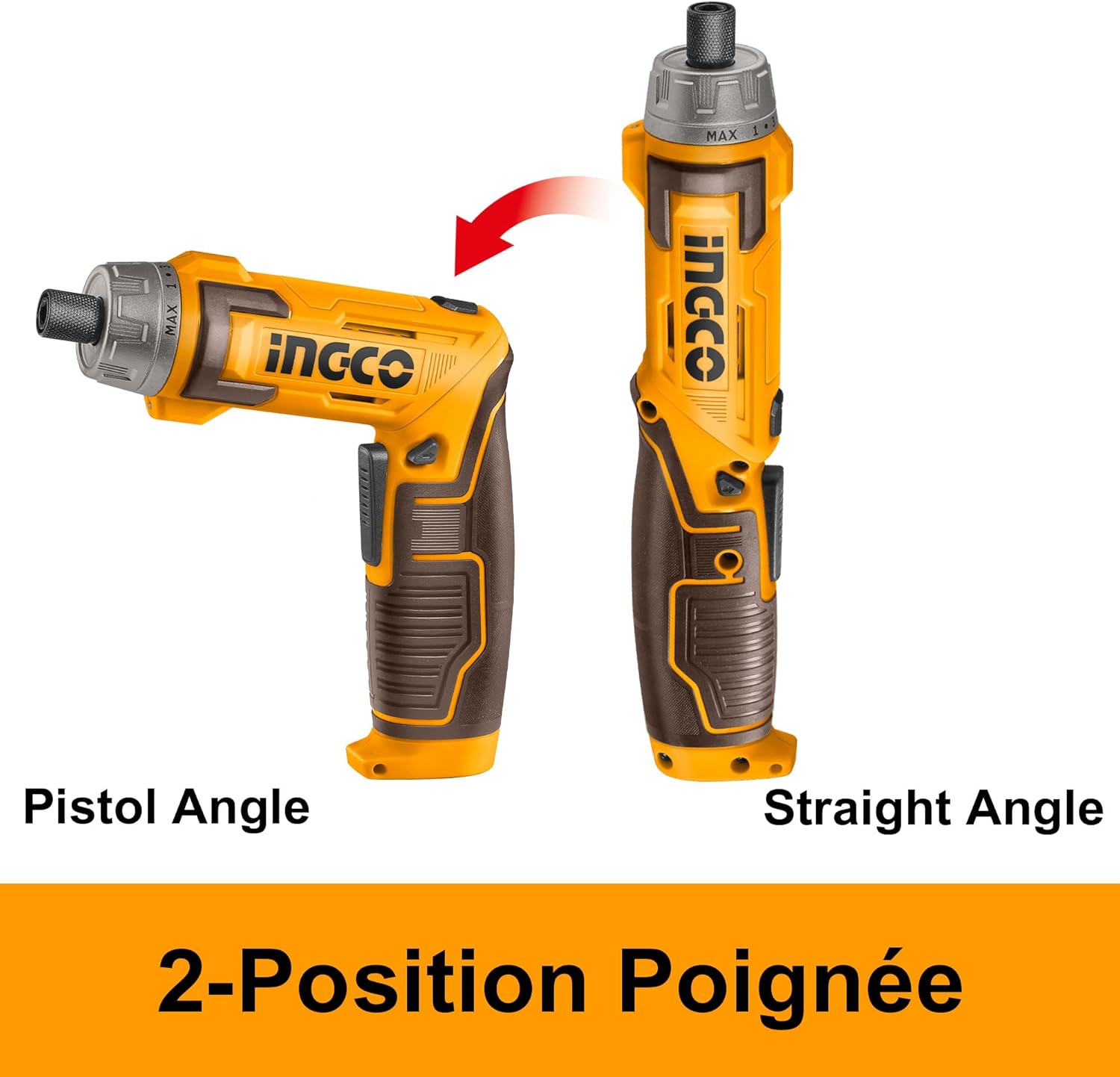
चित्र १: Illustration demonstrating the two-position handle of the Ingco CSDLI08025 screwdriver, showing both pistol grip and straight configurations.
5. सेटअप
5.1. ब्याट्री चार्ज गर्दै
The screwdriver is powered by an integrated Lithium-ion battery. Before first use, fully charge the battery.
- स्क्रूड्राइभरमा USB चार्जिङ पोर्ट पत्ता लगाउनुहोस्।
- Connect the provided USB charging cable to the screwdriver's USB port.
- USB केबलको अर्को छेउलाई उपयुक्त USB पावर एडाप्टर (समावेश गरिएको छैन) वा संचालित USB पोर्टमा प्लग गर्नुहोस्।
- Allow the battery to charge until the charging indicator (if present) shows a full charge. Charging time may vary.
४.३. बिट्स स्थापना/परिवर्तन गर्दै
The self-locking chuck allows for quick and easy bit changes.
- Ensure the screwdriver is turned off and the rotation button is in the neutral (locked) position.
- Insert the desired hex shank bit directly into the chuck until it clicks into place.
- बिट हटाउनको लागि, चक कलरलाई अगाडि तान्नुहोस् र बिटलाई बाहिर तान्नुहोस्।
6. सञ्चालन निर्देशनहरू
Power. पावर अन / अफ
Press the On/Off switch to activate the screwdriver. Release the switch to turn it off.
५.१. घुमाउने दिशा चयन गर्ने
Use the rotation button (forward/reverse switch) to select the desired direction:
- Push the button to the left for forward rotation (driving screws).
- Push the button to the right for reverse rotation (removing screws).
- Ensure the button is in the center position when not in use to prevent accidental activation.
6.3. Adjusting Handle Position
The handle can be adjusted for different working angles:
- पेचकसलाई दृढतापूर्वक समात्नुहोस्।
- Gently twist the handle to unlock its position.
- Adjust the handle to either the pistol grip or straight configuration.
- Twist the handle back to lock it in the desired position.
३.३. एलईडी बत्ती प्रयोग गर्दै
The integrated LED light automatically activates when the screwdriver is in operation, illuminating your work area. It can also function as a flashlight to light up dark corners or confined spaces.

चित्र १: Close-up of the Ingco CSDLI08025 cordless screwdriver in use, highlighting the activated LED light illuminating the work area in a dimly lit space.
6.5. Screwdriving and Drilling
Select the appropriate bit for the task. For screwdriving, ensure the bit fits snugly into the screw head to prevent stripping. For drilling, use the provided HSS drill bits and apply steady, even pressure.

चित्र १: A person wearing safety gear using the Ingco CSDLI08025 cordless screwdriver to drive a screw into a wooden beam, demonstrating its application.

चित्र १: A hand holding the Ingco CSDLI08025 cordless screwdriver in its straight configuration, driving a screw into an overhead wooden surface.
7. मर्मतसम्भार
नियमित मर्मतसम्भारले इष्टतम कार्यसम्पादन सुनिश्चित गर्दछ र तपाईंको उपकरणको आयु बढाउँछ।
- सरसफाई: अत्यधिक तातो हुनबाट जोगाउन उपकरणको भेन्टिलेसन खोल्ने ठाउँहरू सफा राख्नुहोस्। नरम, घamp कपडा। कठोर रसायन वा घर्षण क्लीनर प्रयोग नगर्नुहोस्।
- ब्याट्री केयर: Store the battery in a cool, dry place away from direct sunlight. Do not store the battery in a discharged state for extended periods.
- बिट मर्मत: Clean bits after use. Replace worn or damaged bits to ensure efficient operation and prevent damage to fasteners.
- भण्डारण: Store the screwdriver and its accessories in the provided storage case in a dry, secure location out of reach of children.
T. समस्या निवारण
यदि तपाईंले समस्याहरू सामना गर्नुभयो भने, निम्न सामान्य समस्या र समाधानहरू हेर्नुहोस्:
| समस्या | सम्भावित कारण | समाधान |
|---|---|---|
| स्क्रूड्राइभर खुल्दैन। | ब्याट्री डिस्चार्ज छ। | ब्याट्री पूर्ण रूपमा चार्ज गर्नुहोस्। |
| Screwdriver lacks power. | कम ब्याट्री चार्ज। | ब्याट्री रिचार्ज गर्नुहोस्। |
| बिट स्लिप वा स्ट्रिप्स स्क्रू हेड। | गलत बिट साइज वा जीर्ण बिट। | Use the correct bit size for the screw. Replace worn bits. |
| Handle does not lock in position. | Handle not twisted to lock. | Ensure the handle is twisted firmly to lock it after adjustment. |
यी समाधानहरू प्रयास गरेपछि पनि समस्या रहिरह्यो भने, कृपया ग्राहक समर्थनलाई सम्पर्क गर्नुहोस्।
9. निर्दिष्टीकरणहरू
Technical specifications for the Ingco CSDLI08025 8V Cordless Screwdriver:

चित्र १: A detailed image of the Ingco CSDLI08025 cordless screwdriver with an overlay of its technical specifications, including voltage, speed, torque, and included accessories.
| सुविधा | विवरण |
|---|---|
| मोडेल नम्बर | CSDLI08025 |
| ब्रान्ड | इन्ग्को |
| भोल्युमtage | ३ भोल्ट |
| नो-लोड गति | 220 RPM |
| अधिकतम टोर्क | 6 न्यूटन मिटर |
| टोक़ सेटिङहरू | ३+१ |
| चक आकार | अधिकतम 25 मिमी |
| हेक्स शङ्क | १.५ मिमी (१/१६") |
| शक्ति स्रोत | ब्याट्री संचालित |
| ब्याट्री प्रकार | लिथियम-आयन |
| सामग्री | प्लास्टिक |
| उत्पादन आयाम (L x W x H) | ३७ x १७ x १७ सेमी |
| वस्तुको वजन | ०.६ किलोग्राम |
| सिफारिस गरिएका प्रयोगहरू | Furniture assembly, drawer installation, DIY projects |
10. वारेन्टी र समर्थन
वारेन्टी जानकारी वा प्राविधिक सहयोगको लागि, कृपया तपाईंको खरिदसँग प्रदान गरिएको कागजातहरू हेर्नुहोस् वा आफ्नो खुद्रा विक्रेतालाई सम्पर्क गर्नुहोस्। कुनै पनि वारेन्टी दावीहरूको लागि खरिदको प्रमाण राख्नुहोस्।