1. परिचय
This manual provides essential information for the proper use and maintenance of your GOUYESHO Remote Control for Walkingpad treadmills. Please read this manual thoroughly before use to ensure optimal performance and longevity of your device.
2. उत्पादन समाप्तview
The GOUYESHO Remote Control is designed to provide convenient control over compatible Walkingpad treadmill models. It features a simple, ergonomic design with clearly marked buttons for various functions.

तस्बिर: अगाडि र पछाडि view of the GOUYESHO Walkingpad remote control. The front shows the control buttons, and the back shows the battery compartment cover.
2.1 बटन प्रकार्यहरू
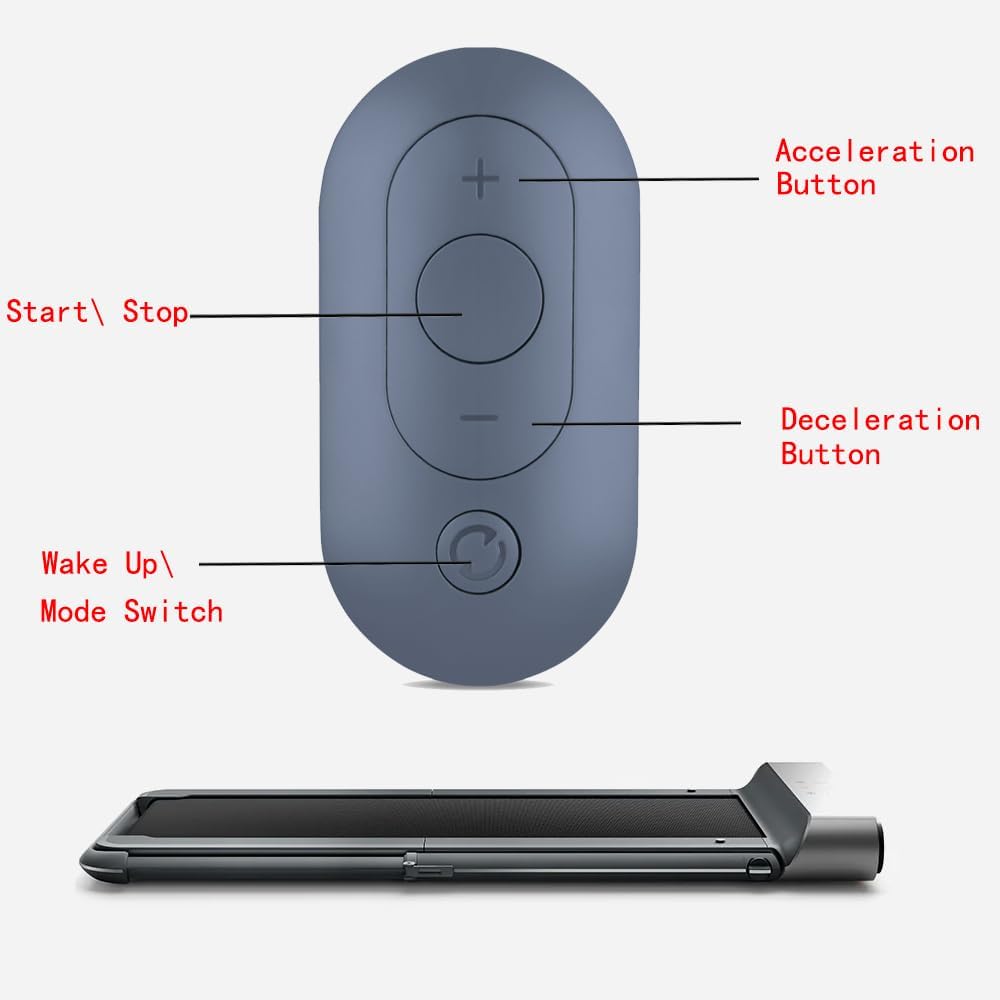
Image: GOUYESHO Walkingpad remote control with labels indicating the function of each button. The top button is 'Acceleration Button' (+), the middle circular button is 'Start/Stop', the button below it is 'Deceleration Button' (-), and the bottom circular button is 'Wake Up/Mode Switch'.
- Acceleration Button (+): Increases the speed of the Walkingpad.
- Start/Stop Button (Central Circle): Initiates or pauses the Walkingpad operation.
- Deceleration Button (-): Decreases the speed of the Walkingpad.
- Wake Up/Mode Switch Button (Bottom Circle): Used to wake up the Walkingpad or switch between modes. This button is also crucial for the pairing process.
3. सेटअप
3.1 ब्याट्री स्थापना
The remote control requires one CR2032 alkaline button cell battery (not included). Follow these steps to install the battery:
- रिमोट कन्ट्रोलको पछाडि ब्याट्री डिब्बा पत्ता लगाउनुहोस्।
- Use a coin or a flat tool to twist the battery cover counter-clockwise to unlock and remove it.
- Insert one CR2032 battery with the positive (+) side facing upwards.
- Replace the battery cover and twist it clockwise to lock it securely.

Image: The back of the remote control showing the battery compartment and a separate CR2032 lithium battery, indicating where the battery should be inserted.
०३ जोडी बनाउने निर्देशनहरू
To pair the remote control with your Walkingpad treadmill, follow these steps:
- Ensure your Walkingpad treadmill is powered off.
- Restart the Walkingpad treadmill.
- Immediately after restarting, press and hold the "Wake Up/Mode Switch" button (the round button at the bottom of the remote, next to the lanyard eyelet) for 5 seconds.
- The Walkingpad should indicate successful pairing (e.g., a beep or a light indicator).

Image: An illustration showing the remote control being held near a Walkingpad treadmill, with arrows pointing to a specific round button on the treadmill's frame. Text overlays indicate the steps: "1. Turn off the power and restart the walking pad" and "2. Press this button for 5 seconds". This button on the treadmill is the pairing button.
महत्त्वपूर्ण नोट: This remote control is specifically designed for Walkingpad C2, A1, A1 Pro, R1 Pro, R2, and Z1 models. It is not compatible with treadmills from other brands.
4. सञ्चालन निर्देशनहरू
Once paired, the remote control allows you to manage your Walkingpad treadmill conveniently.
- सुरु/रोक्नुहोस्: Press the central circular button to start or stop the treadmill.
- गति समायोजन: Use the '+' button to increase speed and the '-' button to decrease speed.
- Wake Up/Mode Switch: Press the bottom circular button to wake the treadmill from standby or to cycle through available modes (if applicable to your Walkingpad model).

Image: A person is shown walking on a Walkingpad treadmill, with a hand holding the remote control in the foreground, illustrating typical use.
5. मर्मतसम्भार
तपाईंको रिमोट कन्ट्रोलको दीर्घायु र उचित कार्य सुनिश्चित गर्न, यी मर्मत निर्देशिकाहरू पालना गर्नुहोस्:
- सरसफाई: रिमोट कन्ट्रोललाई नरम, सुख्खा कपडाले पुछ्नुहोस्। घर्षण गर्ने क्लीनर वा घोलकहरू प्रयोग नगर्नुहोस्।
- भण्डारण: रिमोट कन्ट्रोललाई प्रत्यक्ष सूर्यको किरण र चरम तापक्रमबाट टाढा चिसो, सुख्खा ठाउँमा भण्डार गर्नुहोस्।
- ब्याट्री प्रतिस्थापन: Replace the CR2032 battery when the remote's responsiveness decreases or if it stops functioning. Refer to the "Battery Installation" section for instructions.
- पानीबाट बच्नुहोस्: क्षति हुनबाट जोगाउन रिमोट कन्ट्रोललाई पानी र अन्य तरल पदार्थबाट टाढा राख्नुहोस्।
T. समस्या निवारण
यदि तपाईंले आफ्नो रिमोट कन्ट्रोलमा समस्याहरू सामना गर्नुभयो भने, निम्न समाधानहरू प्रयास गर्नुहोस्:
- रिमोट प्रतिक्रिया गर्दैन:
- ब्याट्री सही तरिकाले जडान गरिएको छ कि छैन र पर्याप्त चार्ज छ कि छैन जाँच गर्नुहोस्। आवश्यक भएमा ब्याट्री बदल्नुहोस्।
- Ensure there are no obstructions between the remote control and the Walkingpad treadmill.
- Verify that the remote is within the effective operating range (up to 10 meters).
- जोडा बनाउने समस्याहरू:
- खण्ड ४ मा वर्णन गरिए अनुसार जोडी बनाउने प्रक्रिया पुन: प्रयास गर्नुहोस्।
- Confirm that your Walkingpad model (C2, A1, A1 Pro, R1 Pro, R2, Z1) is compatible with this remote control. This remote is not designed for other brands or models.
- Ensure the Walkingpad is properly restarted before attempting to pair.
- रुकावट कार्यक्षमता:
- यसले ब्याट्री कम भएको संकेत गर्न सक्छ। ब्याट्री बदल्नुहोस्।
- Ensure the remote control is not exposed to strong electromagnetic interference.
7. निर्दिष्टीकरणहरू
Below are the technical specifications for the GOUYESHO Remote Control:
| सुविधा | विवरण |
|---|---|
| ब्रान्ड | गौयेशो |
| मोडेल नम्बर | 21074a00-8e05-4378-ad60-2a75502e977a |
| जडान प्रविधि | इन्फ्रारेड |
| मिल्दो यन्त्रहरू | Walkingpad C2/A1/A1 Pro/R1 Pro/R2/Z1 |
| अधिकतम समर्थित उपकरणहरू | 1 |
| बटनहरूको संख्या | 1 (referring to the main control area, though there are multiple distinct buttons) |
| नियन्त्रक प्रकार | बटन नियन्त्रण |
| अधिकतम दायरा | २ मिटर |
| ब्याट्री प्रकार | CR2032 Alkaline (not included) |
| निर्माता | रेट्रोसन |
| ASIN | B0D4HT85MD |
२.१ आयामहरू

Image: The remote control shown with its approximate dimensions: 3.31 inches (length), 0.39 inches (thickness), and 1.89 inches (width).
- Length: Approximately 3.31 inches
- Width: Approximately 1.89 inches
- Thickness: Approximately 0.39 inches
8. वारेन्टी र समर्थन
Information regarding specific warranty terms or customer support contact details for this product is not available in the provided data. Please refer to the product packaging or the seller's information on the purchase platform for warranty details and support contacts.