
उत्पादन समाप्त भयोview
The AUGUESLD T160HS is a versatile 2.0 channel stereo amplifier board designed for high-quality audio amplification. It features multiple input methods including Bluetooth, 3.5mm AUX, and USB, making it compatible with a wide range of audio devices. Equipped with the TDA7498E chip, this amplifier board delivers clear sound with minimal distortion. It also includes comprehensive safety protections and intuitive controls for an enhanced user experience.
- बहु इनपुट विधिहरू: Supports Bluetooth, 3.5mm AUX, and USB for broad compatibility.
- TDA7498E चिप: उच्च-गुणस्तरको अडियो सुनिश्चित गर्दछ ampकम विकृति भएको लिफिकेशन।
- बहुकार्यात्मक नब: Provides flexible control over input modes, track selection, and settings.
- सुरक्षा सुरक्षा: Features overheat, reverse, circuit, over-voltage, र अन्डर-भोल्युमtage सुरक्षा।
सेटअप निर्देशनहरू
Follow these steps to correctly set up your T160HS ampजीवित बोर्ड।
1. पावर जडान
Connect a DC 12-36V power supply to the DC input port (DC12-38V) on the board. Ensure the power supply meets the voltage and current requirements (minimum 8A recommended for full power output).

छवि: माथिview को amplifier board with power input and output labels.
२.२। स्पिकर जडान
Connect your passive speakers to the "L" (Left) and "R" (Right) speaker output terminals. Ensure correct polarity (+ to + and - to -) for optimal sound quality.

छवि: Amplifier board showing speaker connections and a mobile device.
५.२. अडियो इनपुट चयन
The T160HS supports multiple audio input methods. Select your preferred method:
- ब्लुटुथ इनपुट: Power on the device. The ampलाइफायर स्वतः ब्लुटुथ पेयरिङ मोडमा प्रवेश गर्नेछ। खोज्नुहोस् "T160HS" on your device and connect.
- 3.5mm AUX इनपुट: Connect your audio source (e.g., phone, computer) to the 3.5mm AUX input jack using an audio cable.
- USB इनपुट: अडियो भएको USB फ्लैश ड्राइव घुसाउनुहोस् files into the USB port. The device will automatically switch to USB playback mode.

Image: Visual representation of the four available input methods.
सञ्चालन निर्देशनहरू
Understand how to use the controls on your T160HS ampजीवित बोर्ड।
Multifunctional Knob Operations
The main knob serves multiple functions:
- लामो प्रेस: Standby / Power ON.
- एकल क्लिक: Play / Pause audio.
- दुई क्लिकहरू: अर्को गीत।
- तीन क्लिकहरू: अघिल्लो गीत।
- चार क्लिकहरू: Switch Input Mode (Bluetooth, AUX, USB).
- पाँच क्लिकहरू: कारखाना रिसेट।
- परिक्रमा: भोल्युम समायोजन गर्नुहोस्।
Image: Close-up of the main volume knob with its various functions indicated.
ट्रेबल र बास नियन्त्रण
Use the dedicated "R&L Treble" and "R&L Bass" knobs to adjust the high and low frequencies of the audio output according to your preference.
छवि: Amplifier board highlighting the treble, bass, and volume adjustment knobs.
मर्मतसम्भार
उचित मर्मतसम्भारले तपाईंको दीर्घायु र इष्टतम प्रदर्शन सुनिश्चित गर्दछ ampजीवित बोर्ड।
- सरसफाई: बोर्डको सतहलाई सुख्खा, नरम कपडाले बिस्तारै पुछ्नुहोस्। तरल क्लिनर वा घोलकहरू प्रयोग नगर्नुहोस्।
- वातावरण: राख्नुहोस् ampलाइफायर बोर्डलाई सुख्खा, राम्रो हावा चल्ने ठाउँमा, प्रत्यक्ष घाम, उच्च तापक्रम र अत्यधिक आर्द्रताबाट टाढा राख्नुहोस्।
- चिसो: The board is equipped with an ultra-quiet cooling fan and a large aluminum heat sink to manage temperature. Ensure the fan is not obstructed to allow proper airflow.

छवि: View को amplifier's cooling fan and the TDA7498E chip.
समस्या निवारण
यदि तपाईंले समस्याहरू सामना गर्नुभयो भने, निम्न सामान्य समस्याहरू र समाधानहरू हेर्नुहोस्।
| समस्या | सम्भावित कारण | समाधान |
|---|---|---|
| पावर छैन / उपकरण अन भइरहेको छैन | गलत बिजुली आपूर्ति भोल्युमtage or current; Power cable not connected; Power switch off. | Ensure DC 12-36V power supply is connected correctly. Verify power supply meets current requirements (8A or above). Long press the main knob to power on. |
| कुनै ध्वनि आउटपुट छैन | Speakers not connected; Incorrect input mode selected; Volume too low; Audio source issue. | Check speaker connections and polarity. Use four clicks on the main knob to switch to the correct input mode. Increase volume. Verify audio source is playing. |
| विकृत ध्वनि | Input signal too high; Speaker impedance mismatch; Power supply insufficient. | Reduce volume from the audio source. Ensure speakers are compatible (4Ω or 8Ω). Use a power supply with sufficient current (e.g., 36V/8A). |
| ब्लुटुथ जडान समस्याहरू | Device not in pairing mode; Too far from ampहस्तक्षेप; बचाउने। | सुनिश्चित गर्नुहोस् amplifier is in Bluetooth mode. Keep devices within range (approx. 50ft line of sight). Try restarting both devices. |
| USB प्लेब्याकले काम गरिरहेको छैन | गलत file format; USB drive not recognized. | अडियो सुनिश्चित गर्नुहोस् files are in supported formats (WAV, FLAC, APE, MP3). Try a different USB drive. |
If the problem persists, try performing a factory reset by clicking the main knob five times. If issues continue, please contact customer support.
निर्दिष्टीकरणहरू
| सुविधा | विवरण |
|---|---|
| मोडेल | T160HS |
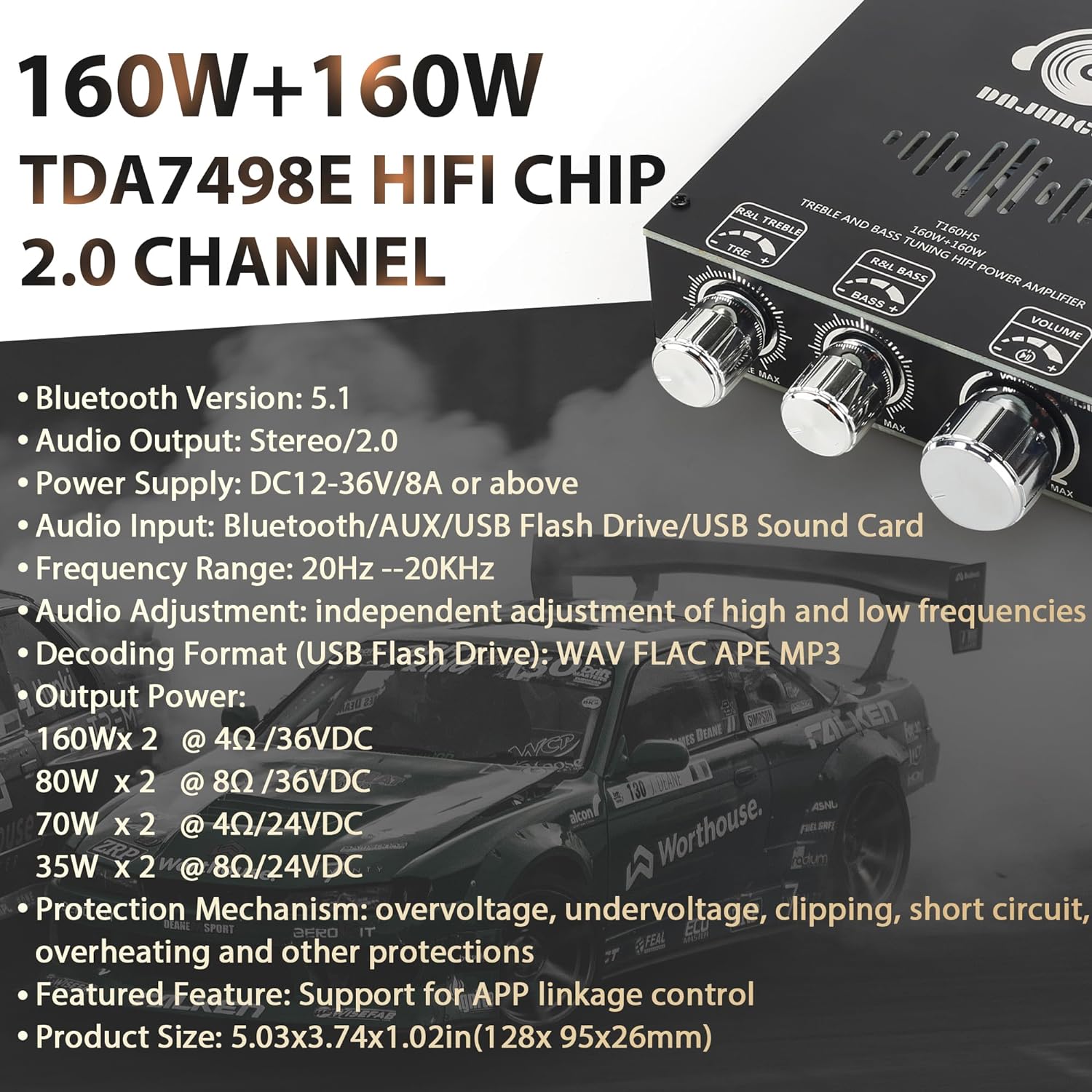
| आउटपुट पावर | 160W x 2 (4Ω/36VDC), 80W x 2 (8Ω/36VDC), 70W x 2 (4Ω/24VDC), 35W x 2 (8Ω/24VDC) |
| च्यानलहरू | २ स्टेरियो |
| Ampलाइफायर चिप | TDA7498E |
| इनपुट भोल्यूमtage | डीसी 12-36V |
| आपूर्ति वर्तमान | 8A or above recommended |
| इनपुट विधिहरू | Bluetooth 5.1, 3.5mm AUX, USB Flash Drive, USB Sound Card |
| Decoding Format (USB) | WAV, FLAC, APE, MP3 |
| आवृत्ति दायरा | 20Hz - 20KHz |
| संरक्षण संयन्त्र | Overheat, Reverse, Circuit, Over-voltagई, अन्डर-भोल्युमtage, Clipping, Short Circuit |
| उत्पादन आयाम (L x W x H) | ९.४ x ५.६ x २.५९ सेमी (३.७ x २.२१ x १.०२ इन्च) |
Image: Graphic displaying key technical specifications of the ampजीवनदाता
वारेन्टी र समर्थन
AUGUESLD is committed to providing quality products and customer satisfaction.
For any questions regarding the product, or if you experience any quality-related issues, please contact AUGUESLD customer service. Our support team is available to provide a satisfactory resolution.
कृपया आफ्नो खरिद कागजात वा खुद्रा विक्रेताको सन्दर्भ गर्नुहोस् webविशिष्ट वारेन्टी सर्तहरू र सम्पर्क जानकारीको लागि साइट।