
परिचय
Thank you for choosing the HP 14-inch Laptop. This manual provides essential information for setting up, operating, maintaining, and troubleshooting your new device. Please read this guide thoroughly to ensure optimal performance and longevity of your laptop.
The HP 14-inch Laptop is designed for everyday computing tasks, offering a balance of portability and functionality. It features an Intel Celeron N4120 processor, 8GB of RAM, and 256GB of storage, running on Windows 11 Home in S Mode.
बक्समा के छ
प्याकेजमा सबै वस्तुहरू छन् भनी प्रमाणित गर्नुहोस्:
- HP 14-inch Laptop
- AC पावर एड्याप्टर
- ६४ जीबी स्टोरेज कार्ड
- माउस प्याड
- HDMI केबल
- USB केबल
- ताररहित इयरफोनहरू
- ताररहित माउस

Image: The HP 14-inch Laptop shown with its 5-in-1 value pack bundle, including wireless earbuds, mouse pad, HDMI cable, USB cable, and wireless mouse.
सेटअप
१. प्रारम्भिक पावर-अप
- ल्यापटप अनप्याक गर्नुहोस्: प्याकेजिङबाट ल्यापटप र सबै सामानहरू सावधानीपूर्वक हटाउनुहोस्।
- पावर जोड्नुहोस्: Plug the AC power adapter into the laptop's AC smart pin port and then into a wall outlet. It is recommended to fully charge the battery before first use.
- पावर अन: Open the laptop lid and press the power button, usually located on the keyboard deck.
2. Windows 11 S Mode Setup
Follow the on-screen prompts to complete the initial Windows 11 Home S Mode setup. This includes selecting your region, keyboard layout, connecting to a Wi-Fi network, and setting up your Microsoft account.
३. सामानहरू जडान गर्ने
- वायरलेस माउस: ल्यापटपमा उपलब्ध USB टाइप-ए पोर्टमा वायरलेस माउसको लागि USB रिसीभर घुसाउनुहोस्। माउस स्वचालित रूपमा जडान हुनुपर्छ।
- ताररहित ईयरफोन: Refer to the earphones' specific instructions for pairing via Bluetooth. On your laptop, go to सेटिङहरू > ब्लुटुथ र उपकरणहरू जोडी गर्न।
- 128GB Storage Card: Insert the storage card into the multi-format media card reader slot.
- HDMI केबल: Connect one end of the HDMI cable to the laptop's HDMI port and the other end to an external display (monitor or TV).
4. Activating Microsoft Office 365
Your laptop includes a 1-year subscription to Microsoft Office 365. To activate:
- Open any Office application (e.g., Word, Excel) from the Start Menu.
- Follow the on-screen prompts to sign in with your Microsoft account and activate your subscription.
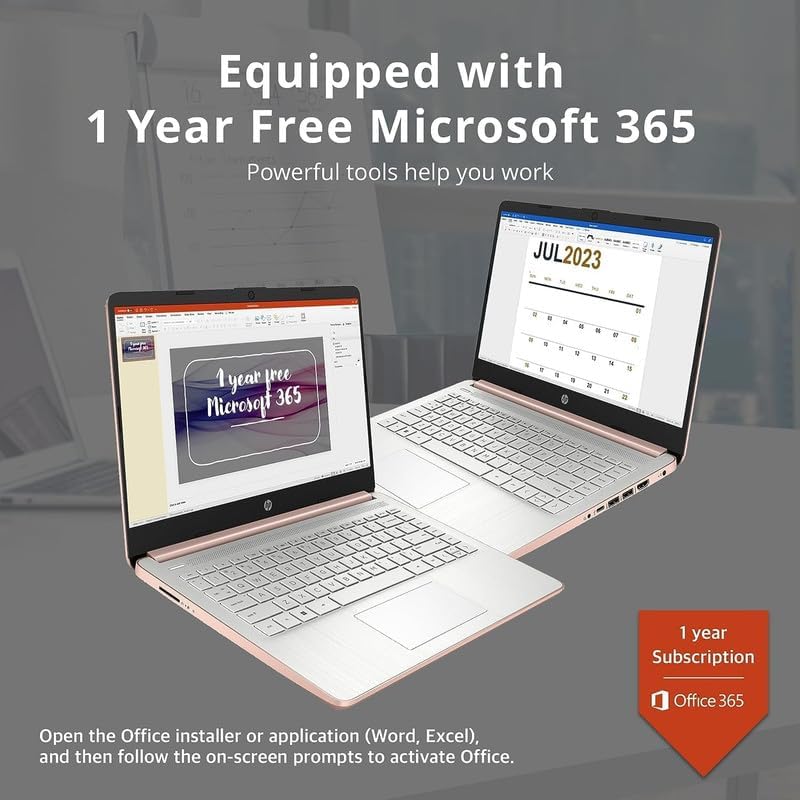
Image: Two HP laptops illustrating the activation process for the included 1-year Microsoft 365 subscription.
तपाईंको ल्यापटप सञ्चालन गर्दै
1. Windows 11 Home in S Mode
Windows 11 Home in S Mode is a streamlined version of Windows configured for security and performance. It exclusively uses apps from the Microsoft Store and requires Microsoft Edge for safe browsing. You can switch out of S Mode if you need to install apps from outside the Microsoft Store, but this action is irreversible.
2. पोर्ट र कनेक्टिविटी प्रयोग गर्दै
Your HP 14-inch Laptop is equipped with various ports for connectivity:
- USB Type-C (1): For data transfer and connecting compatible devices.
- USB Type-A (2): For connecting standard USB devices like external drives, keyboards, or mice.
- HDMI 1.4b (1): बाह्य डिस्प्लेहरूमा जडानको लागि।
- Headphone/Microphone Combo Jack (1): हेडफोनमा अडियो आउटपुट वा माइक्रोफोनबाट इनपुटको लागि।
- Multi-format Media Card Reader (1): For reading SD cards and other compatible memory cards.
- AC Smart Pin (1): पावर एडाप्टर जडानको लागि।

Image: A detailed diagram highlighting the multi-port configuration on the HP 14-inch laptop, including SD Card Reader, Headphone Jack, USB Type-A, USB Type-C, HDMI, and AC Smart Pin.
७.२. वाइफाइ र ब्लुटुथ
Wi-Fi वा ब्लुटुथ उपकरणहरूमा जडान गर्न:
- क्लिक गर्नुहोस् नेटवर्क icon on the taskbar (bottom right).
- Select the desired Wi-Fi network and enter the password, or turn on Bluetooth and pair with your device.
4. प्रयोग गर्दै Webक्यामेरा
The HP True Vision 720p HD camera is integrated for video calls and conferencing. Access it through applications like Camera, Microsoft Teams, or Zoom.

Image: The HP 14-inch laptop demonstrating its remote work capabilities, featuring HP Fast Charge, HP True Vision 720p HD camera, and HD audio with stereo speakers.
5. ब्याट्री व्यवस्थापन
ल्यापटपले १० घण्टासम्म ब्याट्री लाइफ प्रदान गर्दछ। ब्याट्री कार्यसम्पादनलाई अनुकूलन गर्न:
- स्क्रिनको चमक समायोजन गर्नुहोस्।
- प्रयोग नगरिएका अनुप्रयोगहरू बन्द गर्नुहोस्।
- Utilize Windows power saving modes.
- The laptop supports HP Fast Charge, allowing it to charge from 0% to 50% in approximately 45 minutes.
मर्मतसम्भार
१. आफ्नो ल्यापटप सफा गर्दै
- पर्दा: हल्का नरम, लिन्ट-रहित कपडा प्रयोग गर्नुहोस् dampपानी वा स्क्रिन क्लिनरले भिजाउनुहोस्। स्क्रिनमा सिधै तरल पदार्थ नछर्क्नुहोस्।
- किबोर्ड र चेसिस: नरम, सुख्खा कपडा प्रयोग गर्नुहोस्। जिद्दी फोहोरको लागि, थोरै घamp कपडा प्रयोग गर्न सकिन्छ, सुनिश्चित गर्दै कि कुनै तरल पदार्थ खोल्ने ठाउँमा नपसोस्।
- पोर्टहरू: पोर्टहरूबाट धुलो बिस्तारै सफा गर्न कम्प्रेस्ड हावा प्रयोग गर्नुहोस्।
2. सफ्टवेयर अपडेटहरू
तपाईंको प्रणालीमा नवीनतम सुरक्षा प्याचहरू र कार्यसम्पादन सुधारहरू छन् भनी सुनिश्चित गर्न नियमित रूपमा Windows अपडेटहरू जाँच गर्नुहोस् र स्थापना गर्नुहोस्। जानुहोस् सेटिङहरू > विन्डोज अपडेट.
3. भण्डारण व्यवस्थापन
आवधिक रूपमा पुनview अनि अनावश्यक मेटाउनुहोस् files to free up storage space on your 256GB drive (128GB eMMC + 128GB Storage Card). Utilize the included 128GB storage card for additional file भण्डारण।
4. ब्याट्री केयर
- चरम तापमानबाट बच्नुहोस्।
- Do not leave the laptop plugged in constantly after it is fully charged for extended periods.
- लामो समयसम्म भण्डारणको लागि, ब्याट्रीलाई लगभग ५०% सम्म चार्ज गर्नुहोस् र ल्यापटपलाई चिसो, सुख्खा ठाउँमा राख्नुहोस्।
समस्या निवारण
This section addresses common issues you might encounter with your HP 14-inch Laptop.
| समस्या | सम्भावित समाधान |
|---|---|
| ल्यापटप अन हुँदैन | AC एडाप्टर ल्यापटप र काम गर्ने पावर आउटलेट दुवैमा सुरक्षित रूपमा जडान भएको सुनिश्चित गर्नुहोस्। फरक आउटलेट प्रयास गर्नुहोस्। यदि ब्याट्री पूर्ण रूपमा सकिएको छ भने, प्लग इन गरेपछि प्रतिक्रिया दिन केही मिनेट लाग्न सक्छ। |
| स्क्रिन खाली वा कालो छ | Check if the laptop is powered on. Adjust screen brightness. If an external monitor is connected, ensure it is properly configured (press विन्डोज कुञ्जी + पी to cycle display modes). |
| Wi-Fi जडान समस्याहरू | Ensure Wi-Fi is enabled in Windows settings. Restart your router and modem. Forget the network and reconnect. Update Wi-Fi drivers if necessary. |
| ब्लुटुथ उपकरण जोडा बनाउँदैन | ल्यापटप र उपकरण दुवैमा ब्लुटुथ सक्षम छ भनी सुनिश्चित गर्नुहोस्। उपकरणहरू एकअर्काको नजिक राख्नुहोस्। ब्लुटुथ सेटिङहरूमा उपकरण हटाउनुहोस् र पुन: थप्नुहोस्। |
| Laptop performance is slow/lagging | Close unnecessary applications. Check for background processes in Task Manager. Ensure Windows is up to date. Consider running a disk cleanup. If running in S Mode, ensure all apps are from the Microsoft Store. |
| अडियो काम गर्दैन | Check volume levels. Ensure correct playback device is selected. Update audio drivers. Test with headphones. |
निर्दिष्टीकरणहरू
Detailed technical specifications for the HP 14-inch Laptop:
| सुविधा | विवरण |
|---|---|
| ब्रान्ड | HP |
| मोडेल नाम | Newest HP 14 Inch Laptop |
| प्रोसेसर | Intel Celeron N4120 (Quad-Core, 1.1 GHz base, up to 2.6 GHz burst) |
| ग्राफिक्स | इन्टेल UHD ग्राफिक्स ६३० (एकीकृत) |
| अपरेटिङ सिस्टम | S मोडमा Windows 11 गृह |
| मेमोरी (RAM) | 8 GB DDR4 SDRAM |
| भण्डारण | 256 GB (128GB eMMC + 128GB Storage Card) |
| प्रदर्शन | १४.०-इन्च विकर्ण, HD (१३६६ x ७६८), माइक्रो-एज, उज्यालोView, 220 nits, 45% NTSC |
| जडान | Realtek 802.11b/g/n/ac (2x2) Wi-Fi, Bluetooth |
| पोर्टहरू | 1x SuperSpeed USB Type-C (5Gbps), 2x SuperSpeed USB Type-A (5Gbps), 1x HDMI 1.4b, 1x Headphone/microphone combo, 1x AC smart pin, Multi-format media card reader |
| Webक्यामेरा | एकीकृत डुअल एरे डिजिटल माइक्रोफोनको साथ HP ट्रु भिजन ७२०p HD क्यामेरा |
| अडियो | दोहोरो स्पिकरहरू |
| किबोर्ड | US English, Non-Backlit |
| ब्याट्री | 3-cell, 41 Wh Lithium-Ion Prismatic Battery |
| ब्याट्री जीवन | १८ घण्टा सम्म (भिडियो प्लेब्याक) |
| आयाम (L x W x H) | १० x ३ x ३ इन्च |
| वजन | ३०.४ पाउण्ड |
| रङ | गुलाब सुन |

Image: The sleek design of the HP 14-inch laptop, highlighting its thin profile and overall dimensions.

Image: A visual representation of the Intel Celeron N4120 processor, detailing its 4 cores, 4 threads, 2.6GHz Max Turbo Frequency, Intel UHD Graphics 600, and 4MB Smart Cache.

Image: The HP 14-inch laptop displayed in a scenic outdoor setting, emphasizing its core components: Intel Celeron N4020 processor, Intel UHD Graphics 600, and Windows 11 Home in S mode.
वारेन्टी जानकारी
Your HP 14-inch Laptop comes with a limited manufacturer's warranty. For specific terms and conditions, please refer to the warranty documentation included with your product or visit the official HP support webसाइट। वारेन्टी दावीहरूको लागि आफ्नो खरिदको प्रमाण राख्नुहोस्।
समर्थन
For further assistance, technical support, or to download updated drivers and manuals, please visit the official HP support webसाइट:
You can also find contact information for HP customer service on their webसाइट।