
1. परिचय
This manual provides detailed instructions for the installation, operation, and maintenance of the Macrobase CNC Controller 4-Axis MKS DLC32 MAX Expansion Card. This GRBL 32-bit ESP32 shield breakout board is designed to upgrade engraving machines, offering enhanced control and performance. Please read this manual thoroughly before use to ensure proper and safe operation.
१.३। मुख्य विशेषताहरु
- Built-in ESP32-S3 series chip with Xtensa dual-core 32-bit LX7 microprocessor, capable of clock speeds up to 240 MHz.
- Supports CNC and laser engraving applications.
- Capable of supporting up to 60W laser engraving with a maximum speed of 30,000mm/min.
- Supports plug-in drivers, compatible with TMC2209 ultra-quiet drivers or TB67S109 high-current driver modules.
- Supports external high-current driver modules, delivering greater load output.
- Provides 4-axis CNC control and air pump output functionality.
- Includes lid protection and flame detection features for enhanced safety.
- Supports serial offline engraving, eliminating the need for constant computer connection, ensuring more stable engraving.
- Supports APP control and web LAN control for flexible operation.

The MKS DLC32 MAX features a high-performance ESP32-S3 core and powerful expandability with rich driver interfaces, supporting up to 4 axes.
3. निर्दिष्टीकरणहरू

A detailed table outlining the specifications of the MKS DLC32 MAX, including power input, processor model (ESP32 S3), main frequency, driver type, A-axis support, WiFi interfaces, offline engraving, CNC/Laser mode switching, screen type, CNC controller support, air assist, emergency stop, and maximum engraving speed. It also provides a comparison with the standard MKS DLC32.
| विशेषता | मूल्य |
|---|---|
| Board Model | MKS DLC32 MAX |
| पावर इनपुट | 12V-24V 10A |
| प्रोसेसर मोडेल | ESP32 S3 |
| मुख्य आवृत्ति | ४३३.९२ मेगाहर्ट्ज |
| चालक प्रकार | Plug-in type/External |
| A-axis Support | समर्थित |
| WiFi PC Interface | समर्थित |
| WiFi APP Interface | समर्थित |
| अफलाइन उत्कीर्णन | समर्थित |
| CNC/Laser Mode Switching | One-button switching |
| लेजर इन्ग्रेभर स्क्रिन | १०.१ इन्च क्यापेसिटिव टचस्क्रिन |
| सीएनसी नियन्त्रक | समर्थित |
| एयर असिस्ट | समर्थित |
| आपतकालीन स्टप | समर्थित |
| अधिकतम उत्कीर्णन गति | 30000mm/मिनेट |
| प्याकेज आयामहरू | १० x ३ x ३ इन्च |
| वस्तुको वजन | 5.6 औंस |
| रङ | कालो |
4. प्याकेज सामग्री
प्याकेजमा सामान्यतया निम्न वस्तुहरू समावेश हुन्छन्:
- MKS DLC32 MAX Controller Board
- USB केबल
- Endstops (quantity may vary, typically 3)

The Macrobase MKS DLC32 MAX CNC Controller board, designed for 4-axis GRBL control, shown with its accompanying blue USB cable for connectivity.

The Macrobase MKS DLC32 MAX CNC Controller board, highlighting the Makerbase branding and including three endstop switches, which are essential for defining movement limits in CNC applications.
5. सेटअप र स्थापना
5.1. घटक समाप्तview
Familiarize yourself with the various ports and components on the MKS DLC32 MAX board before proceeding with connections.

A labeled diagram illustrating the various interfaces on the Macrobase MKS DLC32 MAX mainboard, including driver module interfaces, external driver interface, microstepping settings, external power switch port, spindle output, laser outputs, constant output power voltage interface, axis drives (X, Y, Z, A), air assist, endstops (Y, X, Z), probe interface, flame detection interface, safety door interface, reset/emergency stop, serial screen interface, power fuse, DC power input port, USB PC port, and TF card slot.
5.2. पावर जडान
- Connect a 12V-24V DC power supply (10A recommended) to the DC Power Input Port on the board.
- जडान गर्नु अघि पावर स्विच बन्द स्थितिमा छ भनी सुनिश्चित गर्नुहोस्।
5.3. स्टेपर मोटर चालक स्थापना
The MKS DLC32 MAX supports plug-in stepper motor drivers. Carefully insert your chosen drivers (e.g., TMC2209, TB67S109) into the Driver Module Interfaces, ensuring correct orientation.
३.५। एन्डस्टप जडानहरू
Connect the provided endstops to the designated X-Axis Endstop, Y-Axis Endstop, and Z-Axis Endstop ports. These are crucial for defining the physical limits of your machine's movement.
5.5. Firmware Update (if necessary)
To update the firmware, transfer the firmware file (e.g., Gpad_firmware.bin) to an SD card. Insert the SD card into the controller, connect power, and turn on the device. The update process will typically start automatically.
This video demonstrates the process of updating firmware and loading G-code files using an offline controller, which is applicable to the MKS DLC32 MAX's offline capabilities.
6. सञ्चालन निर्देशनहरू
6.1. Driver Current and Microstep Settings
Properly configure your stepper motor drivers for optimal performance. Refer to the diagram below for guidance on setting current and microsteps for common driver types.
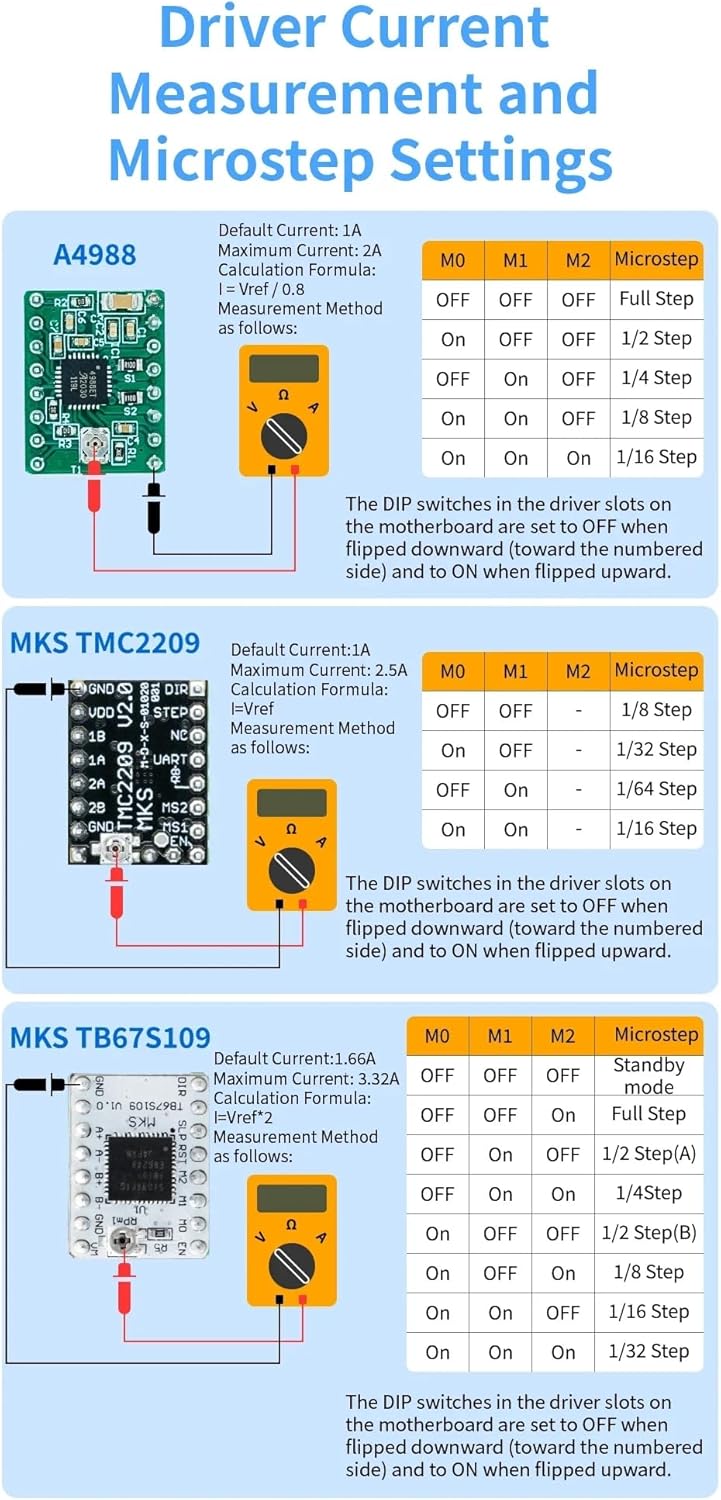
A comprehensive guide explaining how to set driver current and microstep configurations for common stepper motor drivers like A4988, MKS TMC2209, and MKS TB67S109. It includes default current, maximum current, calculation formulas, measurement methods, and DIP switch settings for various microstep resolutions.
6.2. Offline Control and G-Code Execution
The MKS DLC32 MAX supports offline control via an SD card or a compatible touchscreen. Prepare your G-code files and transfer them to the SD card. Insert the card into the controller, then use the interface to select and run your desired G-code.

An illustration demonstrating the versatile control methods for the CNC controller, including a web-based interface on a desktop monitor, a mobile app interface on a smartphone, and a dedicated touchscreen interface, highlighting its flexibility in operation.
This video demonstrates the use of a 7-inch IPS Touch GRBL Module, showing how to load and execute G-code commands, which is similar to the offline control functionality of the MKS DLC32 MAX.
6.3. Air Assist Functionality
The MKS DLC32 MAX supports air assist, which can significantly improve cutting and engraving quality, especially for laser applications, by clearing debris and cooling the workpiece. Connect your air pump to the designated air assist port on the board.
This video demonstrates the use of a laser air assist pump with a laser engraver, showcasing how air assist can improve cutting performance. The MKS DLC32 MAX supports similar air assist functionality.
This video illustrates a 10W laser module cutting 8mm basswood plywood, demonstrating the capabilities of a laser engraver when controlled by a compatible CNC board like the MKS DLC32 MAX.
7. मर्मतसम्भार
- Keep the controller board clean and free from dust and debris. Use compressed air or a soft brush for cleaning.
- सुनिश्चित गर्नुहोस् कि सबै जडानहरू सुरक्षित छन् र जंगबाट मुक्त छन्।
- Operate the board within its specified temperature range (20 Degrees Celsius).
- Regularly check for firmware updates from the manufacturer's official channels to ensure optimal performance and access to new features.
T. समस्या निवारण
8.1. कुनै शक्ति छैन
- बिजुली आपूर्ति सही तरिकाले जडान भएको छ र निर्दिष्ट भोल्युम प्रदान गरिरहेको छ कि छैन जाँच गर्नुहोस्tage (12V-24V)।
- Ensure the power switch on the board is in the ON position.
- Inspect the power fuse on the board for any damage.
६.३. चलिरहेका छैनन् मोटरहरू
- Verify that stepper motor drivers are correctly installed and configured (current, microsteps).
- Check motor wiring for proper connection to the drivers.
- Ensure G-code commands are valid and being sent correctly.
8.3. Offline Control Issues
- Ensure the G-code file is in .txt format and the filename is within 12 characters, without spaces.
- Verify the SD card is properly inserted and formatted.
- Confirm the G-code file has been successfully transferred to the local storage of the controller if using a touchscreen interface.
9. वारेन्टी र समर्थन
Specific warranty information for the Macrobase CNC Controller 4-Axis MKS DLC32 MAX is not provided in the product details. For warranty claims, technical support, or further assistance, please contact the manufacturer, Macrobase, or your point of purchase directly. Keep your purchase receipt as proof of purchase.