
Inefala 2ba21f87-18ff-4355-ad45-79b956fcb744
Inefala एन्ड्रोइड १५ कार रेडियो प्रयोगकर्ता पुस्तिका
Model: 2ba21f87-18ff-4355-ad45-79b956fcb744
ब्रान्ड: इनेफला
1. परिचय
Thank you for choosing the Inefala Android 15 Car Radio. This device is designed to enhance your driving experience with advanced features such as Wireless Carplay, Android Auto, GPS navigation, Bluetooth connectivity, and a 9-inch touchscreen display. This manual provides essential information for proper installation, operation, and maintenance of your new car radio. Please read it thoroughly before use.
2. सुरक्षा जानकारी
- Always ensure the vehicle is parked safely before operating the car radio's advanced features.
- Do not attempt to install or repair the unit if you are not qualified. Improper installation can lead to damage or injury.
- Consult a professional for electrical wiring if you are unsure.
- Keep the volume at a safe level to remain aware of road conditions and traffic.
- युनिटलाई अत्यधिक तापक्रम, लामो समयसम्म प्रत्यक्ष घाम वा अत्यधिक आर्द्रतामा नराख्नुहोस्।
3. प्याकेज सामग्री
कृपया निम्न वस्तुहरूको लागि बाकस जाँच गर्नुहोस्:
- Inefala Android 15 Car Radio for Suzuki SX4 / Fiat Sedici
- पावर केबल
- आरसीए केबल
- जीपीएस एन्टेना
- रिभर्स क्यामेरा इनपुट केबल
- AHD आपतकालीन क्यामेरा
- बाह्य माइक्रोफोन
- 2 x USB केबलहरू
- USB केबल एडाप्टर
- माउन्टिंग कोष्ठक
- स्थापना उपकरण

छवि: विस्तृत view of the wiring harness and included accessories in the package.
4. सेटअप र स्थापना
५.१. सामान्य स्थापना समाप्तview
The Inefala Android 15 Car Radio is designed for direct fitment in Suzuki SX4 (2006-2013) and Fiat Sedici (2005-2014) models. Professional installation is recommended. Ensure the vehicle's power is disconnected before starting installation.
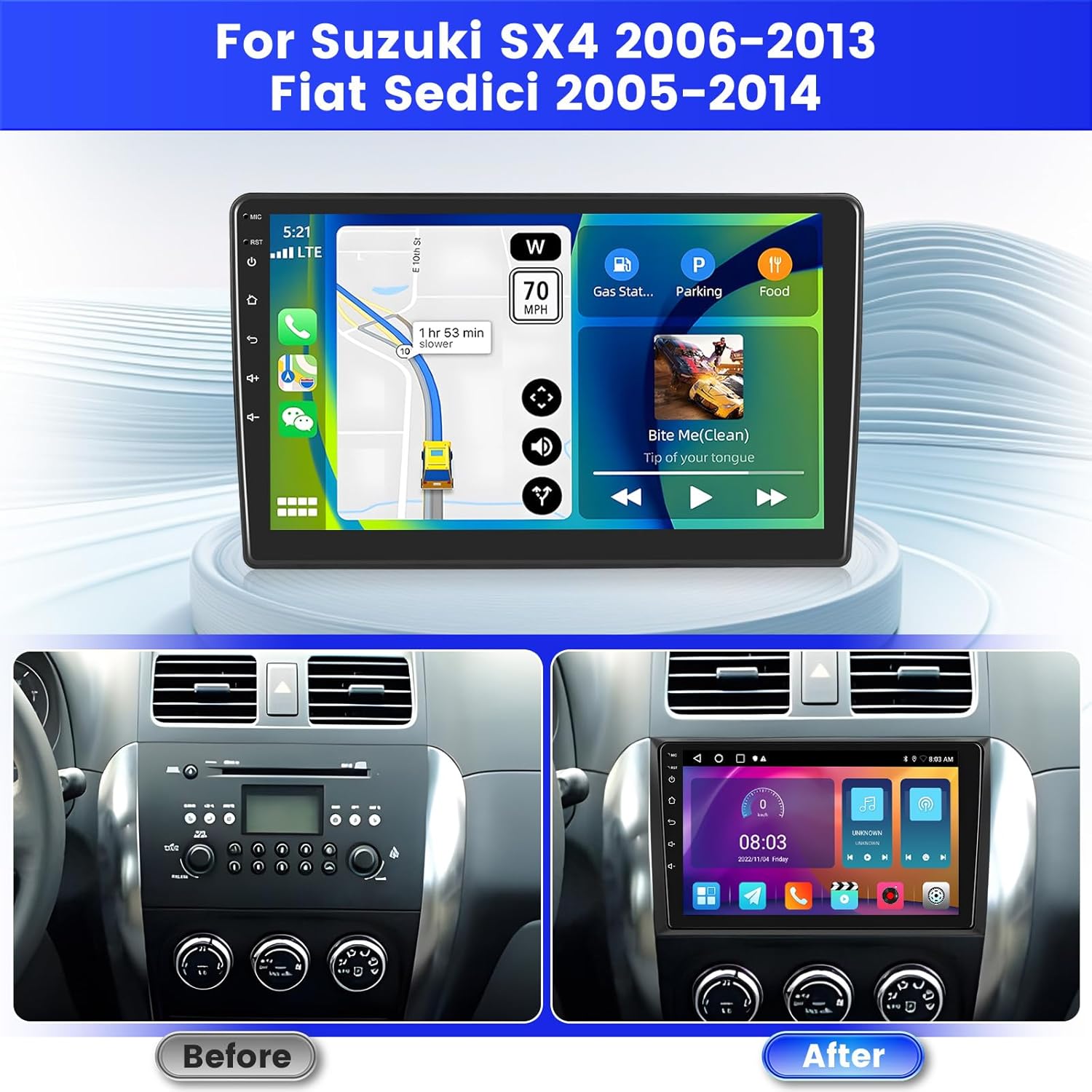
Image: Comparison of the vehicle dashboard before and after the installation of the Inefala car radio.
W. तारि D रेखाचित्र
Connect the power cable, RCA cables, GPS antenna, and USB cables to their respective ports on the car radio. Refer to the detailed wiring diagram for correct connections.
Image: Close-up of the car radio's rear ports and corresponding cable connections, including power, RCA, USB, and antenna inputs.
३.३. ब्याकअप क्यामेरा जडान
The unit supports an AHD backup camera. Connect the red cable of the reverse input cable to the positive terminal of the car's reverse light cable. Connect the black cable to the negative terminal of the car's reverse light cable. The other two red extension cables (if present) do not need to be connected.
महत्त्वपूर्ण नोट:
The reverse input cable must be plugged in even if the reverse camera is not being used. Otherwise, it may affect Bluetooth and Wi-Fi signal reception.

Image: Visual guide for connecting the AHD backup camera, illustrating the wiring to the car's reverse lights and the radio unit.
६.८. स्टेयरिङ ह्वील नियन्त्रण (SWC)
स्टेयरिङ ह्वील नियन्त्रणहरू सक्षम गर्न, यी चरणहरू पालना गर्नुहोस्:
- CANBUS डिकोडर बिना: Connect the plugs or the steering wheel control wires (Key1/Key2) in the power cable to the corresponding port or wire of your original car. Then, go to "SWC manual match" in the radio settings to activate the button function.
- CANBUS डिकोडरको साथ: रेडियो खोल्नु अघि CANBUS जडान गर्नुहोस्। त्यसपछि, यो बाटो पछ्याउनुहोस्: कार सेटिङहरू > कारखाना (००००००) > कार प्रकार सेटिङ SWC लाई राम्रोसँग काम गर्नको लागि। पहिले, CANBUS डिकोडरको ब्रान्ड चयन गर्नुहोस्, त्यसपछि वास्तविक अवस्था अनुसार मिल्दो मोडेल र वर्ष चयन गर्नुहोस्।

Image: Diagram illustrating the connection points for steering wheel controls and a screenshot of the on-screen SWC configuration interface.
5. सञ्चालन निर्देशनहरू
४.१. पावर अन/अफ र आधारभूत नेभिगेसन
Press the power button to turn the unit on or off. The 9-inch touchscreen allows for intuitive navigation through menus and applications. Swipe, tap, and pinch gestures are supported.
5.2. Android System and Applications
The car radio runs on Android 15 with 2GB RAM and 64GB internal storage. This allows for smooth operation and the ability to download various applications from the Google Play Store (requires Wi-Fi connection).
३.२. वायरलेस कारप्ले र एन्ड्रोइड अटो
Connect your smartphone wirelessly via Bluetooth to access Apple CarPlay or Android Auto. This feature allows you to use navigation, make calls, send messages, and listen to music directly from your phone's interface displayed on the car radio screen.

Image: Display of the car radio screen showing various applications accessible through Wireless Carplay and Android Auto, including navigation, music, and communication apps.
६. मिरर लिङ्क
Project your smartphone screen onto the car radio display via Wi-Fi or USB cable using the Mirror Link function. This allows you to view तपाईंको फोनको सामग्री सिधै ठूलो स्क्रिनमा।

Image: Visual representation of the Carplay, Android Auto, and Mirror Link functionalities, showing how each projects phone content to the car radio screen.
६.४. GPS नेभिगेसन
The unit supports both online and offline GPS navigation. Connect to Wi-Fi to download maps or use real-time traffic information. The included GPS antenna ensures accurate positioning.

Image: The car radio screen displaying a navigation map with route information, alongside an illustration of Wi-Fi connectivity.
४.४. एफएम/आरडीएस रेडियो
Tune into your favorite radio stations using the built-in FM/RDS tuner. RDS (Radio Data System) provides additional information such as station name and program type.
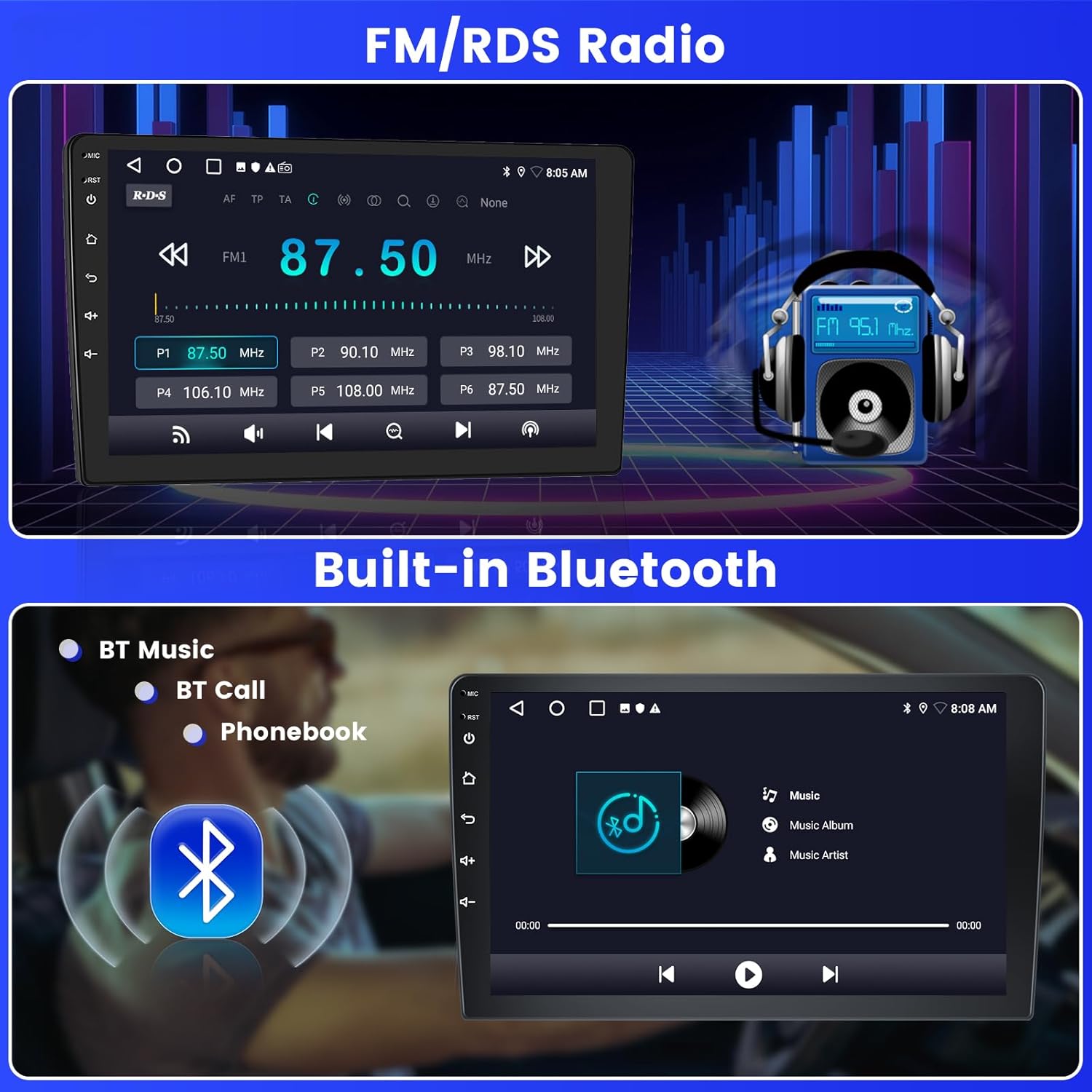
Image: The car radio screen displaying the FM radio interface with frequency selection and an illustration of Bluetooth music streaming.
5.7. ब्लुटुथ जडान
Connect your phone via Bluetooth for hands-free calling, music streaming, and file transfer. Access your phonebook directly from the car radio display.
Wi. Wi-Fi जडान
Connect the car radio to a Wi-Fi hotspot (e.g., from your smartphone) to access online features, download apps, stream videos, and update maps.
5.9. स्प्लिट स्क्रिन प्रकार्य
स्प्लिट-स्क्रिन सुविधाले तपाईंलाई चलाउन अनुमति दिन्छ र view two applications simultaneously on the 9-inch display, such as navigation and music playback.

Image: The car radio screen demonstrating the Digital Sound Processor (DSP) settings, the split-screen functionality with two apps running, and a selection of 26 user interface themes.
5.10. Sound Settings (EQ & DSP)
Utilize the built-in EQ (Equalizer) and DSP (Digital Sound Processor) to customize your audio experience. Adjust sound output, balance, and various sound effects to match your preferences.
५.२.१२. UI थिमहरू
The car radio offers 26 different user interface themes. You can change the theme to personalize the look and feel of your display.
७. ब्याकअप क्यामेरा डिस्प्ले
When the vehicle is in reverse gear, the screen will automatically display the high-definition image from the AHD backup camera, providing a clear view सुरक्षित पार्किङ र चालबाजीको लागि।
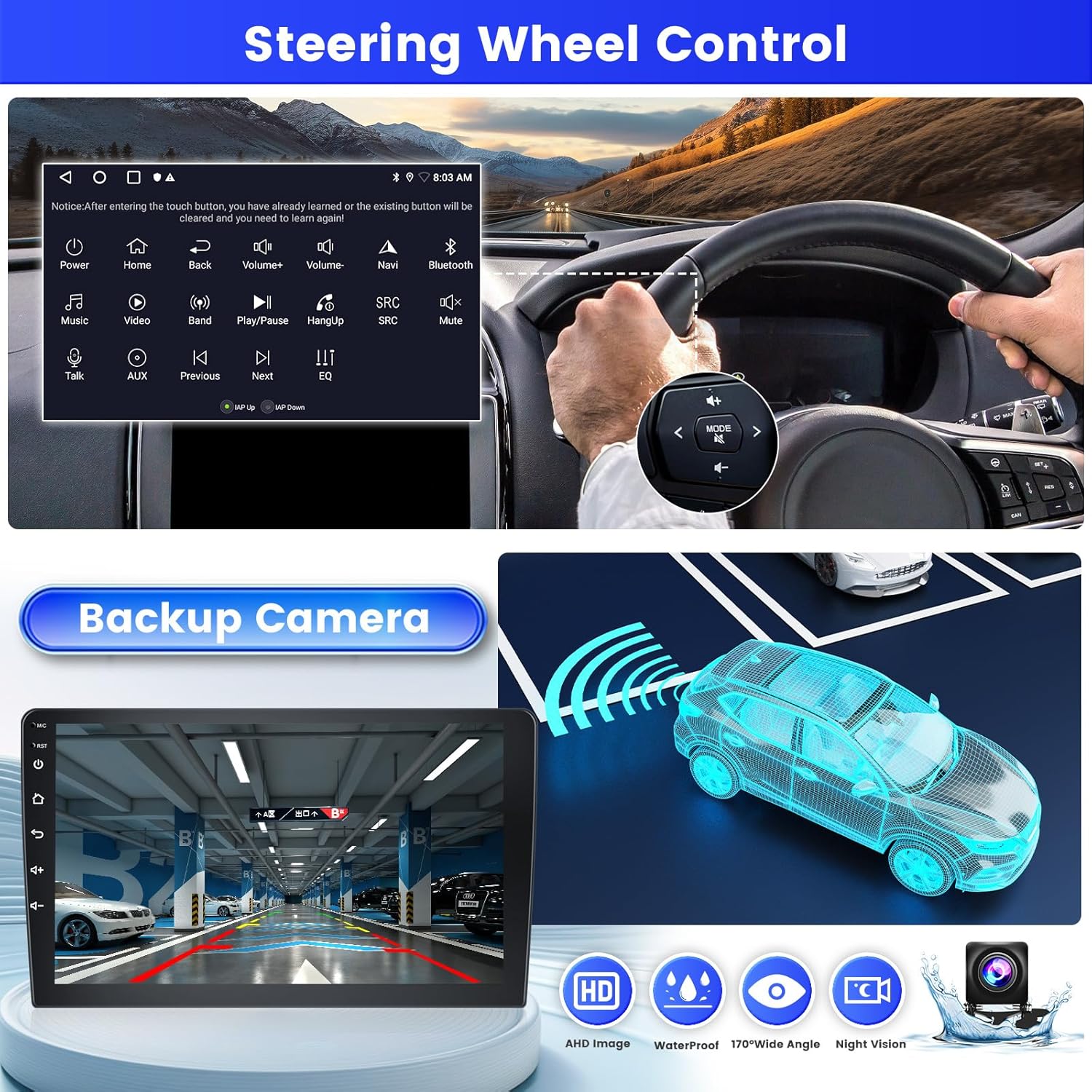
तस्बिर: कार रेडियो स्क्रिनले देखाउँछ view from the backup camera, along with an illustration of steering wheel controls.
6. मर्मतसम्भार
- स्क्रिन सफा गर्दै: टचस्क्रिनलाई बिस्तारै पुछ्न नरम, लिन्ट-रहित कपडा प्रयोग गर्नुहोस्। घर्षण गर्ने क्लिनर वा घोलकहरू प्रयोग नगर्नुहोस्।
- सामान्य सफाई: Keep the unit free from dust and debris. Use a dry cloth for cleaning the exterior.
- सफ्टवेयर अपडेटहरू: इष्टतम कार्यसम्पादन र नयाँ सुविधाहरूमा पहुँच सुनिश्चित गर्न समय-समयमा Wi-Fi मार्फत सफ्टवेयर अपडेटहरूको लागि जाँच गर्नुहोस्।
T. समस्या निवारण
| समस्या | सम्भावित कारण | समाधान |
|---|---|---|
| युनिट पावर अन गर्दैन। | बिजुलीको कनेक्सन खुकुलो भयो, फ्यूज उड्यो। | पावर केबल र सवारी साधनको फ्यूज जाँच गर्नुहोस्। उचित वायरिङ सुनिश्चित गर्नुहोस्। |
| आवाज छैन। | भोल्युम धेरै कम छ, अडियो स्रोत गलत छ, स्पिकरका तारहरू खुकुलो छन्। | भोल्युम बढाउनुहोस्। सही अडियो स्रोत चयन गर्नुहोस्। स्पिकर जडानहरू जाँच गर्नुहोस्। |
| GPS सिग्नल हराएको वा गलत। | GPS एन्टेना अवरुद्ध वा अनुचित रूपमा जडान गरिएको। | Ensure GPS antenna is mounted in a clear location and securely connected. |
| ब्लुटुथ/वाइफाइ समस्याहरू। | Reverse input cable not connected (even if camera not used). | Ensure the reverse input cable is plugged into the unit. |
| स्टेयरिङ ह्वील नियन्त्रणहरूले काम गरिरहेको छैन। | Incorrect wiring or software configuration. | Verify SWC wiring. Follow configuration steps in Section 4.4. |
8. निर्दिष्टीकरणहरू
| सुविधा | विवरण |
|---|---|
| मोडेल नाम | 2ba21f87-18ff-4355-ad45-79b956fcb744 |
| अपरेटिङ सिस्टम | एन्ड्रोइड 15 |
| RAM + ROM | 2GB RAM + 64GB ROM |
| स्क्रिन साइज | १५.६ इन्च |
| स्क्रिन प्रकार | टचस्क्रिन |
| जडान | ब्लुटुथ, USB, वाइफाइ |
| विशेष सुविधाहरू | Wireless Carplay, Android Auto, Mirror Link, FM RDS Radio, EQ, DSP, GPS, 26 UI Themes, SWC (Steering Wheel Control), Double USB Input |
| मिल्दो सवारी | Suzuki SX4 (2006-2013), Fiat Sedici (2005-2014) |
| अडियो आउटपुट मोड | स्टेरियो |
| नियन्त्रण विधि | छुनुहोस् |
| उत्पादन वजन | 1.29 किलो |
| उत्पत्तिको देश | चीन |
9. वारेन्टी जानकारी
यो उत्पादन एक संग आउँछ 24-महिना वारेन्टी। Inefala ले सोधपुछको लागि जीवनभर अनलाइन सहायता प्रदान गर्दछ र २४ घण्टा भित्र जवाफ दिने लक्ष्य राख्छ।
10. ग्राहक समर्थन
If you encounter any difficulties during installation or use, or have any questions regarding your Inefala car radio, please contact our customer support team.
You can reach us through the Amazon platform by clicking on the seller name "Inefala" and then selecting "Ask a question". Alternatively, you may contact our customer service team via email at inefalaservices@163.com मा जानुहोस्.
We strive to respond to all inquiries within 24 hours, regardless of holidays.

Image: Guide showing how to locate the "Ask a question" option on Amazon to contact Inefala customer support.