
1. परिचय
This manual provides detailed instructions for the installation, operation, and maintenance of your Ruancheng Android Car Stereo GPS Navigation System, Model R1. This advanced multimedia system features a 7-inch HD touchscreen, Android 12 operating system, 1.8GHz processor, 4GB RAM, and 64GB ROM, offering seamless navigation, entertainment, and connectivity.
उचित कार्य सुनिश्चित गर्न र तपाईंको प्रयोगकर्ता अनुभवलाई अधिकतम बनाउन उत्पादन प्रयोग गर्नु अघि कृपया यो म्यानुअल राम्ररी पढ्नुहोस्।

छवि १: Ruancheng R1 Android Car Stereo installed in a vehicle dashboard. This image illustrates the device's appearance when integrated into a car's interior, showcasing its 7-inch display and physical buttons.
2. प्याकेज सामग्री
तल सूचीबद्ध सबै वस्तुहरू तपाईंको उत्पादन प्याकेजमा समावेश छन् भनी प्रमाणित गर्नुहोस्:
- Car Multimedia Player (Main Unit)
- जीपीएस एन्टेना
- USB केबल (x2)
- Reversing Line of Sight (for backup camera connection)
- Universal Power Cord
- RCA Line (Audio/Video cables)
- उपयोगकर्ता पुस्तिका (यो कागजात)
- माइक्रोफोन (MIC)
- कोष्ठक शिकंजा

छवि १: Visual representation of the Ruancheng R1 package contents. This image displays the main unit, GPS antenna, USB cables, reversing line, power cord, RCA cables, user manual, microphone, and bracket screws.
3. सेटअप र स्थापना
3.1 उत्पादन आयामहरू
The Ruancheng R1 features a universal 2-DIN design. Before installation, ensure your vehicle's dashboard opening is compatible with the following dimensions:
- चौडाइ: १० मिमी (०.४ इन्च)
- उचाइ: १० मिमी (०.४ इन्च)
- गहिराई: १० मिमी (०.४ इन्च)
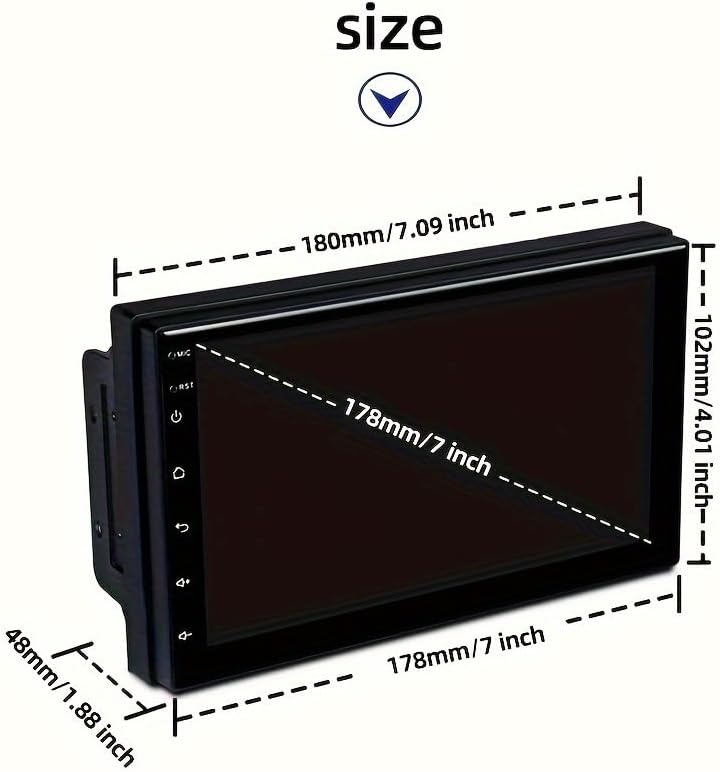
छवि १: Diagram showing the physical dimensions of the Ruancheng R1 unit. Measurements are provided in both millimeters and inches for width, height, and depth, indicating a 7-inch screen size.
3.2 तारिङ रेखाचित्र
Refer to the following diagram for proper wiring connections. Incorrect wiring can damage the unit or your vehicle's electrical system. If you are unsure, consult a professional installer.

छवि १: Comprehensive wiring diagram for the Ruancheng R1 car stereo. This diagram labels each wire by color and function, including connections for speakers, power (ACC, +12V, GND), reversing control, steering wheel control, antenna, and ampलाइफायर चालू।
- पावर जडान: Connect the yellow wire to constant +12V (B+), the red wire to accessory +12V (ACC), and the black wire to ground (GND).
- स्पिकर जडानहरू: Connect the speaker wires according to the diagram (Front Left, Front Right, Rear Left, Rear Right). Ensure correct polarity (+/-).
- GPS एन्टेना: GPS एन्टेनालाई युनिटको पछाडिको समर्पित पोर्टमा जडान गर्नुहोस् र यसलाई स्पष्ट स्थानमा माउन्ट गर्नुहोस्। view आकाश को।
- USB केबलहरू: बाह्य उपकरण जडानको लागि प्रदान गरिएका USB केबलहरू जडान गर्नुहोस्।
- रिभर्सिङ क्यामेरा (वैकल्पिक): If installing a backup camera (purchased separately), connect its video output to the 'Reversing line of sight' input and its power to the reverse light circuit.
- स्टेयरिङ ह्वील नियन्त्रण: Connect the steering wheel control wires (KEY1, KEY2) if your vehicle supports this feature. Configuration will be done in the system settings.
- आरसीए केबलहरू: Use the RCA cables for external amplifier connections or video output/input as needed.
५.२ सामान्य स्थापना चरणहरू
- कुनै पनि विद्युतीय काम सुरु गर्नु अघि गाडीको नकारात्मक ब्याट्री टर्मिनल विच्छेद गर्नुहोस्।
- Remove the existing car stereo or dashboard panel to access the mounting area.
- Connect all necessary wiring harnesses as per the wiring diagram (Image 3.2).
- Mount the Ruancheng R1 unit into the dashboard opening using the provided bracket screws.
- Carefully reassemble the dashboard panels.
- गाडीको नकारात्मक ब्याट्री टर्मिनल पुन: जडान गर्नुहोस्।
- Turn on the vehicle and test the unit's functionality.
4. सञ्चालन निर्देशनहरू
४.१ पावर अन/अफ र आधारभूत नेभिगेसन
- पावर अन: The unit will power on automatically when the vehicle's ignition is turned to ACC or ON.
- पावर अफ: गाडीको इग्निशन बन्द हुँदा युनिट स्वतः बन्द हुनेछ।
- टचस्क्रिन इन्टरफेस: Navigate through menus and applications by touching the icons on the 7-inch HD display. Swipe gestures are supported.
4.2 GPS नेभिगेसन
The unit comes with built-in GPS functionality. Ensure the GPS antenna is properly installed for optimal signal reception.
- मुख्य मेनुबाट नेभिगेसन अनुप्रयोग पहुँच गर्नुहोस्।
- अन-स्क्रिन किबोर्ड प्रयोग गरेर आफ्नो गन्तव्य इनपुट गर्नुहोस्।
- Follow the voice prompts and on-screen directions for turn-by-turn navigation.
- Maps can be updated via Wi-Fi or USB.
६.२ कारप्ले र एन्ड्रोइड अटो
The Ruancheng R1 supports both Apple CarPlay and Android Auto for seamless smartphone integration.
- जडान: Connect your smartphone to the unit via one of the USB ports.
- सक्रियता: The system should automatically detect and prompt you to activate CarPlay or Android Auto. Follow the on-screen instructions.
- विशेषताहरु: Access compatible apps such as navigation, music, messaging, and calls directly from the car stereo's display.
4.4 ब्लुटुथ जडान
ह्यान्ड्स-फ्री कलिङ र अडियो स्ट्रिमिङका लागि ब्लुटुथ मार्फत आफ्नो स्मार्टफोनलाई जोडा बनाउनुहोस्।
- कार स्टेरियोको ब्लुटुथ सेटिङहरूमा जानुहोस्।
- आफ्नो स्मार्टफोनमा ब्लुटुथ सक्षम गर्नुहोस् र उपलब्ध यन्त्रहरू खोज्नुहोस्।
- Select 'Ruancheng R1' (or similar device name) from the list on your phone.
- दुबै उपकरणहरूमा जोडी कोड पुष्टि गर्नुहोस्।
- एकपटक जोडिएपछि, तपाईंले वायरलेस रूपमा कलहरू गर्न/प्राप्त गर्न र अडियो स्ट्रिम गर्न सक्नुहुन्छ।
६.२ स्टेयरिङ ह्वील नियन्त्रण सिकाइ
यदि तपाईंको गाडीमा स्टेयरिङ ह्वील नियन्त्रणहरू छन् भने, तपाईं तिनीहरूलाई कार स्टेरियो सञ्चालन गर्न कन्फिगर गर्न सक्नुहुन्छ।

छवि १: Illustration of the steering wheel control learning process. This image shows a car's steering wheel with highlighted control buttons and arrows pointing to the car stereo, indicating how to program functions like volume adjustment and track skipping.
- प्रणाली मेनुमा रहेको 'स्टीयरिङ ह्वील नियन्त्रण' सेटिङहरूमा नेभिगेट गर्नुहोस्।
- Follow the on-screen prompts to assign functions (e.g., volume up/down, track skip, mode) to your vehicle's steering wheel buttons.
- Press and hold the desired button on your steering wheel, then select the corresponding function on the stereo's screen.
- सबै इच्छित बटनहरूको लागि दोहोर्याउनुहोस्।
5. मर्मतसम्भार
To ensure the longevity and optimal performance of your Ruancheng R1 car stereo, follow these maintenance guidelines:
- स्क्रिन सफा गर्दै: टचस्क्रिनलाई बिस्तारै पुछ्न नरम, लिन्ट-रहित कपडा प्रयोग गर्नुहोस्। जिद्दी दागहरूको लागि, थोरै घampकपडालाई पानी वा स्क्रिन-सेफ क्लिनरले पुछ्नुहोस्। कठोर रसायन वा घर्षण गर्ने सामग्रीहरूबाट बच्नुहोस्।
- सामान्य सफाई: युनिट र वरपरको ड्यासबोर्ड क्षेत्रलाई धुलो र फोहोरबाट मुक्त राख्नुहोस्। पुग्न गाह्रो क्षेत्रहरूको लागि नरम ब्रश वा कम्प्रेस्ड हावा प्रयोग गर्नुहोस्।
- सफ्टवेयर अपडेटहरू: प्रणाली सेटिङहरू वा निर्माताको माध्यमबाट समय-समयमा सफ्टवेयर अपडेटहरूको लागि जाँच गर्नुहोस्। webतपाईंसँग नवीनतम सुविधाहरू र बग समाधानहरू छन् भनी सुनिश्चित गर्न साइट।
- तापक्रम: लामो समयसम्म युनिटलाई अत्यधिक तापक्रममा नराख्नुहोस्।
T. समस्या निवारण
If you encounter issues with your Ruancheng R1, refer to the following common problems and solutions:
- कुनै शक्ति छैन:
- Check all power connections (constant +12V, ACC, Ground) as per the wiring diagram.
- स्टेरियोको लागि गाडीको फ्यूज अक्षुण्ण छ कि छैन भनी प्रमाणित गर्नुहोस्।
- कुनै आवाज छैन:
- स्पिकरका तारहरू सही रूपमा जडान भएका छन् र सर्ट सर्किट भएका छैनन् भनी सुनिश्चित गर्नुहोस्।
- भोल्युम स्तर र म्यूट सेटिङहरू जाँच गर्नुहोस्।
- यदि बाह्य प्रयोग गर्दै हुनुहुन्छ amplifier, verify its power and connections.
- GPS सिग्नल हराएको/गलत:
- GPS एन्टेना सुरक्षित रूपमा जडान गरिएको छ र स्पष्ट स्थानमा माउन्ट गरिएको छ भनी सुनिश्चित गर्नुहोस् view आकाश को।
- सिग्नलमा बाधा पुर्याउन सक्ने धातुका वस्तुहरूको नजिक एन्टेना नराख्नुहोस्।
- ब्लुटुथ जडान समस्याहरू:
- स्टेरियो र तपाईंको स्मार्टफोन दुवैमा ब्लुटुथ सक्षम छ भनी सुनिश्चित गर्नुहोस्।
- दुबै यन्त्रहरूमा अघिल्ला जोडीहरू मेटाउनुहोस् र पुन: जोडा बनाउने प्रयास गर्नुहोस्।
- आफ्नो फोन स्टेरियोको नजिक लैजानुहोस्।
- टचस्क्रिन अनुत्तरदायी:
- Perform a soft reset (refer to system settings for reset options, or turn off vehicle ignition and restart).
- स्क्रिन सफा र फोहोरमुक्त छ भनी सुनिश्चित गर्नुहोस्।
यी समाधानहरू प्रयास गरेपछि पनि समस्याहरू रहिरहेमा, कृपया ग्राहक समर्थनलाई सम्पर्क गर्नुहोस्।
7. निर्दिष्टीकरणहरू
Key technical specifications for the Ruancheng Android Car Stereo GPS Navigation System R1:
| सुविधा | निर्दिष्टीकरण |
|---|---|
| मोडेल नम्बर | R1 |
| अपरेटिङ सिस्टम | एन्ड्रोइड 12 |
| प्रोसेसर | 4-core, 1.8GHz |
| RAM | 4GB |
| रोम (आन्तरिक भण्डारण) | 64GB |
| डिस्प्ले साइज | १५.६ इन्च |
| प्रदर्शन प्रकार | HD टचस्क्रिन |
| जडान | Bluetooth, GPS, USB, Wi-Fi |
| विशेष सुविधाहरू | CarPlay Support, GPS Navigation |
| अडियो आउटपुट मोड | स्टेरियो |
| उत्पादन आयामहरू | ३.७ x २.२ x ०.८ इन्च (९४.० x ५५.४ x २०.१ मिमी) |
| वस्तुको वजन | 2.2 पाउन्ड |
8. वारेन्टी र समर्थन
The Ruancheng R1 Android Car Stereo comes with a 1-वर्ष निर्माता वारेन्टी खरिद मिति देखि। यो वारेन्टीले सामान्य प्रयोग अन्तर्गत सामग्री र कारीगरीमा दोषहरू समावेश गर्दछ।
For warranty claims, technical support, or any inquiries not covered in this manual, please contact your retailer or the manufacturer directly. Keep your proof of purchase for warranty validation.