
TELESIN PFK-EU-P1-MP-01-NEW
TELESIN Smartphone Grip Holder with Bluetooth Remote Control
Model: PFK-EU-P1-MP-01-NEW
परिचय
This user manual provides comprehensive instructions for the TELESIN 3-in-1 Smartphone Grip Holder. This versatile device combines a comfortable grip, an extendable selfie stick, and a stable table stand, enhanced with a detachable Bluetooth remote control. It is designed to transform your smartphone into a more capable camera, offering DSLR-like controls for photography and videography.

Image: The TELESIN Smartphone Camera Grip attached to a smartphone, illustrating its ergonomic design and how it enhances mobile photography.
प्याकेज सामग्री
कृपया तल सूचीबद्ध सबै वस्तुहरू तपाईंको प्याकेजमा समावेश छन् भनी प्रमाणित गर्नुहोस्:
- TELESIN Smartphone Grip Holder x 1
Note: Additional accessories such as tripods or external lights are not included unless specified.
उत्पादन समाप्त भयोview र सुविधाहरू
The TELESIN Smartphone Grip Holder is engineered for enhanced mobile content creation. Its key features include:
- 3-in-1 कार्यक्षमता: Functions as a comfortable handheld grip, an extendable selfie stick (up to 30cm), and a stable desktop stand.
- ब्लुटुथ रिमोट कन्ट्रोल: Detachable remote with a 10-meter range for stable, hands-free shooting.
- DSLR-like Controls: Half-press for autofocus, full press to shoot, and quick double-tap to switch between front and rear cameras.
- Zoom and Mode Switching: Joystick for precise zoom control and dedicated buttons for switching between photo, portrait, and video modes.
- विश्वव्यापी अनुकूलता: Compatible with 99% of smartphones, including iPhone and Android models.
- कम्प्याक्ट र हल्का वजन: Weighing only 120 grams, it is highly portable and fits easily into bags or pockets.
- १/४" स्क्रू माउन्ट: Allows attachment to standard tripods and other camera accessories.

Image: Visual representation of the product's versatile features, including its hidden selfie stick, remote control capability, desktop stand function, and compact, pocket-sized design.

Image: Diagram highlighting the multifunctional aspects of the camera grip, including instant mode switching, classic half-shutter focus, double-tap for camera swap, and quick zoom with lever operation, all controlled via Bluetooth.
सेटअप निर्देशनहरू
Follow these steps to properly install your smartphone into the grip holder. For safety, it is recommended to use your phone with a protective case.
- Cl खोल्नुहोस्amp: फोन cl तान्नुहोस्amp downwards to open it.
- Position Phone: Ensure the back of your phone is pressed tightly against the device for a secure fit.
- फोन घुसाउनुहोस्: Place your phone inside the opened clamp.
- सुरक्षित फोन: cl जारी गर्नुहोस्amp to securely hold your phone.

Image: A visual step-by-step guide demonstrating how to install a smartphone into the grip holder, emphasizing pulling the clamp, positioning the phone, inserting it, and securing it for a firm hold.
ब्लुटुथ जोडी गर्दै
To connect the Bluetooth remote control to your smartphone:
- Ensure the remote control has power (1 A battery included).
- Turn on the remote control (if applicable, usually by pressing and holding the shutter button).
- आफ्नो स्मार्टफोनमा, ब्लुटुथ सेटिङहरूमा जानुहोस्।
- खोज्नुहोस् available devices and select "TELESIN" or a similar device name.
- Once paired, the remote is ready for use.
Note: For first-time connection with iPhones, special setup may be required. Please refer to the manufacturer's website or contact customer service for detailed instructions if you encounter issues.
सञ्चालन निर्देशनहरू
Using the Shutter Button and Controls
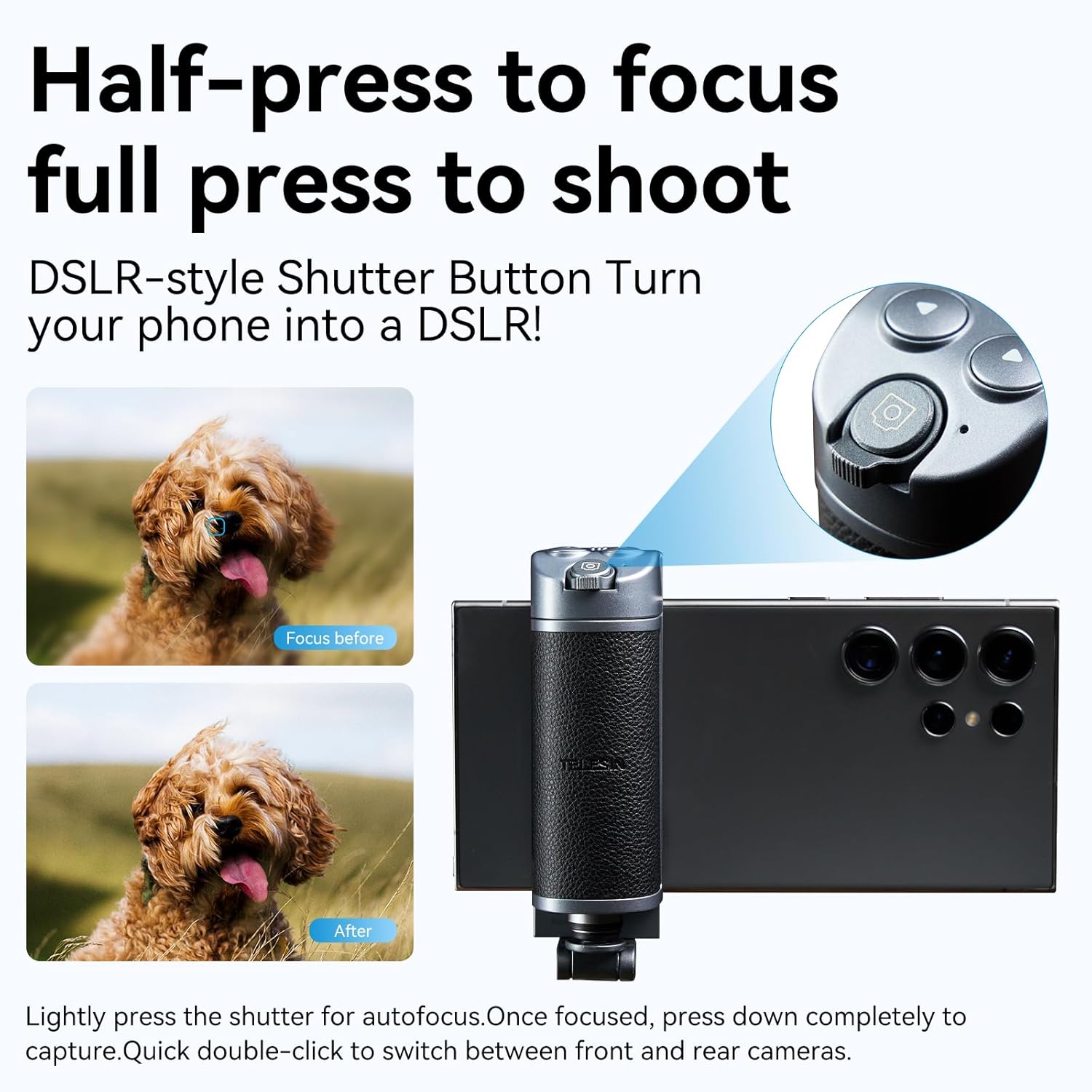
Image: Illustration of the DSLR-style shutter button, showing how a half-press activates autofocus and a full press captures the image. Also indicates double-click for camera switching.
- अटोफोकस: Lightly press the main shutter button (half-press) to activate autofocus, similar to a DSLR camera.
- फोटो/भिडियो खिच्नुहोस्: Once focused, press the shutter button down completely to capture a photo or start/stop video recording.
- क्यामेराहरू स्विच गर्नुहोस्: Double-click the shutter button to quickly switch between your smartphone's front and rear cameras.
- जुम नियन्त्रण: Use the joystick or lever switch on the remote to precisely zoom in or out (telephoto or wide-angle mode).
- मोड स्विचिङ: Use the left/right buttons on the remote to switch between different camera modes such as Photo, Portrait, and Video, compatible with your phone's native camera functions.

Image: Demonstrates one-handed operation, highlighting the lever switch for quick control over telephoto and ultra-wide zoom functions.
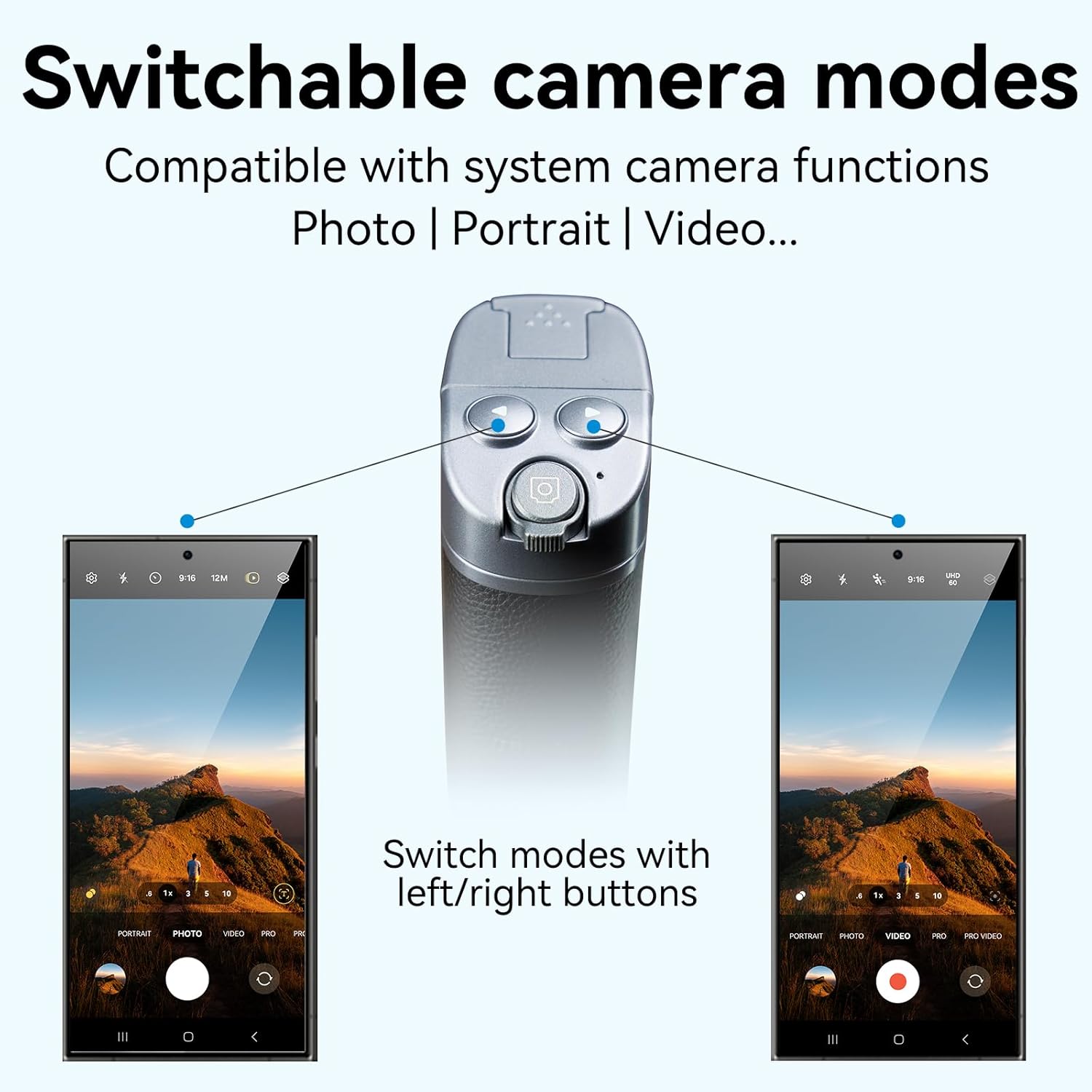
Image: Illustrates how the left and right buttons on the grip allow users to switch between various camera modes like Photo, Portrait, and Video, integrating seamlessly with the smartphone's native camera app.
सेल्फी स्टिकको रूपमा प्रयोग गर्दै
The grip features a hidden extendable rod that transforms it into a selfie stick:
- Gently pull the top section of the grip upwards to extend the selfie stick. It can extend up to 30cm.
- Adjust the angle of your phone holder (360° rotation, 180° tilt) for the desired shot.
- Use the Bluetooth remote for convenient hands-free capture.

Image: Depicts the hidden selfie stick functionality, showing its extendable length of 30cm and the ability to adjust the phone horizontally and vertically with 360° rotation and 180° tilt for flexible shooting angles.
Using as a Desktop Stand
The base of the grip can be unfolded to create a stable desktop stand:
- Unfold the bottom section of the grip to form a tripod-like base.
- स्ट्यान्डलाई समतल, स्थिर सतहमा राख्नुहोस्।
- Ideal for video calls, watching content, or stable time-lapse photography.

Image: A composite image showing the TELESIN grip in its three primary modes: as a compact handheld grip, extended as a selfie stick with a smartphone, and folded to serve as a stable desktop stand.
मर्मतसम्भार
To ensure the longevity and optimal performance of your TELESIN Smartphone Grip Holder, please follow these maintenance guidelines:
- सरसफाई: नरम, सुख्खा कपडाले उपकरण पुछ्नुहोस्। घर्षण गर्ने क्लीनर वा घोलकहरू प्रयोग नगर्नुहोस्, किनकि तिनीहरूले सतहलाई क्षति पुर्याउन सक्छन्।
- भण्डारण: ग्रिपलाई प्रत्यक्ष घाम र अत्यधिक तापक्रमबाट टाढा चिसो, सुख्खा ठाउँमा भण्डार गर्नुहोस्।
- ब्याट्री: The remote control uses 1 A battery. Replace the battery when performance degrades. Ensure correct polarity when inserting.
- पानीबाट बच्नुहोस्: यो उपकरण पानी प्रतिरोधी छैन। पानी वा उच्च आर्द्रताको सम्पर्कबाट बच्नुहोस्।
- हेरचाह संग ह्यान्डल: Avoid dropping the device or subjecting it to strong impacts, which could damage internal components or the mechanical parts.
समस्या निवारण
If you encounter any issues with your TELESIN Smartphone Grip Holder, please refer to the following common problems and solutions:
| समस्या | सम्भावित कारण | समाधान |
|---|---|---|
| Remote control not pairing/connecting. | Battery low or dead; Bluetooth not enabled on phone; remote not in pairing mode; interference. | Replace the battery. Ensure Bluetooth is on and visible. Press and hold the shutter button on the remote to enter pairing mode. Move closer to the phone. |
| Shutter button or zoom not working. | Not properly paired; app compatibility issue; phone settings. | Re-pair the remote. Ensure your phone's camera app is active and supports external controls. Check phone settings for any accessibility or zoom features that might interfere (e.g., screen zoom on iPhone). |
| Difficulty inserting/removing phone. | Phone case too thick; incorrect insertion angle. | Ensure you pull the clamp fully open. Try adjusting the phone's angle. If using a very thick case, it might need to be removed for easier insertion, though a case is recommended for safety. |
| Selfie stick extension is stiff. | धुलो वा फोहोर; स्नेहनको अभाव। | Clean the extending parts with a soft, dry cloth. Do not apply lubricants unless specifically recommended by the manufacturer. |
If the problem persists after trying these solutions, please contact TELESIN customer support for further assistance.
निर्दिष्टीकरणहरू
| सुविधा | विवरण |
|---|---|
| मोडेल नम्बर | PFK-EU-P1-MP-01-NEW |
| ब्रान्ड | टेलिसिन |
| रङ | कालो + चाँदी |
| प्याकेज आयामहरू | ३७ x १७ x १७ सेमी |
| सामग्री | ABS+PC+एल्युमिनियम मिश्र धातु |
| लम्बाइ घटाउनुहोस् | 100mm |
| विस्तारित लम्बाइ | 300mm |
| Clamp साइज | ०.१-०.३५ मिमी |
| उत्पादन वजन | 120 ± २ जी |
| ब्याट्री क्षमता (रिमोट) | २६००mAh (१ A ब्याट्री समावेश गरिएको) |
| चार्ज इन्टरफेस | USB-C |
| मिल्दो यन्त्रहरू | स्मार्टफोनहरू (आईफोन, एन्ड्रोइड) |

Image: A detailed diagram illustrating the product's dimensions, including its collapsed length (100mm), extended length (300mm), and clamp size (67-95mm), along with material and weight specifications.
वारेन्टी र समर्थन
उत्पादन वारेन्टी: This TELESIN product comes with a 1-year warranty from the date of purchase. This warranty covers manufacturing defects and material flaws under normal use. It does not cover damage caused by misuse, accidents, unauthorized modifications, or improper maintenance.
ग्राहक समर्थन: For technical assistance, warranty claims, or any questions regarding your TELESIN Smartphone Grip Holder, please contact TELESIN customer support. You can typically find contact information on the official TELESIN webसाइट वा तपाईंले उत्पादन खरिद गर्नुभएको खुद्रा विक्रेता मार्फत।
बिक्रेता जानकारी: This product is sold by TELESIN Shop.
For more information, visit the official TELESIN store on Amazon: TELESIN Store
Ask a question about this manual
Ask about setup, troubleshooting, compatibility, parts, safety, or missing instructions. Manuals+ will review the question and use this page’s manual context to help answer it.