
1. परिचय
This manual provides detailed instructions for the setup, operation, and maintenance of your HISTTON H4-T Industrial Mini PC. Please read this manual thoroughly before using the device to ensure proper functionality and safety.
2. सुरक्षा जानकारी
- बिजुली आपूर्ति भोल्युम सुनिश्चित गर्नुहोस्tage यन्त्र आवश्यकताहरूसँग मेल खान्छ।
- उपकरणलाई आर्द्रता, अत्यधिक तापक्रम, वा प्रत्यक्ष सूर्यको प्रकाशमा नदेखाउनुहोस्।
- भेन्टिलेसन खुल्ला अवरुद्ध नगर्नुहोस्।
- उपकरण आफैं खोल्ने वा मर्मत गर्ने प्रयास नगर्नुहोस्। योग्य सेवा कर्मचारीहरूलाई सन्दर्भ गर्नुहोस्।
- यन्त्रलाई बलियो चुम्बकीय क्षेत्रहरूबाट टाढा राख्नुहोस्।
3. प्याकेज सामग्री
प्याकेजमा सबै वस्तुहरू छन् भनी प्रमाणित गर्नुहोस्:
- 1 x HISTTON Mini PC
- १ x पावर एडाप्टर
- १ x प्रयोगकर्ता पुस्तिका (यो कागजात)
- 1 x HDMI केबल
- Screws (for mounting/storage installation)
- वाइफाइ एन्टेना
- VESA Mount (if included with specific models)
- SATA Cable (for 2.5-inch drive installation)

4. उत्पादन समाप्तview
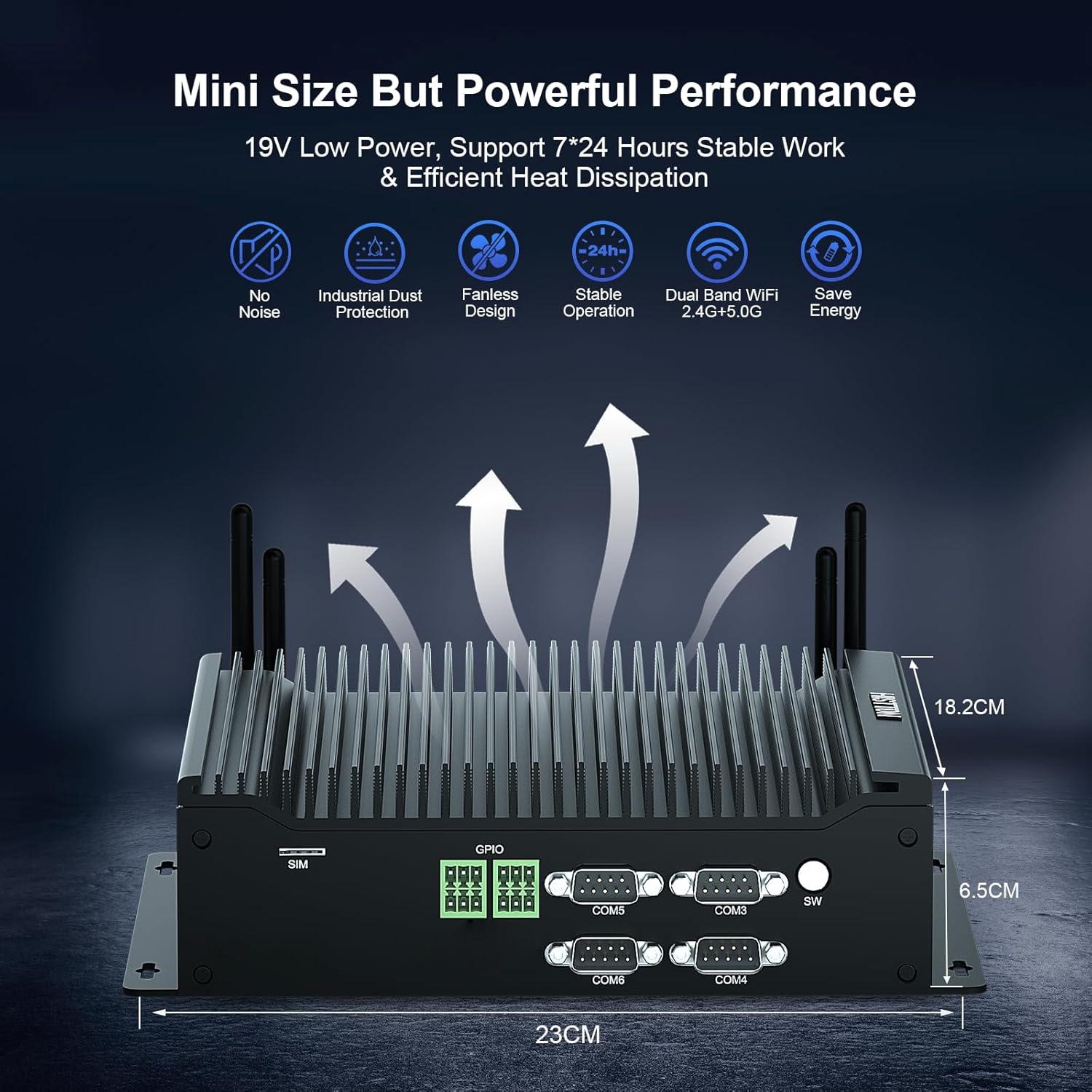
The HISTTON H4-T Mini PC is a compact, fanless industrial computer designed for various applications requiring stable performance and extensive connectivity. It features an Intel Core i7-10710U processor and supports multiple display outputs.
4.1 अगाडि र पछाडि प्यानलहरू

The device features a comprehensive set of ports for various industrial and general computing needs. These include multiple USB ports, LAN ports, COM ports, and video outputs.
१.१ मुख्य विशेषताहरू
- प्रोसेसर: Intel Core i7-10710U (10th Gen) with up to 4.70 GHz turbo frequency.
- ग्राफिक्स: Intel UHD Graphics for 10th Gen Processors, supporting 4K resolution.
- मेमोरी: Dual DDR4 SO-DIMM slots, expandable up to 64GB.
- भण्डारण: M.2 2280 NVME PCIe 3.0x4 / SATA 3 SSD slot and a 2.5-inch SATA HDD/SSD bay.
- प्रदर्शन आउटपुट: HD, DisplayPort (DP), and Type-C for triple 4K display support.
- नेटवर्क: 2 x RJ45 Intel I210/211 Gigabit LAN, Dual-band WiFi 5 (2.4G+5.0G), Bluetooth 4.2.
- जडान: 4 x USB 3.0, 4 x USB 2.0, 6 x DB9pin COM ports (configurable for RS232/RS422/RS485), 2 x 6pin GPIO, 1 x SIM card slot.
- चिसो: Fanless design for silent operation and industrial dust protection.
- सञ्चालन प्रणाली: Pre-installed Windows 11 Pro (64-bit, activated) with support for Ubuntu.


5. सेटअप निर्देशनहरू
४.२.१ जडान गर्ने परिधीयहरू
- प्रदर्शन जडान गर्नुहोस्: Use the provided HDMI cable or a DisplayPort/Type-C cable to connect your monitor(s) to the Mini PC. The device supports up to three 4K displays simultaneously.
- किबोर्ड र माउस जडान गर्नुहोस्: Plug your USB keyboard and mouse into any available USB ports (USB 2.0 or USB 3.0).
- नेटवर्क जडान गर्नुहोस्: For a wired connection, connect an Ethernet cable to one of the RJ45 LAN ports. For wireless, attach the included WiFi antennas to the designated ports.
- अडियो जडान गर्नुहोस्: If using external speakers or headphones, connect them to the SPK (speaker) port. A microphone can be connected to the MIC port.

5.2 पावर अन
- पावर एडाप्टर जडान गर्नुहोस्: Plug the power adapter into the DC 19V 5A input port on the Mini PC, then plug the adapter into a power outlet.
- पावर बटन: Press the power button located on the front panel to turn on the Mini PC.
- The system will boot into Windows 11 Pro. Follow the on-screen instructions for initial setup if prompted.
6. सञ्चालन निर्देशनहरू
Ope अपरेटिंग सिस्टम
Your HISTTON H4-T Mini PC comes with Windows 11 Pro (64-bit) pre-installed and activated. It also supports other operating systems like Ubuntu, allowing for flexible deployment in various environments.
- विन्डोज ११ प्रो: Utilize standard Windows features for productivity, multimedia, and internet browsing.
- Ubuntu Support: For users preferring Linux-based systems, the hardware is compatible with Ubuntu installations. Refer to Ubuntu's official documentation for installation procedures.
४.४ नेटवर्क जडान
- तार सहित ल्यान: The two Gigabit Ethernet ports provide stable and high-speed wired network access.
- Wireless (WiFi & Bluetooth): The dual-band WiFi 5 (2.4G+5.0G) and Bluetooth 4.2 modules enable wireless internet access and connection to Bluetooth peripherals. Ensure antennas are securely attached for optimal performance.

6.3 Industrial Features
The H4-T is designed for industrial applications, offering robust connectivity:
- COM पोर्टहरू: Six DB9pin COM ports support RS232, with four of them configurable for RS422/RS485, suitable for connecting industrial control devices.
- GPIO: Two 6pin GPIO interfaces provide programmable input/output capabilities for custom applications.
- सिम कार्ड स्लट: Supports 4G/5G modules (module not included by default) for mobile network connectivity in remote locations.
7. मर्मतसम्भार
The fanless design of the HISTTON H4-T Mini PC significantly reduces maintenance requirements by eliminating moving parts and minimizing dust accumulation. However, regular care is still recommended.
- सरसफाई: Periodically wipe the exterior of the Mini PC with a soft, dry cloth. Avoid using liquid cleaners or solvents.
- सफ्टवेयर अपडेटहरू: इष्टतम कार्यसम्पादन र सुरक्षा सुनिश्चित गर्न आफ्नो अपरेटिङ सिस्टम र ड्राइभरहरूलाई अद्यावधिक राख्नुहोस्।
- वातावरणीय अवस्था: Ensure the device is operated within recommended temperature and humidity ranges to prolong its lifespan.
- भण्डारण विस्तार: If installing additional storage (2.5-inch HDD/SSD or M.2 SSD), ensure the device is powered off and disconnected from power. Follow proper anti-static procedures.
T. समस्या निवारण
If you encounter issues with your HISTTON H4-T Mini PC, refer to the following common problems and solutions:
| समस्या | सम्भावित कारण | समाधान |
|---|---|---|
| पावर छैन / उपकरण सक्रिय हुँदैन | Power adapter not connected or faulty; Power outlet issue; Power button not pressed correctly. | Ensure power adapter is securely connected to both the PC and a working power outlet. Try a different outlet. Press the power button firmly. |
| मनिटरमा डिस्प्ले छैन | Display cable loose or faulty; Incorrect input selected on monitor; Monitor off or faulty. | Check display cable connections. Ensure monitor is on and set to the correct input source (HDMI, DP, Type-C). Test with a different monitor or cable if possible. |
| इन्टरनेट जडान छैन (तारयुक्त) | Ethernet cable loose or faulty; Router/modem issue; Network driver issue. | Verify Ethernet cable is securely connected. Restart your router/modem. Check network adapter status in OS. |
| इन्टरनेट जडान छैन (वायरलेस) | WiFi antennas not connected; WiFi disabled; Incorrect WiFi password; Router issue. | Ensure WiFi antennas are attached. Check WiFi settings in OS. Verify WiFi password. Restart your router. |
| Peripherals (USB devices) not working | Loose connection; Driver issue; Faulty peripheral. | Try a different USB port. Reinstall or update drivers for the peripheral. Test the peripheral on another computer. |
9. निर्दिष्टीकरणहरू
| सुविधा | विवरण |
|---|---|
| मोडेल नाम | H4-T को लागि सोधपुछ पेश गर्नुहोस्, हामी तपाईंलाई XNUMX घण्टामा सम्पर्क गर्नेछौं। |
| प्रोसेसर | Intel Core i7-10710U (10th Gen), 6 Cores, 12 Threads, 12M Cache, up to 4.70 GHz |
| ग्राफिक्स कोप्रोसेसर | १० औं जेन इंटेल प्रोसेसरहरूको लागि इंटेल UHD ग्राफिक्स |
| RAM | 32GB DDR4 SO-DIMM (Expandable up to 64GB) |
| हार्ड ड्राइभ | 512GB M.2 NVMe SSD (Supports M.2 2280 NVME PCIe 3.0x4 / SATA 3 SSD and 2.5 inch SATA HDD/SSD) |
| अपरेटिङ सिस्टम | Windows 11 Pro (64-bit, activated), Supports Ubuntu |
| आउटपुट प्रदर्शन गर्नुहोस् | HD, DisplayPort (DP), Type-C (Supports Triple 4K Display) |
| LAN | 2 x RJ45 Intel I210/211 Gigabit LAN |
| ताररहित जडान | Dual-band WiFi 5 (2.4G+5.0G), Bluetooth 4.2 |
| USB पोर्टहरू | १ x USB 4.०, १ x USB २.० |
| COM पोर्टहरू | 6 x DB9pin (2 x RS232, 4 x RS422/RS485 configurable) |
| अन्य इन्टरफेस | 2 x 6pin GPIO, 1 x SIM card slot, 1 x SPK, 1 x MIC |
| विद्युत आपूर्ति | DC19V 5A |
| पावर खपत | 15W-20W |
| चिसो | फ्यानलेस डिजाइन |
| आयाम (LxWxH) | २.३ x २.१७ x २.३६ इन्च (५.८ x ५.५ x ६ सेमी) |
| वस्तुको वजन | ०.६६ पाउण्ड (लगभग ०.३२ किलोग्राम) |
10. वारेन्टी जानकारी
HISTTON products are covered by a standard manufacturer's warranty. Please refer to the warranty card included with your product or visit the official HISTTON webविस्तृत वारेन्टी नियम र सर्तहरूको लागि साइट। वारेन्टी दावीहरूको लागि आफ्नो खरिदको प्रमाण राख्नुहोस्।
11. ग्राहक समर्थन
For technical assistance, troubleshooting, or any questions regarding your HISTTON H4-T Mini PC, please contact HISTTON customer support. Contact information can typically be found on the official HISTTON webसाइट वा प्याकेजिङ सामग्रीहरूमा।
अनलाइन स्रोतहरू: For additional support and driver downloads, visit the official HISTTON webसाइट।