परिचय
This manual provides detailed instructions for the setup, operation, and maintenance of your EXknight Mini Keyboard M4. This compact wireless Bluetooth keyboard is designed for compatibility with various devices, including smartphones, tablets, and PCs running iOS, Android, and Windows operating systems. Its portable design and responsive keys aim to enhance your typing experience across different environments.
उत्पादन समाप्त भयोview
The EXknight Mini Keyboard M4 is a compact and lightweight input device. Below are visual representations of the product and its key features.

चित्र १: The EXknight Mini Keyboard M4, demonstrating its small form factor when held in an average adult hand.
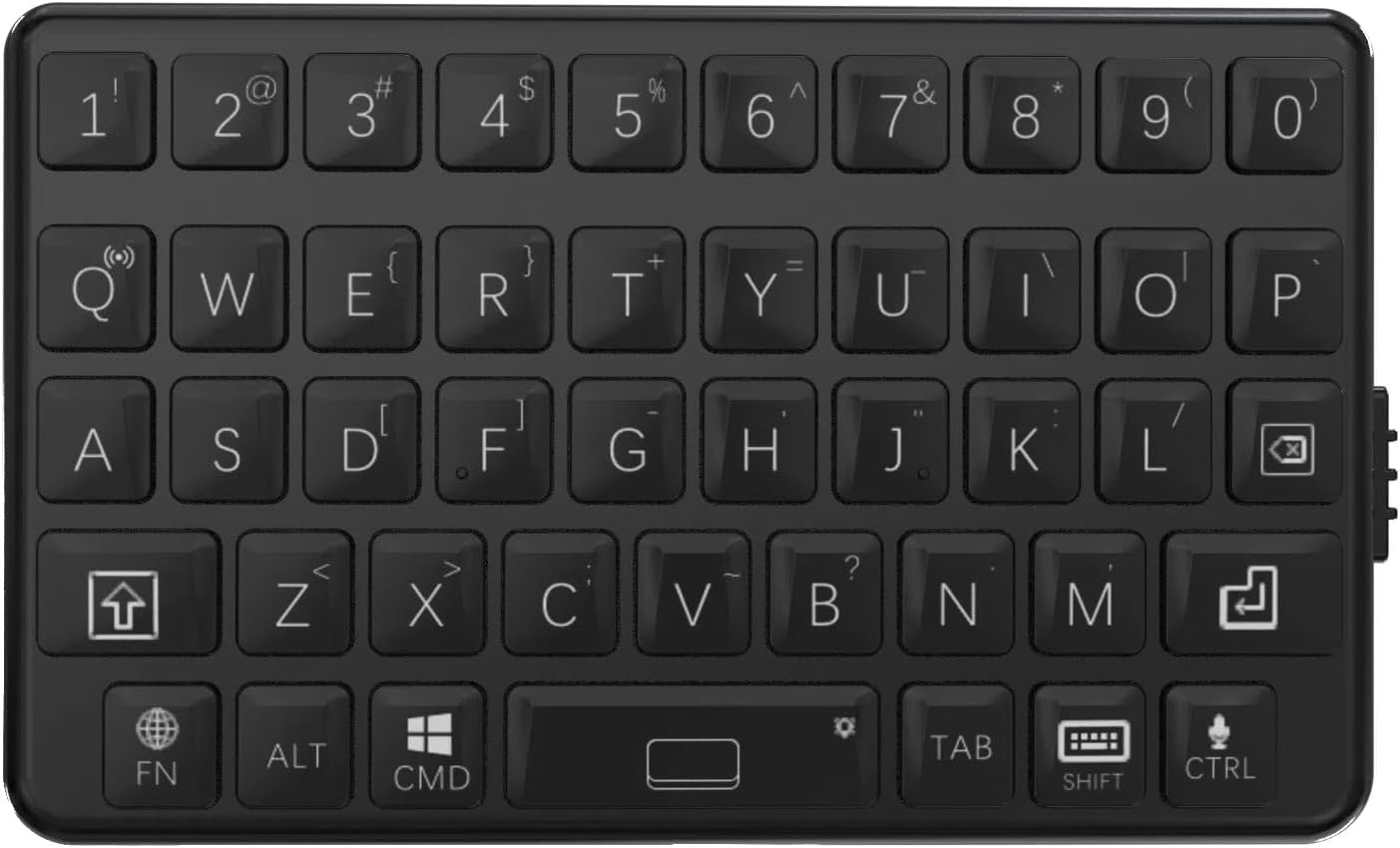
चित्र १: एक विस्तृत view of the keyboard's QWERTY layout, including function keys and special characters.

चित्र १: The physical dimensions of the keyboard, measuring 7.5 cm in length and 4.5 cm in width.

चित्र १: Key design principles of the M4 Mini Keyboard: Compact Design, Portable, and Classic Tactile Keys. It emphasizes efficient space utilization, ease of transport, and a comfortable typing experience.

चित्र १: पक्ष view of the EXknight Mini Keyboard M4, illustrating the location of the charging port.
निर्दिष्टीकरणहरू
| सुविधा | विवरण |
|---|---|
| ब्रान्ड | EXknight |
| मोडेल नम्बर | M4 |
| उत्पादन आयामहरू | ३७ x १७ x १७ सेमी |
| वस्तुको वजन | 40 ग्राम |
| जडान प्रविधि | ब्लुटुथ 5.0 |
| मिल्दो यन्त्रहरू | Smartphones, Tablets, Laptops, PCs (iOS, Android, Windows) |
| किबोर्ड लेआउट | QWERTY |
| किबोर्ड विवरण | झिल्ली |
| विशेष सुविधाहरू | Portable, Lightweight, Ultra-low latency (4ms) |
| ब्याट्री प्रकार | 1 Non-standard Battery (included, contained in equipment) |
| ब्याट्री जीवन | Up to 12 hours continuous use on a single charge |
| सामग्री | ABS |
सेटअप
1. किबोर्ड चार्ज गर्दै
Before initial use, fully charge the EXknight Mini Keyboard M4. Connect the provided charging cable to the keyboard's charging port (refer to Figure 5 for port location) and to a standard USB power source. The charging indicator light will illuminate during charging and typically turn off or change color when fully charged. A full charge takes approximately 2 hours and provides up to 12 hours of continuous use.
२ ब्लुटुथ पेयरि।
- किबोर्ड पर्याप्त चार्ज भएको सुनिश्चित गर्नुहोस्।
- Turn on the keyboard using the power switch (location typically on the side or back). A status indicator light may flash, indicating it's in pairing mode.
- On your device (smartphone, tablet, PC), navigate to the Bluetooth settings.
- ब्लुटुथ सक्षम गर्नुहोस् र उपलब्ध यन्त्रहरू खोज्नुहोस्।
- Select "EXknight M4" or a similar name from the list of found devices.
- If prompted, enter the pairing code displayed on your device into the EXknight Mini Keyboard M4 and press प्रविष्ट गर्नुहोस्.
- Once paired, the keyboard's indicator light will typically stop flashing and remain solid, or turn off, indicating a successful connection.
The keyboard features automatic device recognition for iOS, Android, and Windows, eliminating the need for drivers.
सञ्चालन निर्देशनहरू
आधारभूत टाइपिङ
The EXknight Mini Keyboard M4 features a QWERTY layout with a tactile key feel for comfortable and accurate typing. Press keys firmly for optimal response.
Function Keys and Special Characters
- Fn कुञ्जी: द Fn key is used in combination with other keys to access secondary functions or special characters. For example, to input symbols not directly printed on the main keycap, press and hold Fn and then press the corresponding key.
- ओएस स्विचिङ: The keyboard automatically recognizes the operating system (iOS/Android/Windows). However, if manual switching is needed, specific key combinations might be available (refer to the keyboard's keycap markings for OS-specific function keys, e.g., Fn + Q iOS को लागि, Fn + W एन्ड्रोइडको लागि, Fn + E विन्डोजको लागि)।
- ब्याकलाइट नियन्त्रण: Some models may feature a backlight. To activate or adjust the backlight, press and hold the स्पेस key. Note that backlight functionality may vary by product batch, with some units having full backlight and others only partial (e.g., top two rows).
- Capital Letters: To type capital letters, use the शिफ्ट key as you would on a standard keyboard.
- भाषा परिवर्तन: To switch between input languages (e.g., English and Japanese), press the शिफ्ट द्रुत उत्तराधिकारमा दुई पटक कुञ्जी।
Note: Due to the compact design, some keys may have multiple functions. Refer to the keycap legends for all available functions. For Windows users, some CTRL key combinations might behave differently compared to a full-sized keyboard.
मर्मतसम्भार
- सरसफाई: किबोर्डको सतह सफा गर्न नरम, सुख्खा कपडा प्रयोग गर्नुहोस्। जिद्दी फोहोरको लागि, थोरै घamp किबोर्डमा तरल पदार्थ नपस्ने सुनिश्चित गर्दै हल्का साबुन भएको कपडा प्रयोग गर्न सकिन्छ। कठोर रसायन वा घर्षण गर्ने क्लिनरहरू प्रयोग नगर्नुहोस्।
- भण्डारण: किबोर्डलाई प्रत्यक्ष घाम र अत्यधिक तापक्रमबाट टाढा चिसो, सुख्खा ठाउँमा राख्नुहोस्।
- ब्याट्री केयर: ब्याट्रीको आयु बढाउनको लागि, किबोर्डलाई बारम्बार पूर्ण रूपमा चार्ज नगर्नुहोस्। निरन्तर प्रयोग नगरे पनि नियमित रूपमा चार्ज गर्नुहोस्।
समस्या निवारण
- Keyboard does not turn on:
- Ensure the keyboard is fully charged. Connect it to a power source and allow it to charge for at least 30 minutes before attempting to turn it on again.
- ब्लुटुथ मार्फत जोडा बनाउन असमर्थ:
- Make sure Bluetooth is enabled on your device and the keyboard is in pairing mode.
- किबोर्ड प्रभावकारी ब्लुटुथ दायरा (सामान्यतया १० मिटर) भित्र छ भनी सुनिश्चित गर्नुहोस्।
- आफ्नो यन्त्रको ब्लुटुथ सेटिङहरूबाट यन्त्र बिर्सनुहोस् र फेरि जोडा बनाउने प्रयास गर्नुहोस्।
- किबोर्ड र आफ्नो यन्त्र दुबै रिस्टार्ट गर्नुहोस्।
- Keys are not responding or typing incorrectly:
- Check the battery level. Low battery can affect performance.
- Ensure the keyboard is correctly paired and connected to your device.
- Verify that the correct operating system mode is selected on the keyboard (if applicable).
- साँचोहरू वरिपरि भएका सबै फोहोरहरू सफा गर्नुहोस्।
- Backlight not working or only partially lit:
- थिच्नुहोस् र होल्ड गर्नुहोस् स्पेस key to activate or cycle through backlight modes.
- Ensure the keyboard has sufficient battery charge, as backlighting consumes power.
- Note that backlight functionality may vary by product batch; some units may have full backlight, while others may only illuminate specific sections (e.g., top two rows).
वारेन्टी र समर्थन
For warranty information and technical support, please refer to the documentation included with your purchase or visit the official EXknight website. Contact information for customer service is typically available on the product packaging or the brand's online presence.
थप सहयोगको लागि, तपाईंले उत्पादन खरिद गरिएको प्लेटफर्म मार्फत सिधै विक्रेतालाई सम्पर्क गर्न सक्नुहुन्छ।