
1. परिचय
This manual provides essential information for the safe and efficient operation of your Thomson 43FT2S15 FHD LED Smart TV. Please read this manual thoroughly before using the television and retain it for future reference.
2. सुरक्षा जानकारी
आगो, बिजुलीको झट्का र चोटपटकको जोखिम कम गर्न यो उत्पादन प्रयोग गर्दा सधैं आधारभूत सुरक्षा सावधानीहरू पालना गर्नुहोस्।
- टिभीलाई वर्षा वा चिसोमा नदेखाउनुहोस्।
- वेंटिलेसन उद्घाटन रोक्नुहोस्।
- पावर कर्डको लागि उचित ग्राउन्डिङ सुनिश्चित गर्नुहोस्।
- टिभीलाई अस्थिर कार्ट, स्ट्यान्ड, ट्राइपड, कोष्ठक वा टेबलमा नराख्नुहोस्।
- चट्याङ पर्दा वा लामो समयसम्म प्रयोग नगरिएको बेला टिभी अनप्लग गर्नुहोस्।
- योग्य सेवा कर्मचारीहरूलाई सबै सेवाहरू सन्दर्भ गर्नुहोस्।
3. प्याकेज सामग्री
तल सूचीबद्ध सबै वस्तुहरू तपाईंको प्याकेजमा समावेश छन् भनी प्रमाणित गर्नुहोस्:
- Thomson 43FT2S15 FHD LED Smart TV
- पावर एडाप्टर
- रिमोट कन्ट्रोल
- उपयोगकर्ता पुस्तिका (यो कागजात)
- वारेन्टी कार्ड

छवि: अगाडि view of the Thomson 43FT2S15 Smart TV.
4. सेटअप
२.२ भौतिक स्थापना
The Thomson 43FT2S15 TV is designed for table mounting. Ensure the TV is placed on a stable, flat surface.

Image: Diagram showing the dimensions of the Thomson 43FT2S15 Smart TV. The screen size is 109 cm (43 inches) diagonally, with a width of 95 cm and height of 60 cm (including stand). The depth is 6 cm.
आयाम (W x H x D): 95 cm x 60 cm x 6 cm (without stand, depth is 6 cm). The screen diagonal is 109 cm (43 inches).
4.2 जडान उपकरणहरू
आफ्नो बाह्य उपकरणहरू टिभीमा उपयुक्त पोर्टहरूमा जडान गर्नुहोस्। पोर्ट स्थानहरूको लागि तलको रेखाचित्र हेर्नुहोस्।
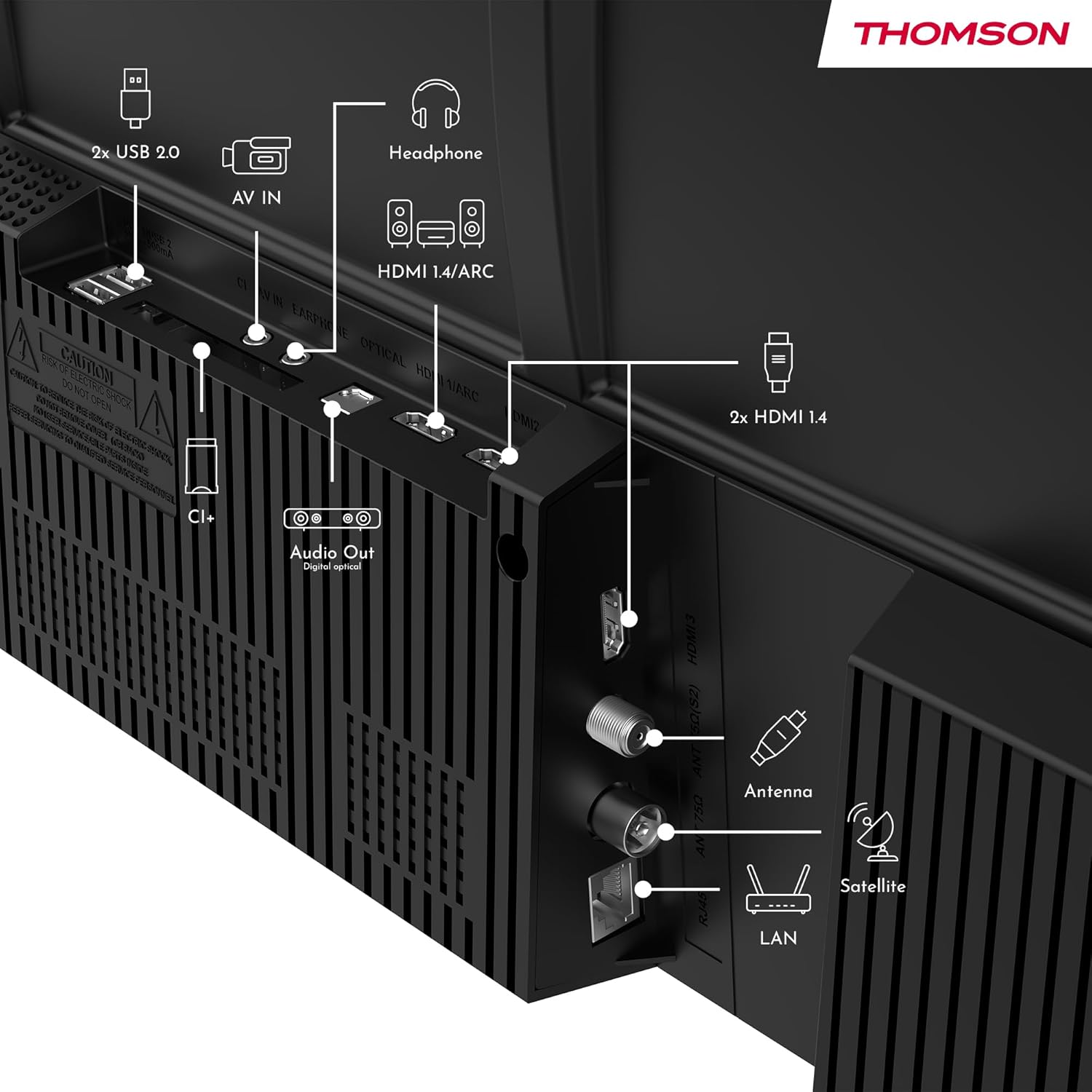
छवि: पछाडि view of the Thomson 43FT2S15 Smart TV showing various connection ports. These include 2x USB 2.0, AV IN, Headphone out, HDMI 1.4/ARC, Optical Audio Out, CI+, Antenna (DVB-T2/C), Satellite (DVB-S2), and LAN (Ethernet).
- HDMI: Connect external devices like Blu-ray players, game consoles, or set-top boxes. The TV has 2 HDMI 1.4 ports, one with ARC support.
- USB: For connecting USB storage devices. The TV has 2 USB 2.0 ports.
- एन्टेना/स्याटेलाइट: Connect your terrestrial or satellite antenna for live TV.
- ल्यान (इथरनेट): तारयुक्त इन्टरनेट जडानको लागि।
- Wi-Fi: वायरलेस इन्टरनेट जडानको लागि।
- ब्लुटुथ: मिल्दो वायरलेस सामानहरू जडान गर्नको लागि।
- अडियो आउट (अप्टिकल): बाह्य ध्वनि प्रणालीमा जडानको लागि।
- हेडफोन: हेडफोन जडानको लागि।
- CI+ स्लट: For inserting a Conditional Access Module (CAM) for encrypted channels.
5. सञ्चालन निर्देशनहरू
५.१ पावर अन/अफ
Connect the power adapter to the TV and a power outlet. Press the power button on the remote control to turn the TV on or off.
5.2 TiVo OS and Smart Features
Your Thomson Smart TV is powered by TiVo OS, which integrates live TV, streaming applications, and on-demand services into a single, intuitive interface. Personalized recommendations help you discover new content.

Image: The Thomson Smart TV displaying the TiVo OS interface with various streaming apps like Netflix, Canal+, Prime Video, YouTube, and Disney+.
5.3 आवाज नियन्त्रण
Use the TiVo Voice Control feature to navigate channels, open applications, or search for content across different platforms using voice commands. The remote control includes a microphone for this function.

Image: The Thomson Smart TV remote control highlighting the voice control microphone, backlit buttons, and direct access buttons for streaming services.
5.4 Wireless Display
Mirror content from your smartphone, tablet, or laptop to the TV screen using the Wireless Display function. This allows for easy sharing of videos, photos, and applications.
5.5 Audio and Video Enhancements
- डल्बी अडियो: Experience enhanced sound quality with Dolby Audio, providing clear dialogue and immersive, multi-dimensional effects.

Image: A Thomson Smart TV displaying content with visual representations of sound waves, indicating the Dolby Audio feature.
- HDR10: Enjoy sharper contrast and lifelike colors with HDR10 technology, revealing details in both bright highlights and deep shadows.

Image: A split-screen comparison showing the difference between SDR (Standard Dynamic Range) and HDR10 (High Dynamic Range) image quality on a Thomson Smart TV, demonstrating improved contrast and color.
२०१२ रिमोट कन्ट्रोल
The ergonomic remote control features backlit buttons for easy navigation in low light conditions. It also includes direct access buttons for popular streaming services such as Netflix, YouTube, Prime Video, Disney+, and Canal+.
6. मर्मतसम्भार
तपाईंको टिभीको दीर्घायु र इष्टतम प्रदर्शन सुनिश्चित गर्न, यी मर्मत दिशानिर्देशहरू पालना गर्नुहोस्:
- स्क्रिन सफा गर्दै: नरम, लिन्ट-रहित कपडाले स्क्रिनलाई बिस्तारै पुछ्नुहोस्। जिद्दी दागहरूको लागि, टिभीहरूको लागि विशेष रूपमा डिजाइन गरिएको स्क्रिन क्लिनर प्रयोग गर्नुहोस्, जुन कपडामा लगाइन्छ, सिधै स्क्रिनमा होइन।
- क्याबिनेट सफाई: टिभी क्याबिनेट पुछ्न नरम, सुख्खा कपडा प्रयोग गर्नुहोस्। घर्षण गर्ने क्लिनर वा घोलकहरू प्रयोग नगर्नुहोस्।
- भेन्टिलेसन: अत्यधिक तातो हुनबाट जोगाउन टिभीको पछाडिको भेन्टिलेसन खोल्ने ठाउँहरू अवरुद्ध नभएको सुनिश्चित गर्नुहोस्।
- पावर कर्ड: कुनै पनि क्षतिको लागि नियमित रूपमा पावर कर्ड जाँच गर्नुहोस्। यदि क्षतिग्रस्त भएमा, प्रतिस्थापनको लागि योग्य सेवा कर्मचारीहरूलाई सम्पर्क गर्नुहोस्।
T. समस्या निवारण
यदि तपाईंले आफ्नो टिभीमा समस्याहरू सामना गर्नुभयो भने, निम्न सामान्य समस्या निवारण चरणहरू हेर्नुहोस्:
- कुनै शक्ति छैन:
- पावर कर्ड टिभी र पावर आउटलेटमा सुरक्षित रूपमा जडान भएको छ कि छैन जाँच गर्नुहोस्।
- अर्को उपकरण प्लग इन गरेर पावर आउटलेटले काम गरिरहेको छ भनी सुनिश्चित गर्नुहोस्।
- रिमोट मात्र होइन, टिभीको पावर बटन थिच्ने प्रयास गर्नुहोस्।
- कुनै तस्वीर/ध्वनि छैन:
- सही इनपुट स्रोत चयन गरिएको छ भनी प्रमाणित गर्नुहोस् (जस्तै, HDMI 1, एन्टेना)।
- टिभी र बाह्य उपकरणहरू बीचका सबै केबल जडानहरू जाँच गर्नुहोस्।
- Adjust the volume and ensure the TV is not muted.
- रिमोट कन्ट्रोलले काम गरिरहेको छैन:
- रिमोट कन्ट्रोलमा ब्याट्रीहरू बदल्नुहोस्।
- रिमोट र टिभीको IR सेन्सर बीच कुनै अवरोधहरू छैनन् भनी सुनिश्चित गर्नुहोस्।
- Smart TV Features Not Working (Wi-Fi/Apps):
- आफ्नो इन्टरनेट जडान जाँच गर्नुहोस्। आवश्यक परेमा आफ्नो राउटर पुन: सुरु गर्नुहोस्।
- Go to the TV's network settings to ensure it's connected to Wi-Fi or Ethernet.
- टिभी पुन: सुरु गर्ने प्रयास गर्नुहोस्।
For more complex issues, please contact customer support or refer to the manufacturer's webसाइट।
8. निर्दिष्टीकरणहरू
Key technical specifications for the Thomson 43FT2S15 FHD LED Smart TV:
| सुविधा | निर्दिष्टीकरण |
|---|---|
| ब्रान्ड | थमसन |
| मोडेल | ४३FT2S15 को परिचय |
| स्क्रिन साइज | १.43.१ ईन्च (.109 XNUMX.२ सेमी) |
| प्रदर्शन प्रविधि | एलईडी |
| संकल्प | 1920 x 1080 (FHD) |
| ताजा दर | ५० हर्ट्ज |
| पक्ष अनुपात | ००:०५ |
| अपरेटिङ सिस्टम | TiVo OS |
| अडियो टेक्नोलोजी | Dolby Audio (Dolby Atmos encoding) |
| HDR समर्थन | HDR10 |
| जडान | Wi-Fi, Ethernet, Bluetooth, 2x HDMI 1.4 (1x ARC), 2x USB 2.0, Optical Audio Out, AV In, Headphone, CI+ |
| ट्युनरहरू | DVB-T2/C/S2 (Triple Tuner) |
| समर्थित इन्टरनेट सेवाहरू | Netflix, YouTube, Prime Video, Disney+, Canal+, Browser |
| आयाम (उत्पादन) | ५४.७ x ४१.९ x २९.६ सेमी; 6 किलो |
| ऊर्जा दक्षता वर्ग | E |

Image: Energy efficiency label for the Thomson 43FT2S15 Smart TV, showing an energy class of E and energy consumption of 42 kWh/1000h (SDR) and 46 kWh/1000h (HDR).
विस्तृत उत्पादन जानकारीको लागि, EPREL डाटाबेस हेर्नुहोस्: https://eprel.ec.europa.eu/qr/1969521
9. वारेन्टी र समर्थन
Your Thomson 43FT2S15 TV comes with a warranty. Please refer to the included Warranty Card for specific terms and conditions.
For technical support or service inquiries, please contact the manufacturer:
- निर्माता: स्ट्रिमview GmbH
- Webसाइट: www.streamview.com
- इमेल: सम्पर्क@स्ट्रिमview.com
- फोन: +३१८५८२२०७९४
Please have your model number (43FT2S15) and purchase information ready when contacting support.