
परिचय
This manual provides essential information for setting up, operating, maintaining, and troubleshooting your HP 15.6-inch FHD IPS Touchscreen Laptop. Please read this guide thoroughly to ensure optimal performance and longevity of your device. This laptop features an AMD Ryzen 7 7730U processor, 64GB DDR4 RAM, 2.28TB storage (2TB SSD + 288GB Docking Station Set), AMD Radeon Graphics, and runs on Windows 11 Pro.
सेटअप
Unpacking and Initial Power-On
Carefully remove all components from the packaging. Connect the power adapter to the laptop and a power outlet. Press the power button to turn on the laptop. Follow the on-screen instructions to complete the initial Windows 11 Pro setup.
समावेश सामान
Your laptop package includes the following accessories:
- 1x 7-in-1 Docking Station with 256GB Storage
- १x ३२ जीबी माइक्रोएसडी कार्ड एडाप्टर सहित
- १x टाइप-सी डाटा केबल
- १x ३-इन-१ चार्जिङ केबल
- १x साबर सफा गर्ने कपडा
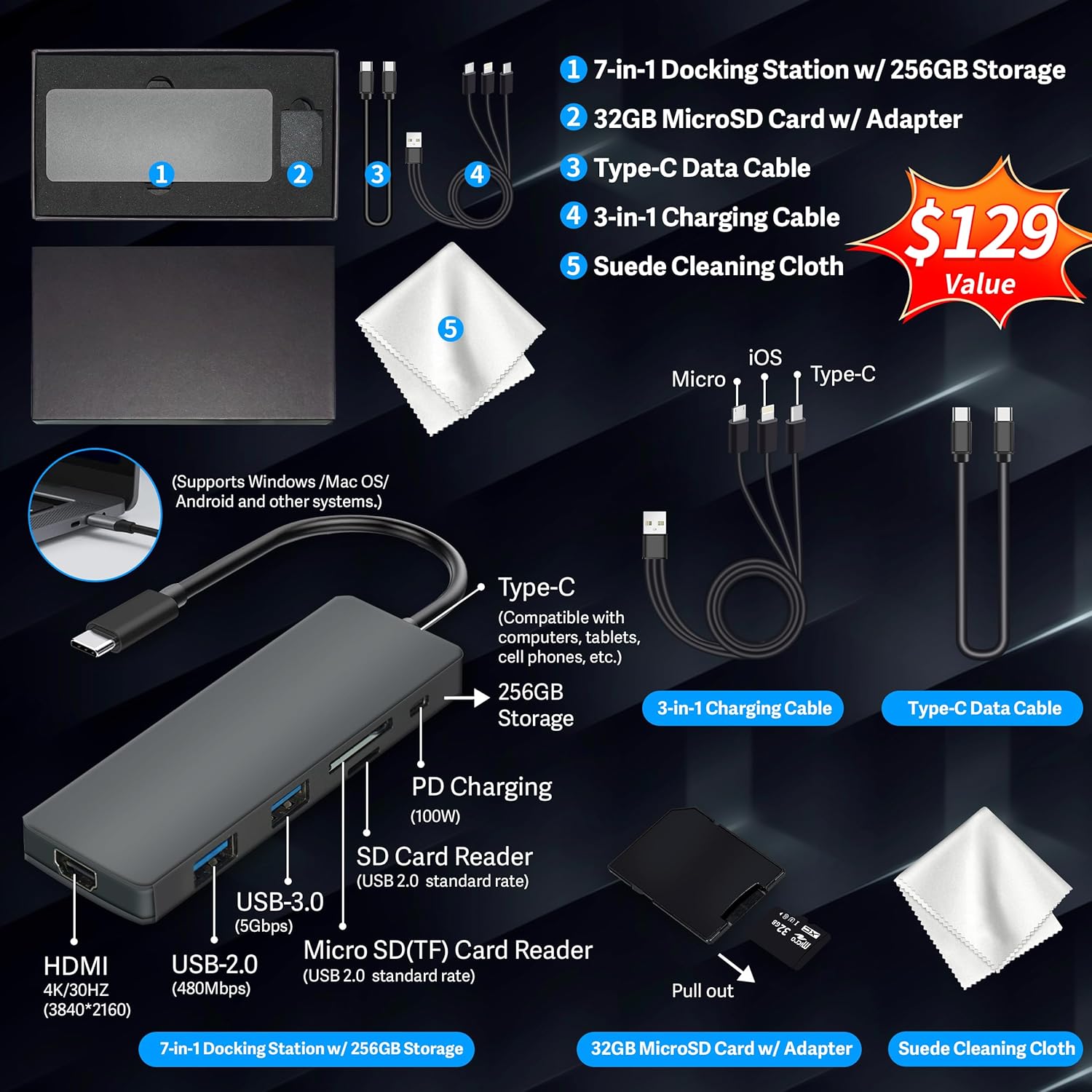
Figure 1: Included accessories, including the 7-in-1 docking station, various cables, and a cleaning cloth.
तपाईंको ल्यापटप सञ्चालन गर्दै
प्रदर्शन सुविधाहरू
The HP 15.6-inch laptop features an FHD IPS touchscreen display with a resolution of 1920 x 1080 pixels and an anti-glare coating. This display provides clear and vibrant visuals from various viewकोणहरू।

Figure 2: The 15.6-inch FHD IPS display offers crisp and vivid details.
कनेक्टिभिटी र पेरिफेरल्स
Your laptop is equipped with various connectivity options and integrated features to enhance your user experience.
- 720p HD Camera: For video calls and online meetings.
- Wi-Fi 6: उच्च गतिको वायरलेस इन्टरनेट जडानको लागि।
- ब्लुटुथ: मुसा, किबोर्ड र हेडफोन जस्ता वायरलेस बाह्य उपकरणहरू जडान गर्नको लागि।
- संख्यात्मक किप्याड: A full numeric keypad is integrated for efficient data entry and calculations.

Figure 3: Key features for staying connected and productive, including the numeric keypad.
The laptop includes multiple ports for connecting external devices:
- 2x USB Type-A ports
- 1x USB Type-C port
- 1x HDMI पोर्ट
- 1x Headphone/Microphone Combo jack

Figure 4: Multi-port configuration on the laptop for various connections.
प्रदर्शन र बहुकार्य
Equipped with an AMD Ryzen 7 7730U processor, 64GB DDR4 RAM, and AMD Radeon Graphics, this laptop is designed for efficient multitasking and demanding applications. The 2.28TB storage (2TB SSD + 288GB Docking Station Set) provides ample space and fast access to your files.

Figure 5: Core specifications for performance and storage.

Figure 6: Laptop demonstrating effortless multitasking with several applications running simultaneously.
The laptop is designed for extended use, offering reliable battery life to support your daily tasks.

Figure 7: The laptop supports continuous work throughout the day with its battery performance.
मर्मतसम्भार
To ensure the longevity and optimal performance of your HP laptop, follow these maintenance guidelines:
- सरसफाई: Use the provided suede cleaning cloth or a soft, lint-free cloth to clean the screen and exterior. Avoid harsh chemicals.
- सफ्टवेयर अपडेटहरू: Regularly update your Windows 11 Pro operating system and drivers to ensure security and performance.
- ब्याट्री केयर: ब्याट्रीलाई बारम्बार पूर्ण रूपमा चार्ज नगर्नुहोस्। लामो समयसम्म भण्डारणको लागि, ब्याट्रीलाई लगभग ५०-६०% सम्म चार्ज गर्नुहोस्।
- भेन्टिलेसन: अत्यधिक तातो हुनबाट जोगाउन ल्यापटपको भेन्टहरू अवरुद्ध नभएको सुनिश्चित गर्नुहोस्। ल्यापटपलाई कडा, समतल सतहमा प्रयोग गर्नुहोस्।
- भण्डारण: ल्यापटपलाई प्रत्यक्ष घाम र अत्यधिक तापक्रमबाट टाढा चिसो, सुख्खा ठाउँमा राख्नुहोस्।
समस्या निवारण
यस खण्डले तपाईंको ल्यापटपमा तपाईंले सामना गर्न सक्ने सामान्य समस्याहरूलाई सम्बोधन गर्दछ।
ल्यापटप अन हुँदैन
- पावर एडाप्टर ल्यापटप र काम गर्ने पावर आउटलेट दुवैमा सुरक्षित रूपमा जडान भएको सुनिश्चित गर्नुहोस्।
- अर्को उपकरण प्लग इन गरेर पावर आउटलेट काम गरिरहेको छ कि छैन भनी प्रमाणित गर्नुहोस्।
- यदि ब्याट्री पूर्ण रूपमा सकिएको छ भने, पावर अन गर्ने प्रयास गर्नु अघि कम्तिमा १५-३० मिनेट चार्ज गर्न दिनुहोस्।
Screen Remains Blank
- ल्यापटप अन छ कि छैन जाँच गर्नुहोस् (पावर इन्डिकेटर लाइट)।
- Try connecting an external monitor to see if display output is available.
- फंक्शन कुञ्जीहरू प्रयोग गरेर स्क्रिनको चमक समायोजन गर्नुहोस्।
Wi-Fi कनेक्टिभिटी समस्याहरू
- विन्डोज सेटिङहरूमा Wi-Fi सक्षम पारिएको सुनिश्चित गर्नुहोस्।
- आफ्नो राउटर र मोडेम रिस्टार्ट गर्नुहोस्।
- डिभाइस म्यानेजर मार्फत आफ्नो वाइफाइ ड्राइभरहरू अपडेट गर्नुहोस्।
- Check for any physical obstructions or interference.
ढिलो प्रदर्शन
- पृष्ठभूमिमा चलिरहेका अनावश्यक अनुप्रयोगहरू बन्द गर्नुहोस्।
- उच्च CPU वा RAM खपत गर्ने प्रक्रियाहरूको लागि कार्य प्रबन्धक जाँच गर्नुहोस्।
- तपाईंको अपरेटिङ सिस्टम र ड्राइभरहरू अद्यावधिक छन् भनी सुनिश्चित गर्नुहोस्।
- डिस्क क्लिनअप र डिफ्र्याग्मेन्टेसन चलाउनुहोस् (HDD हरूको लागि, SSD हरूको लागि आवश्यक छैन)।
- मालवेयर वा भाइरसहरूको लागि स्क्यान गर्नुहोस्।
निर्दिष्टीकरणहरू
Below are the detailed technical specifications for your HP 15.6-inch FHD IPS Touchscreen Laptop.

Figure 8: Laptop dimensions and weight for portability.
| सुविधा | विवरण |
|---|---|
| ब्रान्ड | HP |
| मोडेल नाम | HP 15.6" FHD IPS Touchscreen Laptop |
| स्क्रिन साइज | १५.६ इन्च |
| प्रदर्शन संकल्प | १२८० x ८०० पिक्सेल (FHD) |
| प्रदर्शन प्रकार | LED IPS Touchscreen |
| प्रोसेसर | AMD Ryzen 7 7730U (8 Cores, 2 GHz base) |
| ग्राफिक्स कोप्रोसेसर | AMD Radeon ग्राफिक्स (एकीकृत) |
| RAM मेमोरी | १६ जीबी DDR४ (२९३३ मेगाहर्ट्ज) |
| भण्डारण | 2 TB SSD + 288 GB Docking Station Set (Total 2.28 TB) |
| अपरेटिङ सिस्टम | Windows 11 प्रो |
| जडान | Wi-Fi 6 (802.11ax), Bluetooth, HDMI, USB |
| पोर्टहरू | 2x USB Type-A, 1x USB Type-C, 1x HDMI, 1x Headphone/Microphone Combo |
| Webक्यामेरा | १०८०p HD क्यामेरा |
| किबोर्ड | संख्यात्मक किप्याड सहितको पूर्ण आकार |
| Dimensions (L x W x Th) | ८५.४" x ६२.२" x ३९" |
| वस्तुको वजन | २.२ पाउण्ड (लगभग १ किलोग्राम) |
| रङ | चाँदी |
| UPC | 196188514924 |
| ASIN | B0FX2NR2WN |
वारेन्टी जानकारी
Your HP laptop comes with a manufacturer's warranty. For upgraded components (RAM/SSD), a 1-year warranty is provided by SnowBell. The original 1-year manufacturer warranty applies to all other components of the laptop. Please retain your proof of purchase for warranty claims. For detailed terms and conditions, refer to the warranty documentation included with your product or visit the official HP support webसाइट।
समर्थन
थप सहयोग, प्राविधिक सहयोग, वा सेवा सोधपुछको लागि, कृपया निम्न स्रोतहरू हेर्नुहोस्:
- HP आधिकारिक समर्थन Webसाइट: भ्रमण गर्नुहोस् support.hp.com ड्राइभरहरू, म्यानुअलहरू, र समस्या निवारण गाइडहरूको लागि।
- अनलाइन मद्दत: Utilize the built-in Windows 11 Pro help features for software-related questions.
- Contact Retailer: For issues related to upgraded components or purchase, contact SnowBell or your point of purchase.