परिचय
This manual provides instructions for the UpStart Components replacement remote control, designed for compatibility with Emerson TVs, specifically models that use the NH000UD remote. This remote control is engineered to function like the original, offering a straightforward replacement solution without the need for complex programming.
सेटअप
ब्याट्री स्थापना
रिमोट कन्ट्रोल सञ्चालनको लागि दुई AAA ब्याट्रीहरू (समावेश गरिएको छैन) आवश्यक पर्दछ। ब्याट्रीहरू स्थापना गर्न यी चरणहरू पालना गर्नुहोस्:
- रिमोट कन्ट्रोलको पछाडि ब्याट्री डिब्बा पत्ता लगाउनुहोस्।
- ब्याट्री डिब्बाको कभर खोल्नको लागि तलतिर स्लाइड गर्नुहोस्।
- दुईवटा AAA ब्याट्रीहरू घुसाउनुहोस्, सुनिश्चित गर्नुहोस् कि सकारात्मक (+) र नकारात्मक (-) टर्मिनलहरू डिब्बा भित्रका चिन्हहरूसँग सही रूपमा पङ्क्तिबद्ध छन्।
- ब्याट्री डिब्बाको कभर सुरक्षित रूपमा क्लिक नगरेसम्म फेरि ठाउँमा स्लाइड गर्नुहोस्।

Image: Back of the remote control, illustrating the battery compartment and how to open it for battery installation.
Once batteries are installed, the remote is ready for use with your compatible Emerson TV. No programming is required.
सञ्चालन निर्देशनहरू
This replacement remote control is designed to replicate the functionality of your original Emerson TV remote. Point the remote directly at your television's infrared sensor for optimal performance.
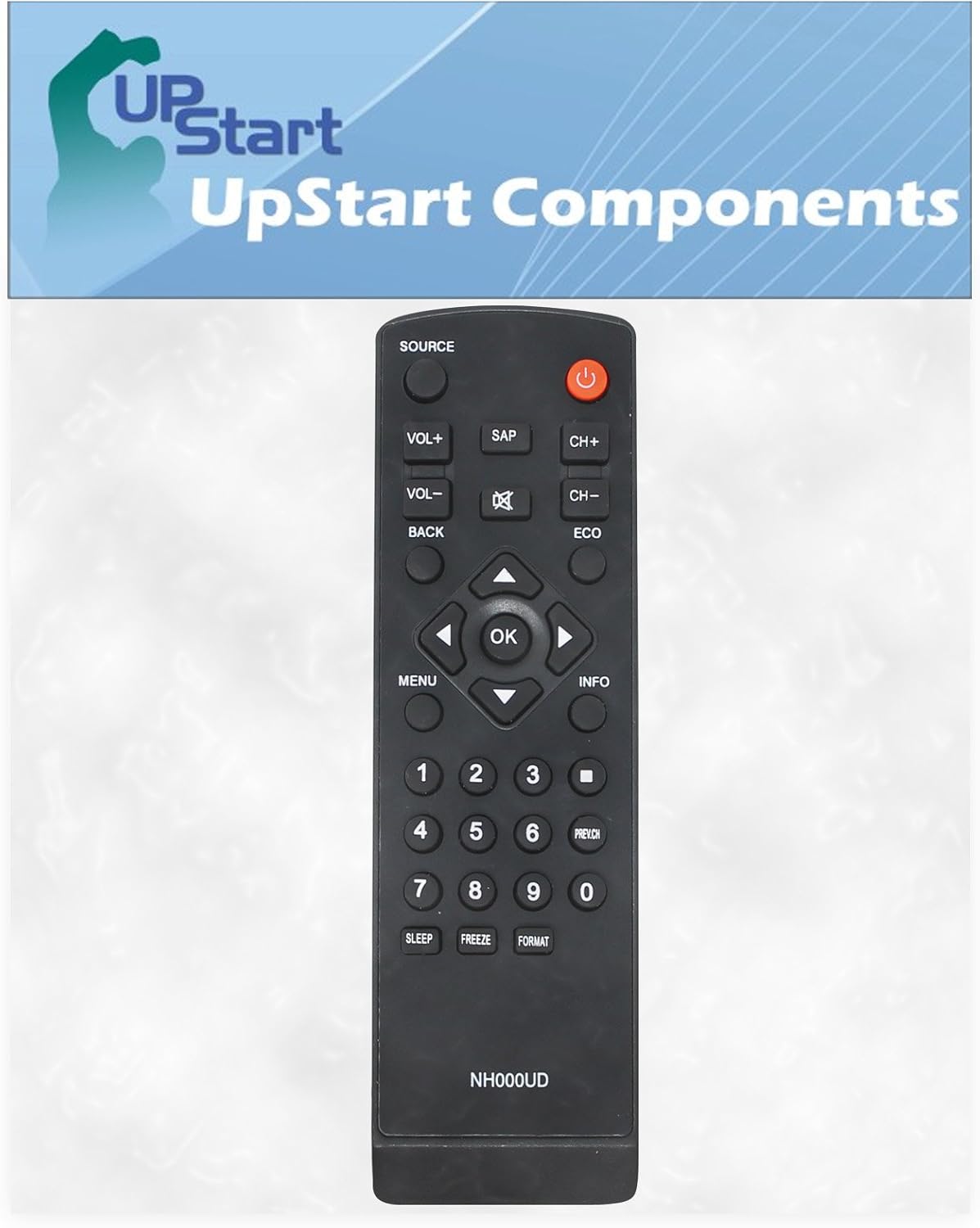
छवि: अगाडि view of the remote control, displaying the layout of all operational buttons.
मुख्य कार्यहरू:
- पावर (रातो बटन): टेलिभिजन खोल्नुहोस् वा बन्द गर्नुहोस्।
- स्रोत: Selects input sources (e.g., HDMI 1, AV).
- VOL+ / VOL-: भोल्युम स्तर बढाउँछ वा घटाउँछ।
- CH+ / CH-: च्यानलहरू माथि वा तल परिवर्तन गर्छ।
- म्यूट गर्नुहोस् (X सहितको स्पिकर): टेलिभिजन अडियो म्यूट वा अनम्युट गर्नुहोस्।
- नम्बर बटन (०-९): सिधै च्यानल नम्बरहरू प्रविष्ट गर्नुहोस्।
- मेनु: टेलिभिजनको मुख्य मेनुमा पहुँच गर्छ।
- Navigation Arrows (Up, Down, Left, Right) & OK: मेनुहरू मार्फत नेभिगेट गर्नुहोस् र चयनहरू पुष्टि गर्नुहोस्।
- पछाडि: अघिल्लो मेनु वा स्क्रिनमा फर्कन्छ।
- जानकारी: हालको कार्यक्रम वा इनपुटको बारेमा जानकारी प्रदर्शन गर्दछ।
- एसएपी: Secondary Audio Program function.
- ECO: ऊर्जा बचत मोडहरू सक्रिय वा निष्क्रिय गर्दछ।
- निद्रा: टिभी स्वतः बन्द हुनको लागि टाइमर सेट गर्छ।
- नि: शुल्क: स्क्रिनमा हालको छविलाई रोक्छ।
- ढाँचा: स्क्रिन पक्ष अनुपात समायोजन गर्दछ।
- PREV.CH: अघिल्लोमा स्विच गर्छ viewएड च्यानल।
मर्मतसम्भार
सरसफाई
To clean your remote control, use a soft, dry cloth. For stubborn dirt, lightly dampकपडालाई पानी वा हल्का, घर्षण नगर्ने क्लिनरले पुछ्नुहोस्। कठोर रसायन वा घर्षण गर्ने सामग्रीहरू प्रयोग नगर्नुहोस्, किनकि यसले रिमोटको सतह वा आन्तरिक घटकहरूलाई क्षति पुर्याउन सक्छ।
ब्याट्री प्रतिस्थापन
Replace batteries when the remote's response becomes sluggish or stops working. Always replace both batteries at the same time with new AAA alkaline batteries. Do not mix old and new batteries, or different types of batteries, as this can lead to leakage or improper function. Dispose of used batteries according to local regulations.
समस्या निवारण
- रिमोटले प्रतिक्रिया दिइरहेको छैन:
- ताजा AAA ब्याट्रीहरू उचित ध्रुवताका साथ सही रूपमा स्थापना गरिएको सुनिश्चित गर्नुहोस्।
- रिमोट कन्ट्रोल र टिभीको इन्फ्रारेड सेन्सर बीच कुनै अवरोधहरू छन् कि छैनन् जाँच गर्नुहोस्।
- तपाईंले रिमोट सिधै टिभीमा देखाउँदै हुनुहुन्छ भनी प्रमाणित गर्नुहोस्।
- Confirm that the TV is powered on.
- बीच-बीचमा प्रतिक्रिया:
- ब्याट्रीहरू कम हुन सक्छन्; तिनीहरूलाई बदल्नुहोस्।
- Ensure there are no strong light sources (like direct sunlight or bright fluorescent lights) interfering with the remote's signal.
निर्दिष्टीकरणहरू
| ब्रान्ड | अपस्टार्ट कम्पोनेन्टहरू |
| मोडेल नाम | RC-NH000UD-DL6 |
| मिल्दो यन्त्रहरू | Television (Emerson TVs compatible with NH000UD) |
| जडान प्रविधि | इन्फ्रारेड |
| नियन्त्रक प्रकार | बटन नियन्त्रण |
| शक्ति स्रोत | २ x AAA ब्याट्रीहरू (समावेश छैन) |
| ब्याट्री प्रकार | Alkaline AAA |
| वस्तुको वजन | ०.९१ औंस |
| रङ | कालो |
| विशेष सुविधा | एर्गोनोमिक डिजाइन |
वारेन्टी र समर्थन
This product is a replacement part manufactured by UpStart Components. Any warranties for this product are offered solely by UpStart Components and are not covered under any warranties offered by the original equipment manufacturers (OEMs).
For support or warranty inquiries, please contact UpStart Components directly through their official channels. Refer to the product packaging or the seller's information for specific contact details.