परिचय
This manual provides essential information for using your new Samsung Galaxy M55 5G smartphone. Please read this manual carefully to ensure proper and safe use of your device. Keep this manual for future reference.
The Samsung Galaxy M55 5G features a 6.7-inch FHD+ Super AMOLED+ display with a 120Hz refresh rate, powered by the Snapdragon 7 Gen 1 processor. It includes a versatile triple-camera system and a 5000mAh battery.
सुरक्षा जानकारी
Before using the device, read all safety information to ensure safe and proper use. Follow warnings and regulations to prevent injury to yourself or others and to prevent damage to your device.
- लामो समयसम्म यन्त्रलाई अत्यधिक तापक्रम वा प्रत्यक्ष सूर्यको प्रकाशमा नदेखाउनुहोस्।
- Samsung-अनुमोदित ब्याट्री, चार्जर र सामानहरू मात्र प्रयोग गर्नुहोस्।
- उपकरणलाई खसाउने वा गम्भीर असर पार्ने काम नगर्नुहोस्।
- उपकरणलाई सुख्खा राख्नुहोस्। भिजेको वातावरणमा प्रयोग नगर्नुहोस्।
- हस्तक्षेपबाट बच्न चिकित्सा उपकरणहरूबाट सुरक्षित दूरी कायम राख्नुहोस्।
प्याकेज सामग्री
निम्न वस्तुहरूको लागि उत्पादन बक्स जाँच गर्नुहोस्:
- Samsung Galaxy M55 5G Smartphone
- USB प्रकार-सी केबल
- सिम इजेक्शन पिन
- द्रुत सुरुवात गाइड
- 25W Fast Charger (if bundled)
The actual components may vary depending on the region and service provider.
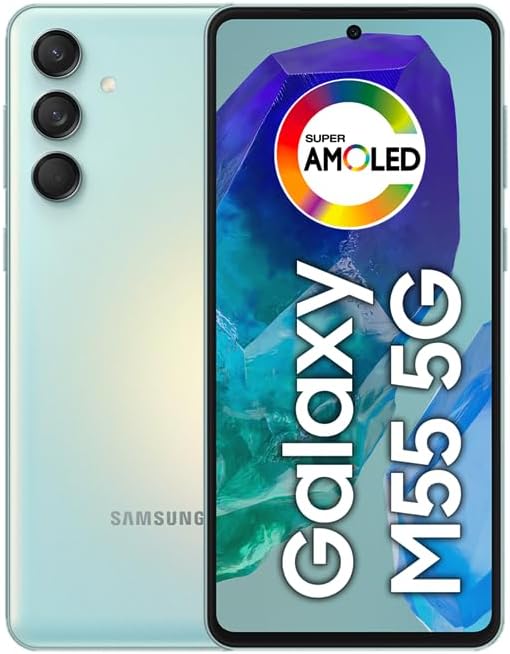
तस्बिर: अगाडि र पछाडि view of the Samsung Galaxy M55 5G smartphone, showcasing the camera module and display.
यन्त्र लेआउट
Familiarize yourself with the main components of your device.
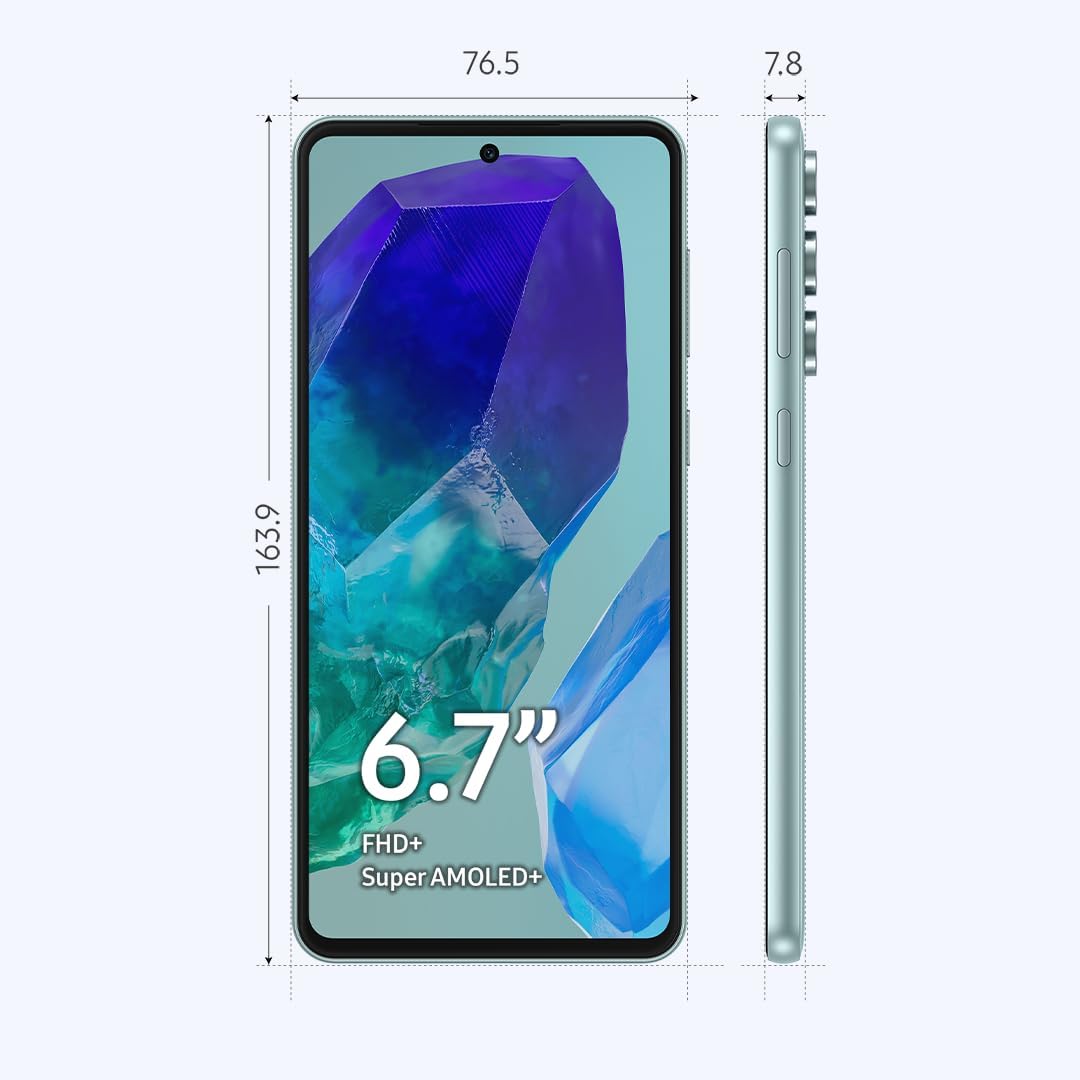
Image: Diagram showing the dimensions (163.9mm height, 76.5mm width, 7.8mm thickness) and key physical features of the Samsung Galaxy M55 5G, including the 6.7-inch Super AMOLED+ display, power button, and volume buttons.
- अगाडिको क्यामेरा: सेल्फी र भिडियो कलहरूको लागि।
- प्रदर्शन: 6.7-inch FHD+ Super AMOLED+ screen.
- भोल्युम कुञ्जीहरु: भोल्युम माथि वा तल समायोजन गर्नुहोस्।
- Side Key (Power/Bixby): Power on/off, wake/sleep, or activate Bixby.
- USB टाइप-सी पोर्ट: चार्जिङ र डाटा ट्रान्सफरको लागि।
- वक्ता: अडियो आउटपुट।
- माइक्रोफोन: कल र भ्वाइस आदेशहरूको लागि।
- सिम/एसडी कार्ड ट्रे: सिम कार्ड र माइक्रोएसडी कार्ड घुसाउनुहोस्।
- रियर क्यामेराहरू: Main, Ultrawide, and Macro lenses.
- फ्ल्यास: For photos in low light.
सेटअप
1. Insert SIM or SD Card
- आफ्नो उपकरणको छेउमा रहेको SIM/SD कार्ड ट्रे पत्ता लगाउनुहोस्।
- Insert the provided SIM ejection pin into the small hole next to the tray to open it.
- आफ्नो नानो-सिम कार्ड(हरू) र/वा माइक्रोएसडी कार्डलाई सुनौलो सम्पर्कहरू तलतिर फर्काएर ट्रेमा राख्नुहोस्। तिनीहरू सही रूपमा राखिएको सुनिश्चित गर्नुहोस्।
- ट्रेलाई ध्यानपूर्वक स्लटमा फिर्ता धकेल्नुहोस् जबसम्म यो ठाउँमा क्लिक हुँदैन।
नोट: The device supports Dual SIM functionality, allowing two SIM cards or one SIM card and one microSD card. You cannot use two SIM cards and a microSD card simultaneously.
१.२ ब्याट्री चार्ज गर्नुहोस्
- USB Type-C केबललाई उपकरणको चार्जिङ पोर्टमा जडान गर्नुहोस्।
- केबलको अर्को छेउलाई पावर एडाप्टरमा जडान गर्नुहोस्, त्यसपछि एडाप्टरलाई पावर आउटलेटमा प्लग गर्नुहोस्।
- Allow the device to charge until the battery is full before initial use.
3. पावर अन र प्रारम्भिक सेटअप
- Press and hold the Side Key until the Samsung logo appears.
- Follow the on-screen prompts to complete the initial setup, including language selection, Wi-Fi connection, Google account setup, and fingerprint/face recognition.
तपाईंको यन्त्र सञ्चालन गर्दै
प्रदर्शन र नेभिगेसन
- टचस्क्रिन इशाराहरू: Tap, double-tap, swipe, pinch-to-zoom.
- गृह स्क्रिन: एपहरू, विजेटहरू र सूचनाहरू पहुँच गर्नुहोस्।
- नेभिगेसन बार: Use gestures or traditional buttons (Back, Home, Recents) to navigate.
- फिंगरप्रिन्ट सेन्सर: The optical fingerprint sensor is located under the display for secure unlocking.
क्यामेरा प्रयोग
Your device features a versatile camera system:
- मुख्य क्यामेरा (४८ मेगापिक्सेल): उच्च-रिजोल्युसन तस्बिरहरूको लागि।
- Ultrawide Camera (8MP): फराकिलो दृश्यहरू खिच्नको लागि।
- म्याक्रो क्यामेरा (२ मेगापिक्सेल): साना वस्तुहरूको नजिकबाट खिच्नको लागि।
- अगाडिको क्यामेरा (१६ मेगापिक्सेल): सेल्फी र भिडियो कलहरूको लागि।
To open the camera, tap the Camera app icon. Select your desired mode (Photo, Video, Portrait, Pro, etc.) and tap the shutter button to capture.
जडान
- ४जी नेटवर्क: The device supports 5G connectivity for faster data speeds where available.
- Wi-Fi: सेटिङहरू > जडानहरू > Wi-Fi मार्फत वायरलेस नेटवर्कहरूमा जडान गर्नुहोस्।
- ब्लुटुथ: सेटिङहरू > जडानहरू > ब्लुटुथ मार्फत अन्य ब्लुटुथ उपकरणहरूसँग जोडा बनाउनुहोस्।
- NFC: सम्पर्करहित भुक्तानी र डेटा आदानप्रदानको लागि।
ब्याट्री व्यवस्थापन
५१५०mAh ब्याट्रीले लामो समयसम्म प्रयोग गर्न सक्छ। ब्याट्रीको आयु अनुकूलन गर्न:
- स्क्रिनको चमक समायोजन गर्नुहोस्।
- सेटिङहरू > ब्याट्री र उपकरण हेरचाहमा गई पावर बचत मोड सक्षम गर्नुहोस्।
- पृष्ठभूमिमा चलिरहेको प्रयोग नगरिएका एपहरू बन्द गर्नुहोस्।
- प्रयोगमा नभएको बेला Wi-Fi, Bluetooth, र GPS बन्द गर्नुहोस्।
मर्मतसम्भार
सफ्टवेयर अपडेटहरू
Regularly check for software updates to ensure your device has the latest features and security enhancements. Go to Settings > Software update > Download and install.
तपाइँको उपकरण सफाई
- स्क्रिन र शरीर सफा गर्न नरम, लिन्ट-रहित कपडा प्रयोग गर्नुहोस्।
- कठोर रसायन वा घर्षण सामग्री प्रयोग नगर्नुहोस्।
- Gently wipe ports to remove dust, but avoid inserting objects.
भण्डारण व्यवस्थापन
Your device comes with 256GB of internal storage. You can expand this using a microSD card. To manage storage, go to Settings > Battery and device care > Storage. Here you can view प्रयोग र ठाउँ खाली गर्नुहोस्।
समस्या निवारण
यदि तपाईंले आफ्नो यन्त्रमा समस्याहरू सामना गर्नुभयो भने, निम्न समाधानहरू प्रयास गर्नुहोस्:
साझा मुद्दाहरू
- यन्त्र सक्रिय छैन: Ensure the battery is charged. Press and hold the Side Key for an extended period (up to 10 seconds).
- एपहरू क्र्यास हुने वा फ्रिज हुने: Close the app and reopen it. Clear the app's cache (Settings > Apps > [App Name] > Storage > Clear cache).
- कमजोर नेटवर्क जडान: Check your SIM card insertion. Restart the device. Verify network settings.
- ब्याट्री चाँडै निस्कन्छ: Refer to the Battery Management section for tips.
- स्क्रिन प्रतिक्रियाहीन: Force restart the device by pressing and holding the Side Key and Volume Down button simultaneously for about 7 seconds.
फ्याक्ट्री डाटा रिसेट
If problems persist, you may need to perform a factory data reset. This will erase all data from your device. अगाडि बढ्नु अघि आफ्नो डेटा ब्याकअप गर्नुहोस्।
- सेटिङहरू > सामान्य व्यवस्थापन > रिसेट > फ्याक्ट्री डेटा रिसेटमा जानुहोस्।
- Review the information and tap "Reset".
- यदि सोधियो भने आफ्नो स्क्रिन लक प्रमाणहरू प्रविष्ट गर्नुहोस्।
- Tap "Delete all" to confirm.
निर्दिष्टीकरणहरू
| मोडेल नाम | सामसुङ ग्यालेक्सी M55 5G |
| मोडेल नम्बर | SM-M556B/DS |
| प्रदर्शन | 6.7-inch FHD+ Super AMOLED+, 120Hz Refresh Rate (1080 x 2400 pixels) |
| प्रोसेसर | क्वालकम स्न्यापड्रागन ६ जेन १ (४ एनएम) अक्टा-कोर |
| RAM | 8 GB |
| आन्तरिक भण्डारण | १२८ जीबी (माइक्रोएसडी मार्फत विस्तार गर्न सकिने) |
| रियर क्यामेरा | ५० मेगापिक्सेल (चौडा) + ५ मेगापिक्सेल (अल्ट्रावाइड) + २ मेगापिक्सेल (म्याक्रो) |
| अगाडिको क्यामेरा | ६० मेगापिक्सेल (चौडा) |
| ब्याट्री | 5000 mAh |
| अपरेटिङ सिस्टम | Android 14, One UI 6.1 |
| जडान | 5G, 4G LTE, Wi-Fi, Bluetooth 5.2, GPS, NFC |
| सिम प्रकार | Dual Nano-SIM (Hybrid slot) |
| आयाम (H x W x D) | ३०५.८६ x १८६.७४ x ७.२३ मिमी (१२.०४ x ७.३५ x ०.२८ इन्च) |
| वजन | 180 ग्राम (6.3 औंस) |
वारेन्टी र समर्थन
This device is an International Model. Please note that there is no warranty coverage in the United States for this specific model.
For support and further information, please visit the official Samsung support website for your region or contact your local service provider.
- अनलाइन समर्थन: www.samsung.com/support/
- ग्राहक सेवा: तपाईंको क्षेत्रको Samsung लाई सन्दर्भ गर्नुहोस् webसम्पर्क नम्बरहरूको लागि साइट।