1. परिचय
The ANJIELO SMART Wired Video Intercom System provides enhanced security and communication for your home or office. This system features a 7-inch HD IPS touch screen indoor monitor and a 1080P outdoor doorbell camera. With Tuya Smart app integration, motion detection, and anti-tamper alarm functions, you can monitor your property and communicate with visitors from anywhere. This manual provides detailed instructions for installation, operation, and maintenance of your intercom system.
2. प्याकेज सामग्री
कृपया तपाईंको प्याकेजमा सबै वस्तुहरू छन् भनी प्रमाणित गर्नुहोस्:
- 1 x Outdoor Doorbell Camera (1080P FHD)
- 2 x Indoor Monitors (7-inch HD IPS Touch Screen)
- 1 x 32GB माइक्रो एसडी कार्ड
- मनिटरहरूको लागि पावर एडेप्टरहरू
- माउन्टिङ हार्डवेयर
- Wiring Cables (for doorbell to monitor connection)
- प्रयोगकर्ता पुस्तिका
Product. उत्पाद सुविधाहरू
The ANJIELO SMART Intercom System offers a range of features for comprehensive security and convenience:
- भित्री मनिटर: 7-inch HD IPS Touch Screen, Acrylic Wire Drawing Panel.
- एप एकीकरण: Supports Tuya Smart / Smart Life app for remote control and monitoring.
- सञ्चार: Room-to-room intercom and hands-free dual-way communication with visitors.
- अनुगमन र नियन्त्रण: Door answering, real-time monitoring, and remote unlocking of electric locks.
- गति पत्ता लगाउने: Automatically records videos or snapshots when motion is detected or doorbell is pressed.
- भण्डारण: Built-in memory for 86 pictures, supports external Micro SD card up to 128GB (32GB included).
- अनुकूलन: Adjustable color, brightness, volume, 6 selectable ringtones, weather/calendar/standby wallpaper settings.
- सुरक्षा: CCTV Anti-tamper Alarm, supports 3 home modes (At home, Leave home, Sleep home).
- बाहिरी ढोकाको घण्टी: 1080P FHD camera with 140° wide angle, anti-destructive metal material, 2 white LEDs for clear night vision.
- पहुँच नियन्त्रण: Supports IC Card (13.56khz) and dual electric lock unlocking.
- स्थायित्व: IP65 weatherproof design, high temperature resistance (-45℃ to +60℃).
- विस्तार योग्यता: Supports up to 2 doorbells, 4 indoor monitors, and 2 external 1080P AHD CCTV cameras.
4. सेटअप निर्देशनहरू
4.1. प्रणाली तारिङ
The indoor monitor and outdoor doorbell require a wired connection using a 4-wire cable. Ensure proper polarity and secure connections.
- Connect the 4-wire cable from the outdoor doorbell to the designated port on the indoor monitor.
- For extended distances (up to 100-200 meters), RVV4 (4-core wire), Cat5, or Cat6 cables can be used.
- पावर एडाप्टरलाई इनडोर मनिटरमा जडान गर्नुहोस् र यसलाई पावर आउटलेटमा प्लग गर्नुहोस्।
२. एप जडान (तुया स्मार्ट / स्मार्ट लाइफ)
To enable remote monitoring and control, connect the main indoor monitor to your home WiFi network via the Tuya Smart or Smart Life app.
- डाउनलोड गर्नुहोस् Tuya स्मार्ट or स्मार्ट जीवन तपाईंको मोबाइल उपकरणको एप स्टोरबाट एप।
- तपाईंको खातामा रेजिस्टर वा लग इन गर्नुहोस्।
- On the indoor monitor, navigate to the network settings to display the QR code.
- Open the app on your smartphone or tablet and select the option to add a device by scanning a QR code.
- Scan the QR code displayed on the monitor. Follow the in-app instructions to complete the connection.

Figure 1: Easy internet connection by scanning the QR code on the monitor to bind the app.
4.3. Connecting AHD Cameras (Optional)
The system supports connecting up to two 1080P AHD CCTV cameras for additional surveillance.
- Connect the BNC male connector of the AHD camera to the BNC female connector on the monitor. Tighten securely.
- Connect the 2P wire from the camera's power/video output to the CAM1 or CAM2 port on the monitor.
- Ensure the camera is set to AHD1080/AHD720/TVI720/TVI1080/CVI720/CVI1080/CVBS mode. If using a 1200TVL camera, set it to CVBS.
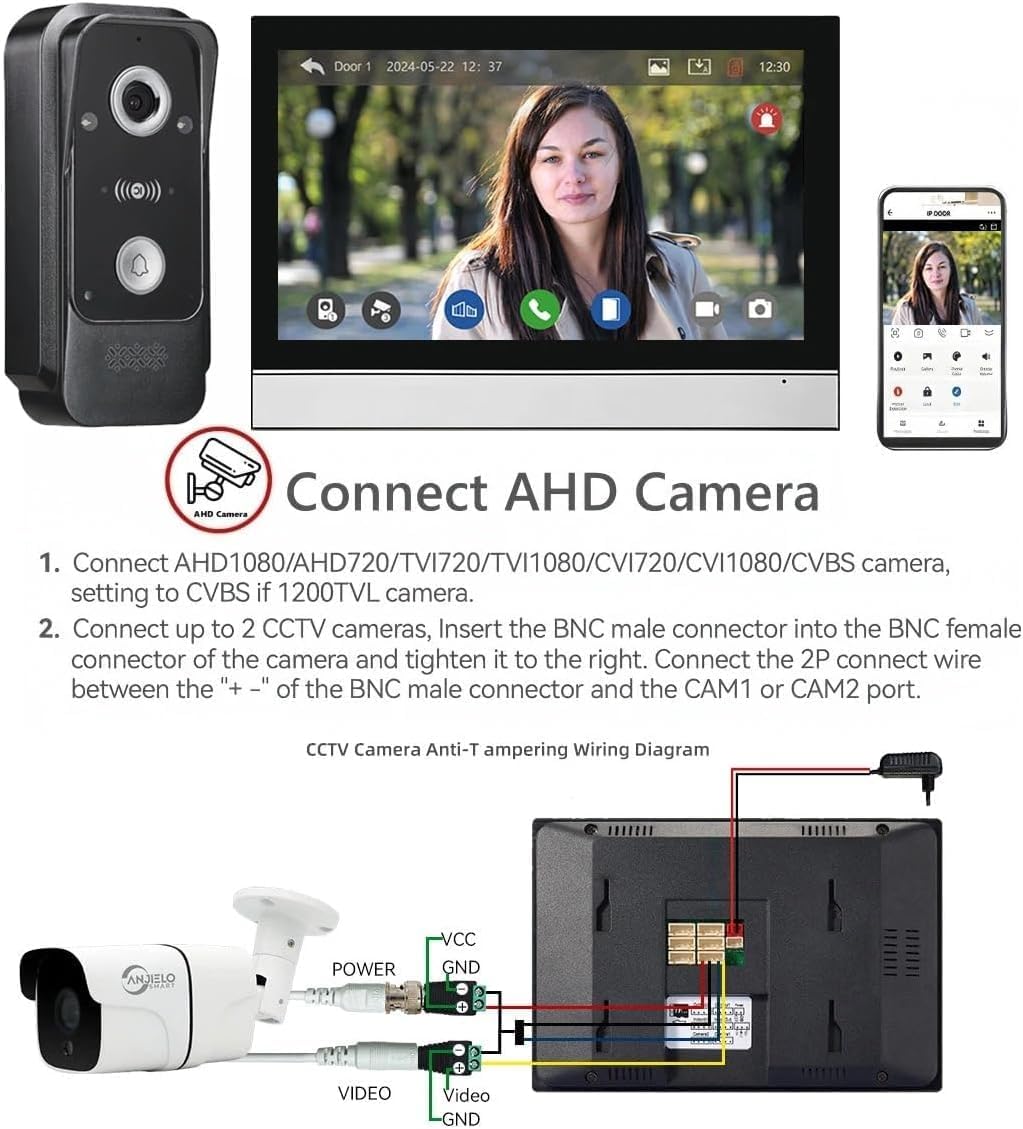
Figure 2: Wiring diagram for connecting an AHD camera to the indoor monitor.
५. प्रणाली विस्तार
The system can be expanded to include multiple door stations, monitors, and CCTV cameras.
- Maximum capacity: 2 outdoor door stations, 4 indoor monitors, and 2 CCTV cameras.
- Each component connects to the main monitor or other extension monitors as per the system diagram.

Figure 3: System capacity diagram showing connections for multiple devices.
5. सञ्चालन निर्देशनहरू
१. उत्तर दिने र सञ्चार गर्ने
When a visitor presses the doorbell, the indoor monitor will ring and display the visitor's image. You can communicate with them using the two-way audio feature.
- ट्याप गर्नुहोस् जवाफ icon on the monitor to begin a conversation.
- The system supports hands-free dual-way communication.
- You can also communicate with visitors remotely via the Tuya Smart app on your mobile device.

Figure 4: Two-way audio communication with a visitor.
६.३. ढोका खोल्ने काम
The system allows you to remotely unlock connected electric locks.
- During a call or while monitoring, tap the अनलक गर्नुहोस् icon on the monitor screen to open the connected electric lock.
- The system supports dual door unlocking for two separate electric locks (e.g., patio gate and main door).
- Unlocking can also be performed via the Tuya Smart app.

Figure 5: One-button operation to switch on the double-lock mode of the indoor unit.
५.३. गति पत्ता लगाउने र रेकर्डिङ
The system automatically detects motion and records events, providing continuous surveillance.
- When motion is detected by the outdoor doorbell camera, the system will automatically start recording video or take snapshots.
- These recordings are saved to the inserted Micro SD card (32GB included).
- You will receive alerts on your mobile phone via the Tuya Smart app when motion is detected.
- Review रेकर्ड गरिएको footage directly on the monitor or through the app.

Figure 6: Motion detection triggering recording and mobile alerts.
5.4. नाइट भिजन
The outdoor doorbell camera is equipped with infrared (IR) night vision for clear visibility in low-light conditions.
- The 2 white LEDs automatically activate in dark environments to provide illumination.
- This ensures that details are captured even at night.

Figure 7: IR Night Vision capturing details in darkness.
५.४.१। विरोधी टीampएर अलार्म
प्रणालीमा एन्टी-टी समावेश छamper alarm feature for enhanced security.
- The CCTV Anti-tamper Alarm function provides an additional layer of security.
- When triggered, the system will alert you, helping to deter unauthorized access or vandalism.
6. मर्मतसम्भार
नियमित मर्मतसम्भारले तपाईंको इन्टरकम प्रणालीको इष्टतम प्रदर्शन र दीर्घायु सुनिश्चित गर्दछ।
- सरसफाई: Use a soft, dry cloth to clean the monitor screen and doorbell camera lens. Avoid abrasive cleaners or solvents.
- केबल जडानहरू: Periodically check all wired connections for tightness and ensure they are free from damage.
- सफ्टवेयर अपडेटहरू: Check the Tuya Smart app or ANJIELO SMART website for any available firmware updates for your system.
- SD कार्ड: Regularly back up important recordings from the Micro SD card and format it periodically to maintain performance.
- बाहिरी एकाई: Ensure the outdoor doorbell is free from obstructions and debris. Its IP65 rating provides protection against weather, but extreme conditions may require additional shelter.

Figure 8: Outdoor doorbell with IP65 weatherproof rating.
T. समस्या निवारण
If you encounter issues with your ANJIELO SMART Intercom System, refer to the following common problems and solutions:
| समस्या | सम्भावित कारण | समाधान |
|---|---|---|
| मोनिटरमा कुनै छवि छैन | Loose wiring, power issue, camera fault. | Check all 4-wire connections. Ensure monitor and doorbell have power. Restart the system. |
| कलको समयमा कुनै अडियो छैन | Microphone/speaker issue, volume too low. | Check volume settings on the monitor. Ensure wiring is secure. |
| App cannot connect to monitor | WiFi connectivity issue, incorrect app setup. | Ensure monitor is connected to 2.4GHz WiFi. Re-scan QR code in the app. Check router settings. |
| गति पत्ता लगाउने काम छैन | Motion detection disabled, sensitivity too low. | Enable motion detection in monitor settings. Adjust sensitivity. Ensure clear view for doorbell camera. |
| Door unlock not functioning | Incorrect wiring to electric lock, lock fault. | Verify wiring to the electric lock. Test the electric lock independently. |
If the problem persists after attempting these solutions, please contact ANJIELO SMART customer support for further assistance.
8. निर्दिष्टीकरणहरू
| सुविधा | विवरण |
|---|---|
| मोडेल नम्बर | PMIC+AHD7024 |
| भित्री मनिटर स्क्रिन | ६.९ इन्चको एचडी आईपीएस टच स्क्रिन |
| बाहिरी डोरबेल क्यामेरा | 1080P FHD, 140° Wide Angle |
| जडान | Wired (monitor to doorbell), Wireless (WiFi for app) |
| एप समर्थन | Tuya स्मार्ट / स्मार्ट जीवन |
| Max. System Capacity | 2 Door Stations + 4 Monitors + 2 CCTV Cameras |
| भण्डारण | Built-in memory (86 pictures), supports Max. 128GB Micro SD Card |
| विद्युत आपूर्ति | DC15V 1.2A (for monitor) |
| पावर खपत | २०० एमए अधिकतम। |
| Conversation Duration | ३ सेकेन्ड |
| सञ्चालन तापमान | -45℃ to +60℃ (Outdoor Unit) |
| मौसम प्रतिरोधी रेटिंग | IP65 (आउटडोर युनिट) |
| आयाम (मोनिटर) | १० x ३ x ३ इन्च |
| वस्तुको वजन | १ पाउन्ड (लगभग) |
9. वारेन्टी र समर्थन
ANJIELO SMART products are designed for reliability and performance. For specific warranty details, please refer to the warranty card included with your product or visit the official ANJIELO SMART webसाइट।
If you require technical assistance, troubleshooting, or have questions about your product, please contact ANJIELO SMART customer support. Have your model number (PMIC+AHD7024) and purchase information ready when contacting support.
ANJIELO SMART Customer Support:
- तपाईंको उत्पादन प्याकेजिङमा प्रदान गरिएको सम्पर्क जानकारी हेर्नुहोस्।
- भ्रमण गर्नुहोस् अमेजनमा एन्जिएलो स्मार्ट स्टोर थप जानकारीको लागि।


