

कुपनहरू सिर्जना गर्नुहोस्
कुपन कसरी सिर्जना गर्ने 
यस गाइडले कुपन लिङ्क/कोड कसरी उत्पन्न गर्ने भन्ने कुरा समेट्नेछ। यसले सक्रिय कोडहरू कसरी व्यवस्थापन गर्ने र तपाईंको ब्याक अफिसमा मेरो कुपन र लिङ्कहरू पृष्ठ कसरी नेभिगेट गर्ने भन्ने कुरा पनि समेट्नेछ।
1. Log in to your Back Office. Once logged in, travel to your My Coupons & Links पृष्ठ।

स्क्राइब संग बनाइएको - https://scribehow.com
2. There are two tabs on the page. The “Active Codes” tab includes all the coupons that are currently active and can be used.

3. The “Expired Codes” tab contains all of your previously active coupons that are now expired.

4. To generate a new coupon, click “Create New Coupon”.

5. Within the Generate Coupon Code popup, you have the ability to determine the details of the coupon. You can select your discount percentage by choosing any of the preset discount amounts.

6. Or you can choose the “Custom” option to then select a specific discount amount. The max discount for coupons is 15%, so you can choose any amount up to 15%.

7. Next, you can select the coupon usage. You can dictate if the coupon will be one-time use per Customer or if it can be used unlimited times per Customer.

Made with Scribe – https://scribehow.com 4
8. Important Note: there is a set expiration timeframe for the one-time use per Customer option. The one-time use per Customer option will expire in 5 years.

9. Selecting the unlimited use option will allow you to set your own expiration date, up to 1 year.

१०८०। You can select the preset 15 Days expiration option or you can choose to customize the date it expires. You can enter the number of days until it expires or you can choose a date.

१०८०। To choose a specific date from the calendar, you will click the little calendar icon in the “Pick a date field”.

Made with Scribe – https://scribehow.com 6
१०८०। त्यहाँ एक पूर्व छview of the coupon details (amount & expiration date) at the top of the popup.

१०८०। Once ready, you will then click “Generate” at the bottom of the popup.

Made with Scribe – https://scribehow.com 7
१०८०। You can now see the newly generated coupon at the top of the “Active Codes” tab.
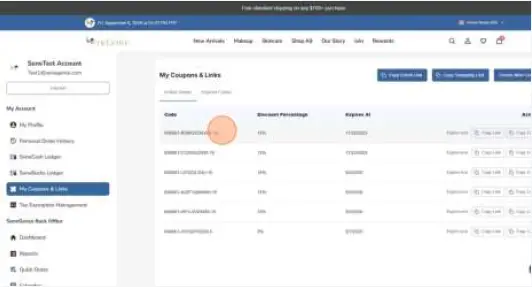
१०८०। Click “Copy Link” to share the coupon link.

Made with Scribe – https://scribehow.com 8
१०८०। Click “Copy Code” to share the coupon code.

१०८०। If you need to delete/end the coupon before its set expiration date, you can click “Expire now” to immediately expire it.

Made with Scribe – https://scribehow.com 9
१०८०। The expired coupon will now show in your “Expired Codes” tab.

Made with Scribe – https://scribehow.com 10
कागजातहरू / स्रोतहरू
 | कुपनहरू सिर्जना गर्नुहोस् |
सन्दर्भहरू
- scribehow.comscribehow.com
- प्रयोगकर्ता पुस्तिकाmanual.tools